Supermetrics for Claude
Connect Shopify to Claude — Every Product, Every Metric, One Conversation


Which products actually drive profit? Are repeat customers growing? Is that discount code cannibalizing margins? Get instant answers from your Shopify data by asking Claude — no spreadsheet exports, no pivot tables.
Why Connect Shopify to Claude?
Your store data lives in Shopify — but the insights live in Claude.
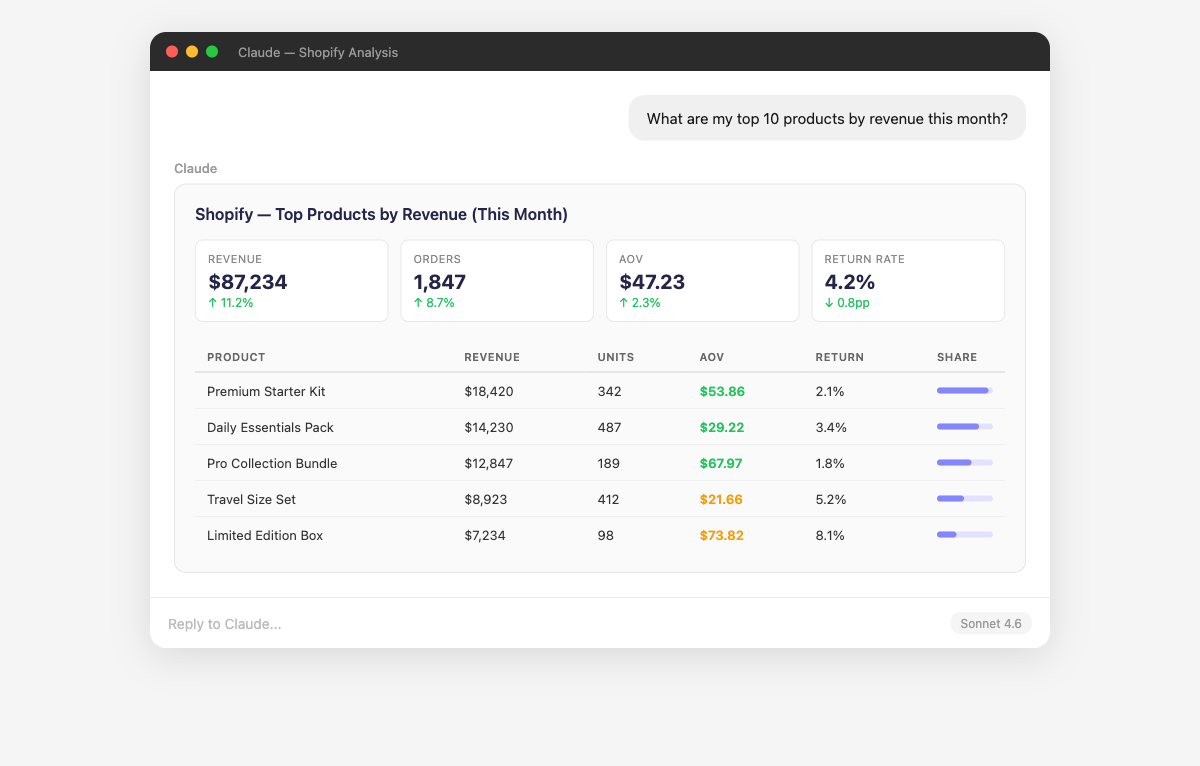
- Claude ranks your entire product catalog by revenue, units sold, gross margin, or any combination of metrics. It identifies trending products that are gaining momentum, stagnant SKUs that need attention, and your true profit drivers vs revenue-only heroes. Ask "Which products have the best revenue-to-refund ratio?" or "Show me products with increasing sales velocity over the last 4 weeks" to make smarter merchandising decisions.
- Claude analyzes your Shopify customer data to reveal purchase frequency, repeat rates, and cohort behavior. It identifies which products drive repeat purchases, how long between orders, and which acquisition channels bring one-time buyers vs loyal customers. Ask "What percentage of customers who bought Product X came back within 90 days?" or "Which referring sites bring customers with the highest lifetime order value?"
- Claude tracks your Shopify revenue daily, weekly, and monthly — spotting trends, seasonal patterns, and anomalies automatically. It compares current performance against the same period last year, calculates growth rates, and identifies the products and collections driving changes. Ask "Is my revenue growth accelerating or decelerating?" or "Which product categories drove the year-over-year growth this quarter?"
- Claude combines your Shopify revenue data with Facebook Ads, Google Ads, TikTok Ads, and other platforms to calculate true ROAS based on actual orders — not platform-reported conversions. It identifies discrepancies between what each ad platform claims and what Shopify actually records. Ask "What's my true ROAS for Facebook Ads based on Shopify order data?" or "Which ad campaigns drive the highest AOV?"
- Claude analyzes the impact of every discount code and promotion on revenue, order volume, AOV, and margin. It identifies which promotions drive incremental revenue vs simply discounting sales that would have happened anyway. Ask "Which discount codes have the highest revenue per use?" or "Are my promotional campaigns cannibalizing full-price sales?" to protect your margins while driving growth.
- Claude analyzes fulfillment status, refund rates, and return patterns across your product catalog. It identifies products with unusually high return rates, fulfillment bottlenecks, and seasonal fulfillment capacity issues. Ask "Which products have the highest refund rate?" or "How does fulfillment time vary by product type and shipping method?" to optimize your operations.
How to Connect Shopify to Claude
Three steps. Under two minutes. Zero code.

- 1
Open Supermetrics in Claude
Visit the Supermetrics connector page in the Claude directory and click Connect to link your Supermetrics account.
- 2
Authorize Shopify
Authorize Shopify when prompted — just a quick sign-in, then you're ready to go.
- 3
Start Asking Questions
Ask Claude anything about your Shopify data in plain English. No queries, no exports, no waiting.
Example Claude Prompts for Shopify
Copy these prompts or use them as inspiration. Claude understands natural language — just ask what you want to know.
How Teams Use Shopify in Claude
Click a role to see tailored prompts and analysis examples for your workflow.
- “Which products have the highest revenue-to-return ratio? Show me my most reliably profitable SKUs.”
Identify products that drive revenue with minimal returns for reliable profit.
“What's my average order value by product collection? Which collections drive the largest basket sizes?”Optimize merchandising and cross-sell strategy by understanding AOV drivers.
“Show me seasonal sales patterns for my top 10 products over the last 12 months.”Plan inventory and marketing around predictable demand patterns.
- “What's my true ROAS by ad platform (Facebook, Google, TikTok) using Shopify order data, not platform-reported conversions?”
Get honest ROAS numbers that match your bank account, not platform dashboards.
“Which UTM campaigns drove the most first-time customers this month? What was the average first order value?”Measure new customer acquisition effectiveness across all marketing channels.
“Compare customer acquisition cost by referring site. Where should I increase or decrease spend?”Allocate marketing budget based on actual customer acquisition efficiency.
- “Give me a monthly executive summary: total revenue, order count, AOV, repeat rate, and top growth drivers.”
Investor-ready store performance overviews generated in seconds.
“What's my customer retention curve? How many customers who bought in January have ordered again?”Understand long-term customer value and retention for growth planning.
“How does my gross margin vary by product category? Are we growing revenue in high-margin or low-margin categories?”Ensure revenue growth translates to profit growth, not just top-line vanity.
What Shopify Data Can You Analyze in Claude?
Supermetrics gives Claude access to your full Shopify reporting data — metrics and dimensions you already know from the Shopify interface.
Key Metrics
- Orders
- Net sales
- Gross sales
- Average order value
- Units sold
- Gross profit
- Discount amount
- Shipping charges
- Tax amount
- Returns
- Total sales
Key Dimensions
- Product title
- Product type
- Product vendor
- Product tags
- SKU
- Variant title
- Order status
- Fulfillment status
- Channel
- UTM source
- Customer location
- Referring site
Share Your Shopify Dashboards in Supermetrics Studio
Built a dashboard in Claude? Publish it to Supermetrics Studio and give your team one link to a live board instead of a screenshot.
- Publish from the chat. No exporting, no rebuilding it in another tool
- Viewing the board in Supermetrics Studio doesn't use Claude tokens
- Fresh data every time someone opens the board
- Share with colleagues and clients, with Supermetrics permissions controlling what each person sees
Resources & Guides
How to make marketing data AI-ready
7 Supermetrics use cases for ecommerce
Why Supermetrics for Claude?
The only native Claude connector with 170+ data sources, campaign management, and enterprise-grade security.

Native Claude Connector
One-click setup directly in Claude. No plugins to install, no terminal commands, no technical skills required. The first marketing data platform with native AI integrations.

170+ Data Sources
Connect Shopify alongside 170+ other platforms through a single integration. Cross-channel analysis in one conversation.

Campaign Management
The only Claude integration with write access. Create, pause, and modify campaigns across Facebook Ads, Google Ads, Microsoft Ads, TikTok Ads, and LinkedIn Ads.

Enterprise Security
SOC 2 Type II certified. GDPR compliant. OAuth authentication. Your data is encrypted at rest and in transit.

Real-Time Data
No stale exports. Supermetrics pulls fresh data from Shopify every time you ask Claude a question. Always current, always accurate.

Every Order, Every Product
Pull your complete Shopify catalog — every order, product, variant, and customer segment. No row limits, no sampling, no date restrictions.
Frequently Asked Questions
- Visit the Supermetrics connector page in the Claude directory (claude.ai/directory/connectors/supermetrics), click Connect, then authorize Shopify as a data source. You can start querying your Shopify data in natural language immediately — no code, no exports, no spreadsheets.
- Yes. Supermetrics uses OAuth-based authentication with your Shopify credentials encrypted at rest and in transit. Data is only processed as needed to serve your queries. Supermetrics is SOC 2 Type II certified and GDPR compliant.
- Absolutely. Supermetrics connects 170+ data sources to Claude through a single integration. You can ask Claude to compare Shopify performance against data from other platforms in the same conversation — for example, cross-referencing ad spend with revenue or web analytics.
- You can access all standard Shopify reporting metrics through Supermetrics, including Orders, Net sales, Gross sales, Average order value, Units sold, and more. Both metrics and dimensions are available, so you can slice data by campaign, date, audience, and other dimensions.
- No. The setup takes under two minutes with zero coding. The Supermetrics MCP server handles all the API connections, authentication, and data formatting behind the scenes. Just connect, authorize, and start asking questions in plain English.
- Yes. Supermetrics supports both standard Shopify and Shopify Plus stores. All order, product, customer, and analytics data is available regardless of your Shopify plan.
- Yes. This is one of the most powerful use cases. Connect Shopify alongside Facebook Ads, Google Ads, or any other ad platform to calculate true ROAS and understand which campaigns drive actual purchases.
Also Connect to Claude


Ready to Connect Shopify to Claude?
Join 200,000+ companies that use Supermetrics to connect their marketing data. Set up in under two minutes.