Free marketing checks in Claude and ChatGPT
Check UTMs, redirects, landing page speed, link previews, email authentication and ad copy length without leaving your AI chat. You don't need a subscription or a connected data source.
Campaign tracking
Make sure every click is credited to the right campaign.
UTM builder
Tags a whole list of links at once, encoded correctly, with platform macros like {campaignid} left untouched.
Try asking: "Tag these five landing pages for the October newsletter."
UTM audit
Checks tagged links against your team's conventions and flags mediums that GA4 would file under "Unassigned".
Try asking: "Audit the UTMs on these ad links before we launch."
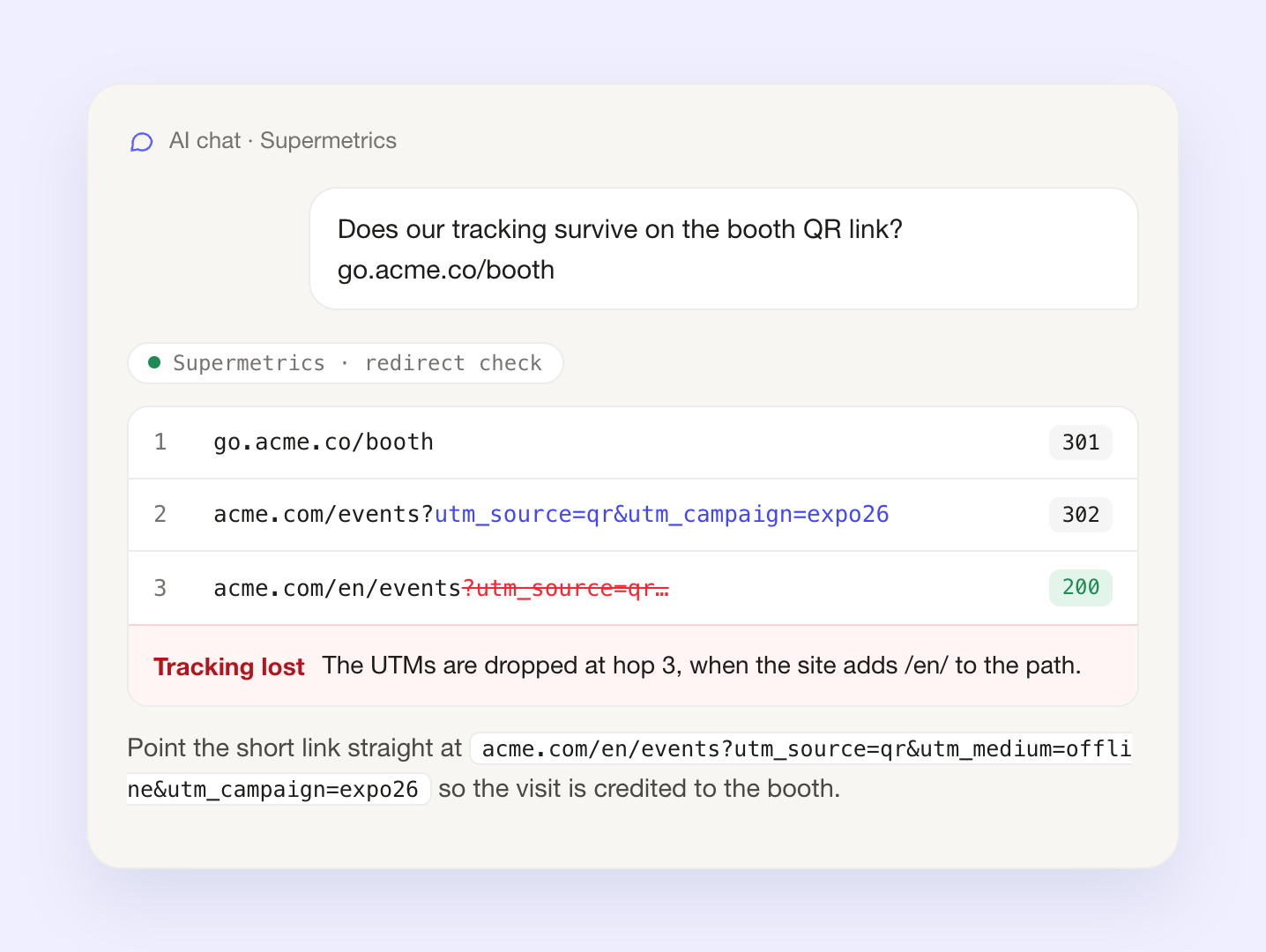
Redirect check
Follows each link through its redirects and shows the hop where UTMs or click IDs like gclid and fbclid get lost.
Try asking: "Do my UTMs survive this shortened link?"
Landing pages and previews
How fast the page loads, and how the link looks when someone shares it.
Page speed
Scores your pages on mobile or desktop for performance, SEO and accessibility, with the top fixes for each.
Try asking: "How fast is our pricing page on mobile?"
Web Vitals trend
About six months of real-visitor speed data from Chrome, so you can see whether a site is getting faster or slower.
Try asking: "Has our site got slower since the redesign?"
Link preview
Shows how a link will look on LinkedIn, Facebook, X and Slack, and flags a missing image, description or cut-off title.
Try asking: "How will this blog post look when we share it on LinkedIn?"
Before you publish or send
For links, emails and ad copy that are hard to change once they're out.
Link safety
Flags malware or phishing, expiring certificates and domains registered in the last 30 days, on every host a link passes through.
Try asking: "Is this partner's link safe to put in our email?"
Email authentication
Checks a sending domain's SPF, DKIM, DMARC, MX and BIMI records, which inbox providers use to decide whether to trust your email.
Try asking: "Is our domain set up so the webinar follow-up won't go to spam?"
Character limits
Measures headlines and captions against Google Ads, Meta, LinkedIn and X limits, counted the way each platform counts.
Try asking: "Will these 15 headlines fit a Google responsive search ad?"
What a chat model can't check on its own
Ask a chat model whether a headline fits or a link keeps its tags and it will usually answer without checking. These checks do the work it can't, then the AI explains the result.
- Counts characters the way each ad platform does
- Follows every redirect to the final page
- Looks up live DNS records, safety lists and speed data

When to run them
How our own marketing team uses them.


Works with your team's business context
Supermetrics stores the rules your team works by, such as UTM conventions, naming rules and reporting preferences, as business context. Everyone on the account uses the same saved version, in Claude, ChatGPT and any other AI tool connected to Supermetrics.
The UTM builder and audit check every link against your saved conventions, so two people checking the same link get the same answer. When you connect your data, the AI sees the same context when you ask about your own performance.
- Saved once for the whole team
- Set up by telling the AI how your team works
- Used by the UTM checks and by your data questions

See which campaigns turned those clicks into pipeline
The checks tell you a link is tagged correctly and the page loads. Connect your ad platforms and analytics to Supermetrics, and you can ask the same chat what each campaign brought in.
