Connect Teads to Claude
Connect Teads to Claude with Supermetrics and turn your Teads data into answers, reports, and next steps without leaving Claude.
Don’t take our word. Try it free today.
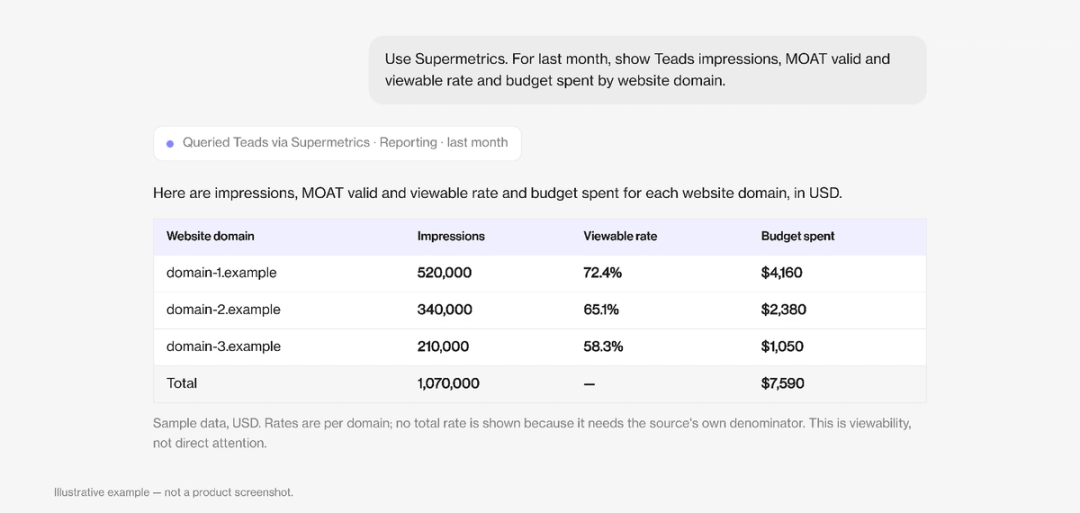
At a glance
What it does
Ask Claude about Teads impressions, clicks, budget spent, MOAT viewability, video progress and unique viewers in plain language.
What you can find
Find low-cost, viewable placements and see where video audiences drop off.
What you need
You connect with a Teads API key that you generate yourself in Teads Settings.
Read-only
The connector is read only, so Claude can’t edit campaigns or budgets.
Before you start
Claude
You need a Claude account that can add connectors. Anthropic explains remote connectors in its custom connectors guide.
Supermetrics
You don’t need a Supermetrics subscription to start, because a trial is created at login. If your company already pays, the Supermetrics Hub should show an AI chats destination. If it doesn’t, upgrade or swap an existing destination to AI chats.
The connection keeps the email and team from your first login. If you later buy a subscription under a different email, you may see LICENSE_NOT_FOUND (Supermetrics for Claude docs). For plans, see pricing.
Teads
You need a Teads API key, which you generate during setup. The Teads connection guide lists no required user role.
Start here
How do you connect Teads to Claude?
 1
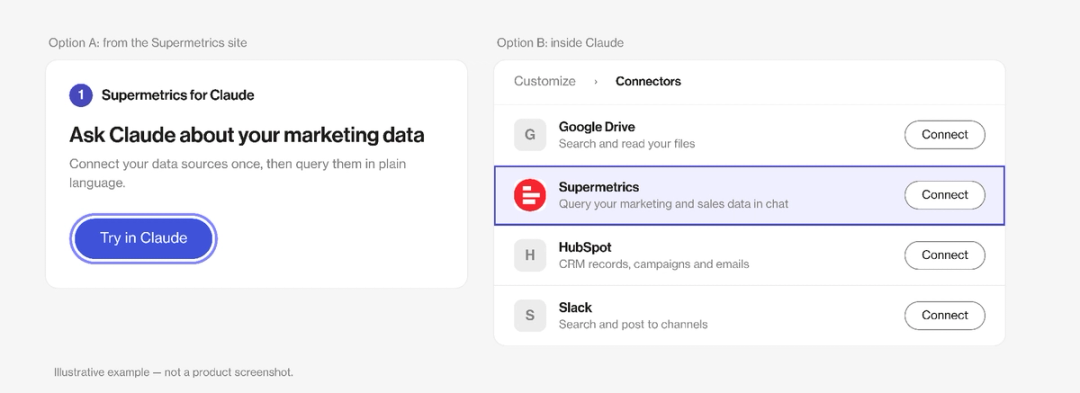
Add Supermetrics to Claude. Open the Supermetrics for Claude page and click Try in Claude. Or, inside Claude, search for Supermetrics under Customize, then Connectors.
 2
Select a team. Sign in to Supermetrics and choose the team. If you have no subscription, the trial starts at this point.
3 Generate a Teads API key. Log in to Teads and open Settings from the gear icon in the header. In the API keys section, click Generate API key. Rename the key with the edit icon if you want, then copy it from under its name.
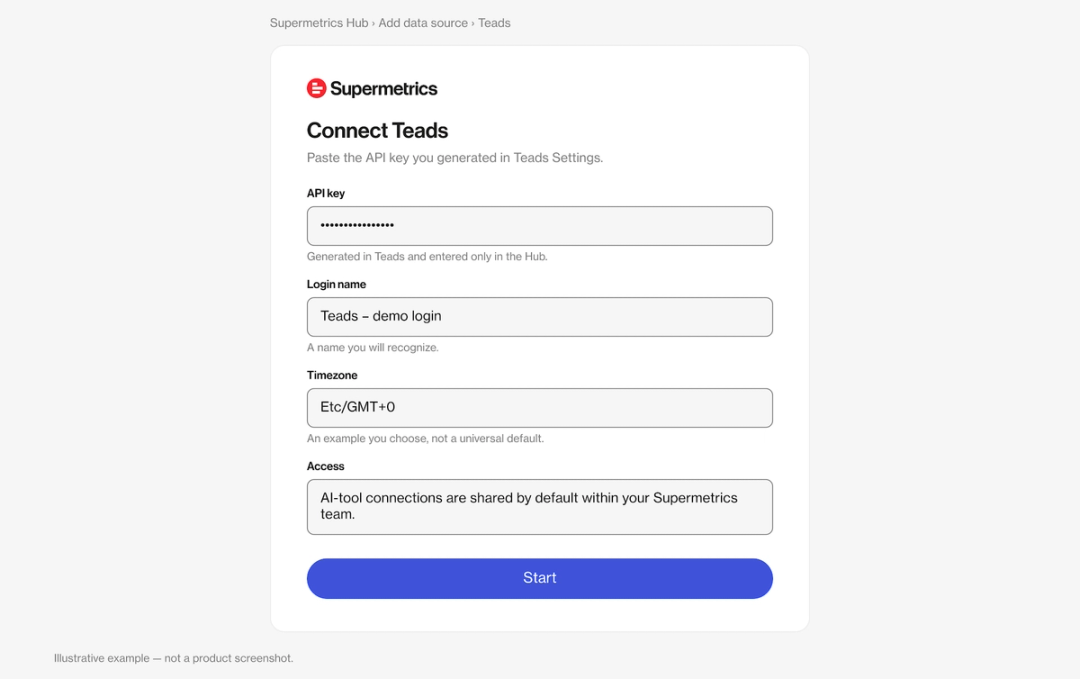
4 Connect Teads in the Hub. Add the key in the Supermetrics Hub. Open Teads in the Hub, or use the login link Claude provides. Paste the key and give the login a name you’ll recognize, which helps when you hold several. Click Start and select a timezone.
 5
Start prompts with “use Supermetrics”. If several data tools are connected, this tells Claude which one to use.
6 Run a narrow first query. Every query needs a date range. Try: “Use Supermetrics. Show Teads impressions, clicks and budget spent by campaign name for the last 14 days, with the campaign currency.”
7 Check, then widen. Compare the totals with the Teads interface for the same dates and timezone. If they agree, add MOAT viewability, video progress or a dashboard.
If a colleague holds the Teads API key, the Hub can share an authentication link with them.
Building your own agent or n8n workflow instead? Use the standalone Supermetrics MCP server, which needs a Supermetrics subscription with API access. For more setup help, see the AI tools connection guide.
What can you ask Claude about Teads?
Swap in your own dates and campaign names.
| Goal | Prompt | What you get |
|---|---|---|
| Reporting | Use Supermetrics. Show Teads impressions, clicks, CTR and budget spent by campaign for last month, in the campaign currency. | A campaign table |
| Reporting | Use Supermetrics. Which Teads seats and advertisers spent the most last quarter? | Budget by seat and advertiser |
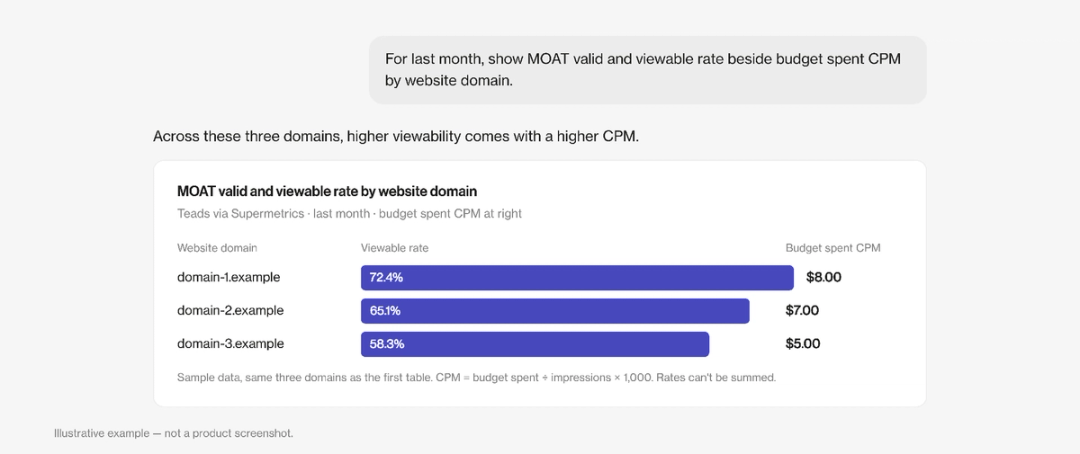
| Diagnosis | Use Supermetrics. For last month, set Teads budget spent CPM beside MOAT valid and viewable rate by website domain, and rank the domains that are low-cost and viewable. | A domain ranking |
| Comparison over time | Use Supermetrics. Compare Teads impressions and unique viewers by device for the last 30 days. | A device table |
| Cross-source | Use Supermetrics. Put Teads impressions by campaign for last month beside DoubleVerify viewability for the same campaign names. | A joined view, if the names match |
| Dashboard | Use Supermetrics. Build an interactive dashboard of Teads impressions, viewable rate and completion rate by campaign for last quarter. | A Claude artifact dashboard that other Claude users in your organization can open in a browser. They need a Supermetrics account and source connections. |
More example prompts
| Goal | Prompt | What you get |
|---|---|---|
| Diagnosis | Use Supermetrics. Show Teads MOAT average in-view time and complete in-view impressions by creative type for the last 30 days. | An attention table per format |
| Diagnosis | Use Supermetrics. For each Teads campaign last month, show video starts, first quartile, midpoint, third quartile and completes, then the completion rate. | A drop-off table |
| Comparison over time | Use Supermetrics. Split Teads budget spent into total ad cost and fee by ISO week for the last eight weeks. | A weekly cost split |
| Cross-source | Use Supermetrics. Compare Teads budget spent by day with StackAdapt media cost by day for the last 30 days. | Two spend series lined up by date |
More patterns: AI chats use cases and the Teads support center.
What can you do with Teads data in Claude?
Measure true video attention
See how long video ads stayed in view, beyond whether they loaded.
Track completion drop-off
Follow viewers through starts, each quartile and completion to see where they leave, with the completion rate beside it.
Find low-cost, viewable placements
Rank website domains by CPM and MOAT viewable rate.
Audit reach by device and country
Split estimated unique viewers by device and country.
Reconcile fees by seat
Compare the agency fee, which Teads doesn’t invoice, with the Ad Manager fee for each seat.
Compare creative formats
Split results by creative family, type and size.
How do you combine Teads with other data in Claude?
Teads can share a chat with other Supermetrics sources. Try these:
Check video delivery against verification
With DoubleVerify in Claude, ask whether campaigns with weak MOAT viewability also show verification flags.
Compare video and audio spend
With Spotify Ads in Claude, compare daily Teads spend with audio spend.
Compare video and programmatic display spend
With StackAdapt in Claude, line up Teads budget spent with StackAdapt media cost by week.
Compare clicks with sessions
With Google Analytics 4 in Claude, compare Teads clicks with sessions from the same campaigns.
One limit: sources join only on a shared dimension. Date is the usual one, and campaign names work only if both systems name campaigns identically. Supermetrics creates no join key for you.
Confirm AI chats supports Spotify Ads and DoubleVerify on your account before relying on these pairings.
What Teads data can Claude query?
Teads has a single report type, Reporting. It carries every field and one setting, Timezone, which accepts any IANA timezone identifier such as Europe/London and defaults to Etc/GMT+0 (UTC). Every query needs a date range.
Supermetrics lists 206 Teads fields: 164 metrics and 42 dimensions.
| Field group | What it covers | Example field IDs |
|---|---|---|
| Delivery | Impressions, clicks, conversions and unique viewers | reporting__impression, reporting__click, reporting__ctr, reporting__post_click_conversion, reporting__uv_impression |
| Budget spent | What Teads invoiced, split into ad cost and fee | reporting__turnover_value, reporting__turnover_advertising_value, reporting__turnover_fee_value |
| Budget delivered | Advertiser budget consumed, including agency fee | reporting__budget_delivered_value, reporting__budget_delivered_agency_fee_value |
| Unit costs | Cost per result, CPM and CPC on four bases | reporting__turnover_average_cpm_value, reporting__turnover_average_cpc_value |
| MOAT viewability | Analyzed, measurable and valid impressions, in-view time, 1 to 30 second counts | reporting__moat_inview_viewable_impression, reporting__moat_viewable_rate, reporting__moat_5s_inview_impression |
| Video progress | Starts, quartiles, completion and 1 to 30 second views | reporting__video_start, reporting__video_midpoint, reporting__video_complete, reporting__progress_10 |
| Structure | Seat, advertiser, campaign, line item, creative | reporting__ad_owner_name, reporting__advertiser_name, reporting__ad_external_name, reporting__creative_external_name |
| Context | Device, country, browser, website domain, creative format | reporting__device, reporting__country_name, reporting__website_domain, reporting__format_creative_type_name |
Limits and data notes
| Situation | What happens | What to do |
|---|---|---|
| Date range | Required for the Reporting report type | State the period in the prompt |
| Timezone | The Timezone setting accepts any IANA identifier and defaults to Etc/GMT+0. Daily totals shift if it differs from the timezone you read in Teads | Ask Claude to use the timezone you use for Teads reports |
| Accounts | There’s no account list. Seat, advertiser and campaign are dimensions | Group by reporting__ad_owner_name or reporting__advertiser_name |
| Currency | Money fields sit beside reporting__io_currency (Campaign currency) | Include it, and don’t add across currencies |
| Cost bases | Budget spent and budget delivered are different measures (see the field glossary) | Say which one you mean |
| Second-by-second fields | There are 30 MOAT in-view counts, 30 progress counts and more | Ask for named seconds or the quartiles |
| Read only | Claude can’t edit campaigns or budgets | Make changes in Teads |
Field glossary
Budget spent is what Teads invoiced. Budget delivered is the advertiser budget consumed, including the agency fee that Teads doesn’t invoice.
| Field ID | Plain-English meaning | Type | Watch out |
|---|---|---|---|
| reporting__turnover_value | Budget spent, meaning invoiced by Teads | Metric | Not the same as budget delivered |
| reporting__budget_delivered_value | Advertiser budget consumed | Metric | Includes the agency fee that Teads doesn’t invoice |
| reporting__budget_delivered_agency_fee_value | Agency fee, not invoiced by Teads | Metric | Only relevant if an agency fee applies |
| reporting__turnover_fee_value | Budget spent on Ad Manager fee cost | Metric | Compare with reporting__turnover_advertising_value |
| reporting__uv_impression | Estimated number of unique Teads IDs | Metric | An estimate, so don’t present it as exact reach |
| reporting__advertiser_billable_volume | Billable events: number of results delivered | Metric | Pair with reporting__price_advertiser_event |
| reporting__moat_viewable_rate | MOAT valid and viewable percentage | Metric | Can’t be summed across rows |
| reporting__moat_average_inview_time | MOAT average in-view time, in milliseconds | Metric | Divide by 1,000 for seconds |
| reporting__video_completion_rate | Video completion rate | Metric | Can’t be summed across rows |
| reporting__ad_owner_name | Teads Ad Manager seat name | Dimension | Seat, not advertiser |
| reporting__io_currency | Campaign currency | Dimension | Add it to every money query |
| reporting__device | Device, such as Desktop, SmartTV or Smartphone | Dimension | — |
Rates can’t be summed across rows. Besides the two rates above, this covers reporting__ctr and the ratio and cost-per-unit fields on the budget delivered bases. Ask Claude for the grouping you need.
What is the Teads MCP connector for Claude?
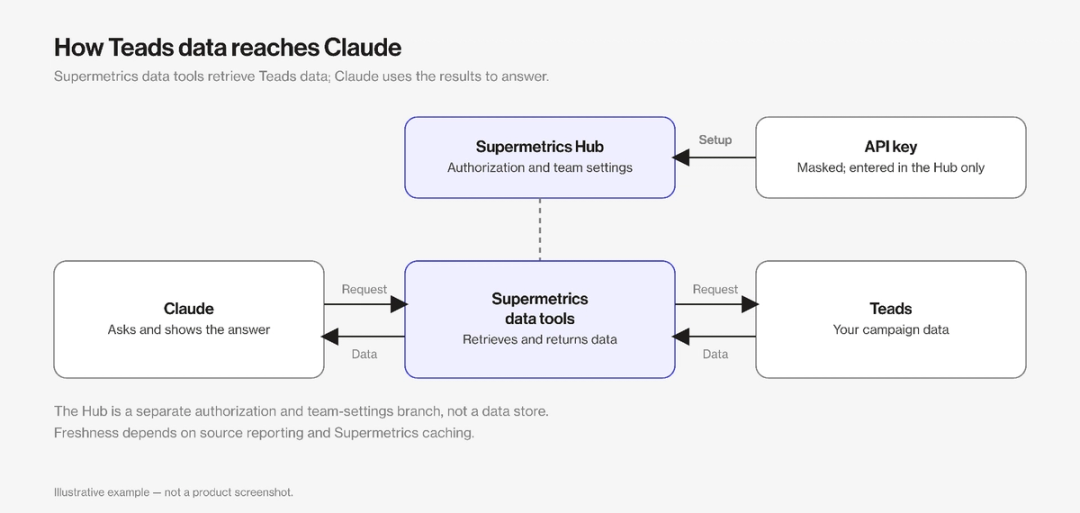
The Teads MCP connector for Claude is the Supermetrics connector that lets Claude read your Teads data through the Model Context Protocol (MCP).
The connector brings Teads campaign performance data into Claude. It uses the Model Context Protocol (MCP), an open standard that lets AI applications call outside tools and data (modelcontextprotocol.io). Supermetrics calls this route AI chats, and there’s nothing to set up on the MCP side.
Ask a Teads question, and Claude picks fields from the Reporting report type. Supermetrics retrieves them from Teads, and Claude presents the rows as an answer.
Use AI chats to ask questions in Claude. For custom agents, n8n workflows or other MCP clients, use the standalone Supermetrics MCP server.
Which way should you connect Teads to Claude?
| Approach | Setup effort | Data scope | Cross-source blending | Maintenance | Suits |
|---|---|---|---|---|---|
| Supermetrics connector for Claude | Low: add the connector and paste a Teads API key once | Teads plus every other source in your Supermetrics account | Yes, within one chat | Supermetrics updates the connector | Video buyers, planners and agencies who want answers in chat |
| Supermetrics MCP server (custom client) | Medium: you wire up an MCP host yourself | Same sources | Yes, if your agent combines results | Your team looks after the client | Engineers building agents |
| Teads’ own MCP or AI integration, if the platform offers one | Depends on the platform | Teads only | No, unless other tools are added | Depends on the platform | Teads-only questions |
| CSV export and upload | Low per file, repeated each time | One file | Only after you merge files | Manual | One-off snapshots |
| Direct API and custom code | High: keys, calls and hosting are yours | Whatever you build | Whatever you build | You maintain it | Teams with engineers and special needs |
Choose the Supermetrics connector for Claude when you want viewability, completion and cost in one conversation, perhaps beside another channel.
Choose the Supermetrics MCP server when your team already runs agents and needs a client it controls.
Choose Teads’ own tooling when you need a setting or report that sits outside the Supermetrics field list.
Choose CSV or the API when you need a single file for a deck, or a data pipeline you own end to end.
When is this not the right tool?
- You need an attention study beyond MOAT fields. Only the MOAT and video fields Supermetrics provides are available.
- You need years of stored history. A chat isn’t an archive. Send Teads data to BigQuery to keep video delivery history in a warehouse.
- You need a dashboard that updates on a schedule. Build viewability dashboards for clients with Teads in Looker Studio.
- You work in spreadsheets. Teads in Google Sheets keeps placement tables where you edit them.
- You need to pause a campaign or raise a bid. Do that in Teads.
How do you check Claude’s Teads numbers?
Confirm the date range and the Timezone setting first. Then compare one total, such as impressions, with the Teads interface for the same dates.
Check the campaign currency, and ask Claude to show the query and the fields it used. If a number still differs, the table below lists the usual reasons.
| What you see | Likely reason | What to check |
|---|---|---|
| Daily totals differ from Teads | Day boundaries shift with the timezone | Whether the Timezone setting matches the timezone you read in Teads |
| Two cost totals disagree | One is budget spent and the other budget delivered | Which cost basis each total uses (see the field glossary) |
| Viewability differs | Analyzed impressions can be filtered for IVT or unfiltered | Which version Claude used |
| Reach looks too exact | Unique viewers is an estimate of unique Teads IDs | That you present it as an estimate |
| Money totals look wrong | Rows mix campaign currencies | Whether the query includes the campaign currency |
| A rate looks wrong | Rates were added across rows | Ask Claude for the grouping you need instead of summing rates |
Troubleshooting
| Symptom | Likely cause | Fix |
|---|---|---|
| LICENSE_NOT_FOUND | The connection uses an older email address or team | Disconnect Supermetrics in Claude Connectors, reconnect and pick the team of your paid subscription |
| Claude reads the wrong team or ignores Supermetrics | A different team was chosen at first login, or another data tool took the question | Reconnect in Claude Connectors with the correct team, and start the prompt with “use Supermetrics” |
| “No accounts found” | Teads has no account list, so this error points to the connection or API key | Read the Supermetrics docs article “How to fix No accounts found errors”, then reconnect Teads with a valid API key |
| Teads isn’t authorized | The Hub connection is missing or needs renewing | Ask Claude for the Teads login link, or reconnect in the Hub and rerun the query |
| The Hub wants an API key | Teads connects with an API key that you generate | Generate a key as in setup step 3, then paste it into the Hub |
| Still stuck | Another cause | Contact support through the Supermetrics Hub |
If a working query stops, follow the reauthentication guide.
Is it safe? Security and data handling
- Supermetrics retrieves the fields your prompt asks for from Teads and passes them to Claude, so the results are visible in the chat.
- Nothing is written to Teads. Studio dashboards are separate and need a Studio destination subscription to edit.
- Your Teads API key is the credential, and you create and add it in setup steps 3 and 4.
- AI chats data-source connections are shared by default. Team members assigned to the subscription can use shared logins, so review team membership and subscription access before connecting client accounts. Anyone who can open the Claude chat can see its returned results.
- Anthropic’s storage and use of chat content depends on your Claude plan and organization settings.
- For policies and certifications, see the Supermetrics Trust Center.
Related connectors
Send Teads data to BigQuery to keep video delivery history in a warehouse
Report on Teads in Looker Studio for client dashboards on viewability
Analyze Teads in Google Sheets for spreadsheet views of placement data
Connect Spotify Ads to Claude to add audio spend to the chat
Connect DoubleVerify to Claude to compare verification data with ad delivery
Supermetrics for Claude for a list of supported data sources
FAQ
-
It’s a Model Context Protocol endpoint that lets an AI client read Teads data. In Claude, use the Supermetrics connector. For your own agents, use the standalone Supermetrics MCP server.
-
Check the Teads support center for Teads’ own tools. The Supermetrics connector reads Teads through Supermetrics fields and sits next to your other sources.
-
Yes. Add Supermetrics through Claude’s Connectors directory. The remote connector works on the web, in Claude Desktop and in Claude Code, subject to your account and organization settings. The standalone Supermetrics MCP server is a separate option for custom integrations and requires a subscription with API access.
-
Yes. Ask Claude to rank website domains by CPM and MOAT viewable rate.
-
Yes. Ask for video starts, quartiles and completions, or the 1 to 30 second progress counts for finer detail.
-
Yes. Group any metric by seat name or advertiser name.
-
No. The connector is read only, so Claude can’t edit campaigns or budgets. Make changes in Teads.
-
Claude queries Teads live through Supermetrics each time you ask.
-
Yes. Save several API keys as named logins, then group results by seat or advertiser.
-
You get a free trial when you first log in. Ongoing access needs an AI chats destination on your Supermetrics subscription, so upgrade or swap an existing destination if you don’t have one. See pricing for plans.
-
See the Supermetrics Trust Center for Supermetrics’ policies. Anthropic’s handling of chat content depends on your plan and settings, so read Anthropic’s terms for the plan you use.