Connect Facebook Insights to Claude
Connect Facebook Insights to Claude with Supermetrics and turn your Facebook Insights data into answers, reports, and next steps without leaving Claude.
Don’t take our word. Try it free today.
At a glance
What it does
Ask Claude about Page followers, media views, post engagement, video and reels performance, messaging counts and approximate monetization earnings.
Name the Page and period
The current Facebook Insights field reference lists the available metrics and dimensions. Specify the reporting period and the Page you want to query.
What you need
You need the right access to each Page. See Before you start for the role you need.
Ask by post
Post metrics such as likes, comments and reactions are reported per post, so ask for them by post.
Before you start
Claude
You need a Claude account that can add connectors, found under Customize. Anthropic's custom connectors guide explains how remote connectors work.
Supermetrics
You don't need a Supermetrics subscription to start: your first login creates a trial. If you already pay for Supermetrics, check for an AI chats destination in the Supermetrics Hub. If it isn't there, upgrade or swap one of your destinations. The connection keeps the email and team from your first login (Supermetrics for Claude docs). Plans are on the pricing page.
Facebook Insights
The access you need depends on how you manage the Page (Facebook Insights connection guide):
- With direct Page access, you need administrator access to the Pages you want to pull from.
- Through Business Manager, you need at least Page editor access to those Pages.
- With the New Pages experience, you need partial access to the linked Page.
Agencies and anyone without direct access can send the Hub's authentication link to someone who has access.
Start here
How do you connect Facebook Insights to Claude?
 1
Add Supermetrics to Claude. Click Try in Claude on the Supermetrics for Claude page to add the connector. You can also open Customize, then Connectors, in Claude and search for Supermetrics.
2 Pick your team. Log in to Supermetrics and choose which team's subscription should power the chat. If there's none, your login creates a trial.
3 Connect Facebook Insights in the Hub. Open Facebook Insights in the Supermetrics Hub, or use the login link Claude gives you. Log in with Facebook, select the Businesses and Pages, review the permissions and save.
4 Tell Claude what to use. If you have other tools connected, start your prompt with "use Supermetrics". Then tell Claude which Page, or Pages, to query.
5 Try a first query. Run a small query with a date range. Try: "Use Supermetrics. Show total, organic and paid Page media views by week for the last eight complete weeks for my chosen Page."
6 Check the results. Compare one result with Meta’s own Page insights for the same Page, fields and dates. Then move on to post and video questions.
Building your own agent or n8n workflow instead? Use the standalone Supermetrics MCP server, which needs a Supermetrics subscription with API access. For more setup help, see the AI tools connection guide.
What can you ask Claude about Facebook Insights?
| Goal | Prompt | What you get |
|---|---|---|
| Reporting | Use Supermetrics. Show Page visits and Page media views by week for the last eight complete weeks for my chosen Page. | A weekly Page activity table |
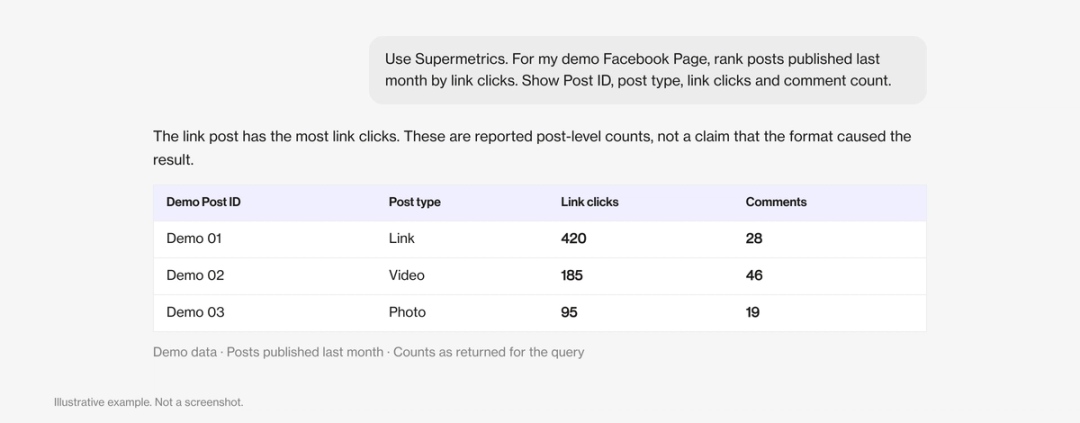
| Reporting | Which five posts last month had the most link clicks, and what type were they? | A ranked list of five posts with post type and link clicks |
| Diagnosis | Compare average view time and available viewing milestones by video for last month. Include video length and the field definitions. | Video metrics with duration context; not a matched audience retention curve |
| Diagnosis | Which posts last month got an unusual share of angry reactions? | A short list of posts with angry and total reaction counts |
| Comparison over time | Compare organic and paid media views by month for the last six months. | A monthly table with organic and paid views side by side |
| Cross-source | Put organic Page media views next to paid reach and spend from my Facebook Ads account by week for the last eight weeks. | Two result sets compared by week |
More example prompts
| Goal | Prompt | What you get |
|---|---|---|
| Diagnosis | Which five posts last month had the most comments? Show Post ID, post type and comment count. | Post-level engagement counts without importing comment text or authors |
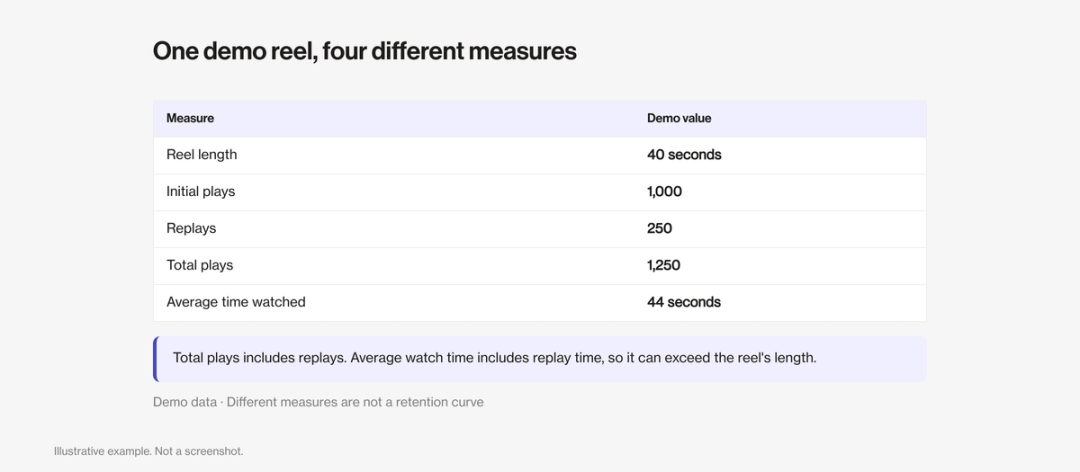
| Comparison over time | Show reels total plays, replays, average watch time and shares for this quarter. Explain how each metric is counted. | A reels report with definitions and replay context |
| Reporting | Show approximate Page monetization earnings by month for the last six complete months. Keep video ad-break earnings in a separate table. | Estimated earnings at Page and video levels without double-counting totals |
| Reporting | Summarize Page media views and my top posts by link clicks for the last complete month. Show the Page, reporting period and fields used. | A concise reporting summary with the figures behind it |
More ideas are in the AI chats use cases doc, and Meta's Page Insights reference covers the platform side.
What can you do with Facebook Insights data in Claude?
Best posts
Find your best posts by ranking them on link clicks, shares, comments and reactions, then compare which formats earn the most engagement.
Reaction mix
See the mix of love, wow, haha and angry reactions by post to spot posts whose topic you may want to review or reply to.
Video watch time
Compare video watch time and viewing milestones alongside each video’s length. Separate milestone counts do not form a matched audience retention curve, so they cannot pinpoint where the same viewers dropped off.
Reels performance
Review reels plays, replays, watch time and shares together. Keep their definitions visible: total plays includes replays, and average watch time can exceed the reel’s length.
- Organic vs paid views. Put organic and paid media views next to total media views by week to compare unpaid and promoted distribution. Views count displays or plays, not unique people.
- Review approximate monetization earnings by month. Keep program-specific and video earnings separate from the Page total rather than adding them together without checking overlap.
How do you combine Facebook Insights with other data in Claude?
Page and ad results
With Facebook Ads in Claude, compare Page media views with campaign spend and results by week. Page data already separates paid media views from organic ones.
Page and Sprout Social data
With Sprout Social in Claude, compare Facebook Page results with Sprout Social data in one chat. Add Instagram in Claude for your linked Instagram account.
Page activity and listings
With Google Business Profile in Claude, see whether a burst of Page activity lines up with listing views or calls.
Align reporting periods and Page scope before comparing sources. Join individual records only through a stable shared identifier or a checked mapping; matching post or campaign names alone is unreliable. Weekly movements show correlation, not attribution.
What Facebook Insights data can Claude query?
Start with the current Facebook Insights field reference. Page totals, post metrics, reels and video reports have different scopes. Likes, comments and reactions on posts need a post-level dimension such as Post ID. If a combination fails, request separate reports and compare them at a consistent level.
Keep the Page, reporting period and post scope explicit. Use the settings available in the current connector rather than assuming every metric accepts the same dimensions.
- The connector can exclude unavailable accounts. Check the returned Page list and any excluded accounts when a result seems incomplete.
| Field group | What it covers | Example field IDs |
|---|---|---|
| Page audience and views | Followers, Page visits and media views | page_followers, page_views_total, page_media_view, page_media_view_organic, page_media_view_paid |
| Post engagement | Reactions, comments, shares and clicks per post | post_likes_on_post, post_comments_on_post, post_shares_on_post, post_link_clicks, post_other_clicks |
| Reactions | Reaction types for Pages, posts and videos | page_post_reactions_love, post_reactions_total, post_reactions_anger, video_reactions_like |
| Video | Views, view time and 15, 30 and 60 second milestones | post_video_views_15s, post_video_view_time, avg_post_video_view_time |
| Reels | Plays, replays, watch time and reactions | reel_video_total_plays, reel_video_replay_count, reel_video_avg_time_watched |
| Monetization | Page and video earnings, ad breaks | page_total_monetization_earnings, page_instream_ads_earning, total_video_ad_break_ad_impressions, total_video_ad_break_earnings |
| Messaging | New, blocked and reported conversations | page_messages_new_conversations_unique, page_messages_blocked_conversations_unique |
| Post and video details | Post IDs, types, publishing details and video titles | post_ID, post_name, post_type, video_title |
| Audience and targeting | Country, city and feed targeting | country, city, feed_targeting_age_min, feed_targeting_genders |
Several legacy reach, impression and video fields are deprecated. Do not treat media views as a one-for-one continuation of an old reach series: views count plays or displays, including repeats. Check the current field reference and Facebook Insights field-change notes when comparing older reports.
Field glossary
| Field ID | Plain-English meaning | Type | Watch out |
|---|---|---|---|
| page_followers | Page followers | Metric | An audience count, not a flow to sum across dates; verify the returned period |
| page_media_view | Media views | Metric | Page-level attention measure, not reach |
| page_total_media_view_unique | Unique Page media views at daily, weekly or monthly granularity | Metric | Do not sum unique counts across periods. Monthly queries need full calendar months |
| page_views_total | Page visits (profile views) | Metric | A profile view measure, separate from content views |
| post_likes_on_post | Likes on post | Metric | Must be split by post-level dimensions |
| post_comments_on_post | Number of comments on a post | Metric | Requires a post-level dimension such as Post ID or Post name |
| post_reactions_total | Total post reactions by type | Metric | Requires a post-level dimension |
| post_link_clicks | Post link clicks | Metric | Pair it with post_type |
| avg_post_video_view_time | Average video view time, in seconds | Metric | Non-aggregatable. Don't average rows |
| page_total_monetization_earnings | Total approximate monetization earnings | Metric | Approximate, so treat as estimates |
| post_ID | Identifier of the post | Dimension | Prefer a stable ID for record matching; post names are not guaranteed unique |
| profile | Page name | Dimension | Use it when you've connected several Pages |
What is the Facebook Insights MCP connector for Claude?
The Facebook Insights MCP connector for Claude is the Supermetrics connector that lets Claude read your Facebook Insights data through the Model Context Protocol (MCP).
MCP stands for Model Context Protocol, an open standard that lets AI apps use outside tools and data sources (modelcontextprotocol.io). The Supermetrics connector for Claude is one of those tools. Ask about your Page and Claude chooses the Facebook Insights fields. Supermetrics fetches them for the Pages you authorized, and Claude explains the numbers.
You can ask about Page-level views and followers, or post-level clicks, shares and reactions. Video, reels and approximate monetization earnings are also available. Choose fields for the question rather than mixing every metric into one report.
Use AI chats to ask questions in Claude. For custom agents, n8n workflows or other MCP clients, use the standalone Supermetrics MCP server.
Which way should you connect Facebook Insights to Claude?
Supermetrics offers two routes into MCP. AI chats is the Claude connector covered on this page, and it needs no MCP setup from you. The Supermetrics MCP server is a standalone product for technical users with n8n, custom agents or other MCP-compatible hosts. It needs a valid Supermetrics subscription with Supermetrics API access rather than an AI chats destination. Setup is at mcp.supermetrics.com. If you want to chat with your data in Claude, use AI chats.
| Approach | Setup effort | Data scope | Blending with other sources | Maintenance | Suits |
|---|---|---|---|---|---|
| Supermetrics connector for Claude | Low: add the connector, sign in with Facebook once | Facebook Insights plus the other sources in your account | Yes, in one chat | Supermetrics maintains the connection | Social and community managers who want answers in chat |
| Supermetrics MCP server (custom client) | Medium: you run your own MCP host | Same sources as the connector | Yes, if your agent joins results | You maintain the client | Engineers building agents or alerts |
| Meta Business Suite and Page insights | Use existing Page access | Facebook Page data | Separate tools or exports needed | Meta maintains the platform | Page reporting and publishing workflows |
| CSV export and upload | Low, but manual | One export at a time | Compare uploaded files using checked matching keys | Export again when a refresh is needed | A monthly snapshot |
| Direct API and custom code | High: you handle app review, tokens and paging | Whatever you code | Whatever you code | You track Graph API changes | Teams with a developer |
Choose the Supermetrics connector for Claude if you want Page answers in conversation without code, or want Page results beside paid and local listing data.
Choose the standalone Supermetrics MCP server when building your own agent or another MCP host. Remote connectors also work in Claude Code, so using Claude Code alone does not require this separate product. An alerting workflow needs its own scheduling and delivery setup.
Use Facebook directly if you need to publish, schedule or moderate.
Choose a CSV or the API if you want a one-off file (CSV) or a pipeline you own (API).
When is this not the right tool?
- If you need ad campaign performance, use Facebook Ads, a separate reporting source. Make campaign changes in Meta’s own tools.
- If you need general reach or impressions fields, see What Facebook Insights data can Claude query?
- If you need to retain Page history, use Facebook Insights to BigQuery and configure ongoing transfers. A warehouse preserves data you collect; it does not recover history the source no longer exposes.
- If you need a standing report, try Facebook Insights in Looker Studio or Google Sheets.
How do you check Claude’s Facebook Insights numbers?
Match the Page, field definitions and date range before comparing a result with Meta’s Page insights. Ask Claude to show its reporting scope and query fields. Changes to Meta’s metrics can also break continuity with older reports.
| Situation | What happens | What to do |
|---|---|---|
| Date range | Every Facebook Insights query needs one | State the period and ask Claude to repeat it |
| Several Pages | The account list shows Pages; unavailable Pages may be excluded | Check profile and profileid and review excluded accounts |
| Post-level metrics | post_likes_on_post, post_comments_on_post and post_reactions_total need a post-level dimension | Add post_ID or post_name to the query |
| Unique media views | page_total_media_view_unique is only available at daily, weekly or monthly granularity, and a monthly split needs full calendar months | Use full months or switch to weeks |
| Averages and rates | Fields such as avg_post_video_view_time and the watch 30s rates are already calculated | Request the grouping you need. Don't add or average rows |
| Media views read as reach | Legacy reach and impressions metrics have been deprecated | Use current views metrics with their own definitions; do not relabel old reach as views |
| Missing posts | A post list may have different scope from the report in Meta | Match Page, post scope and dates, then check the current connector settings |
| Reels metrics | Total plays includes replays; average watch time also includes replay time | Keep plays, replays and watch-time definitions beside the comparison |
| Time zone, history and freshness | Recent figures and available history depend on Meta and the connector | Compare complete periods and match the source report; a new answer does not guarantee an upstream refresh |
| Large results | Large result sets may need a narrower query | Reduce the dates, Pages or fields |
Troubleshooting
| Symptom | Likely cause | Fix |
|---|---|---|
| LICENSE_NOT_FOUND | The connection uses an older email address or team | Check which email and team hold the paid subscription in the Hub, disconnect Supermetrics in Claude Connectors, reconnect and choose that team |
| Claude uses another team or skips Supermetrics | A different team was picked at first login, or other data tools compete | Disconnect and reconnect in Claude Connectors, pick the right team and write "use Supermetrics" |
| "No accounts found" | The Facebook login can't see a Page, or none was selected | Reconnect, make sure your role meets the minimum in Before you start, and select the Pages |
| Facebook Insights isn't authorized | No Facebook login exists in the Hub, or it needs renewing | Ask Claude for the login link or reconnect Facebook Insights in the Hub |
| The connection lacks access to a Page | Your role is below the minimum listed in Before you start | Ask a Page admin to raise your role or complete the sign-in through a shared authentication link |
| A Page is missing from the picker | It wasn't selected in the Businesses and Pages step | Reconnect, select the Pages and save |
| Post metrics return an error | A post-level metric was asked for without a post-level dimension | Add post_ID or post_name |
| Monthly unique views fail | page_total_media_view_unique split by month needs full calendar months | Set the range to whole months, or use a weekly split |
| A working query stops | The Facebook login may need renewing | Reconnect the login in the Hub first |
| Still stuck | Something else | Contact Supermetrics support |
Is it safe? Security and data handling
- Use aggregate Page and post reporting. Exclude personal data from prompts and query results, subject to the limited feature-specific exception in Supermetrics’ AI Terms. Avoid comment text, author names and other identifying fields. Anyone with access to the Claude conversation may see its results.
- Through this connection, Claude reads Page reporting. It cannot publish, delete, reply to or hide Facebook content. Use Meta’s own tools for those actions.
- A person with the required Page access signs in once in the Hub. The Pages they select decide what Claude can query.
- AI chats connections are shared by default. Team members assigned to the subscription can use shared source logins, so review team membership and subscription access before connecting client Pages.
- Anthropic’s separate policies govern Claude conversations and model training. Supermetrics may temporarily store connector data; a chat result is not a guarantee of zero reporting delay or a new upstream API fetch.
- For policy details, see the Supermetrics Trust Center, AI Terms and Anthropic’s privacy guidance.
Related connectors
Send Facebook Insights data to BigQuery: keep Page history in a warehouse
Report on Facebook Insights in Looker Studio: shareable social dashboards
Analyze Facebook Insights in Google Sheets: post rows for spreadsheet work
Connect Sprout Social to Claude: Sprout Social results in the same chat
Connect Google Business Profile to Claude: local listing results beside Page activity
Supermetrics for Claude: the sources you can ask Claude about
FAQ
-
It's a Model Context Protocol endpoint that lets an AI client read Facebook Page data. The Supermetrics Claude connector handles this for you. Technical users who build agents can use the standalone Supermetrics MCP server.
-
Yes. Add Supermetrics under Customize, then Connectors. Remote connectors work on the web, in Claude Desktop and in Claude Code. Use the standalone Supermetrics MCP server when configuring a separate agent or another MCP host.
-
No. This connection retrieves Page reporting. It cannot publish, reply, edit Page content or moderate comments.
-
Yes. Select the Businesses and Pages during authorization, then specify the Page in your prompt. Check the returned Page name and ID; unavailable Pages may be excluded.
-
No. Facebook Insights covers Page and post reporting; Facebook Ads covers ad campaigns. You can compare their results in one chat, while keeping each source’s scope and definitions clear.