Connect Instagram to Claude
Connect Instagram to Claude with Supermetrics and turn your Instagram data into answers, reports, and next steps without leaving Claude.
Don’t take our word. Try it free today.
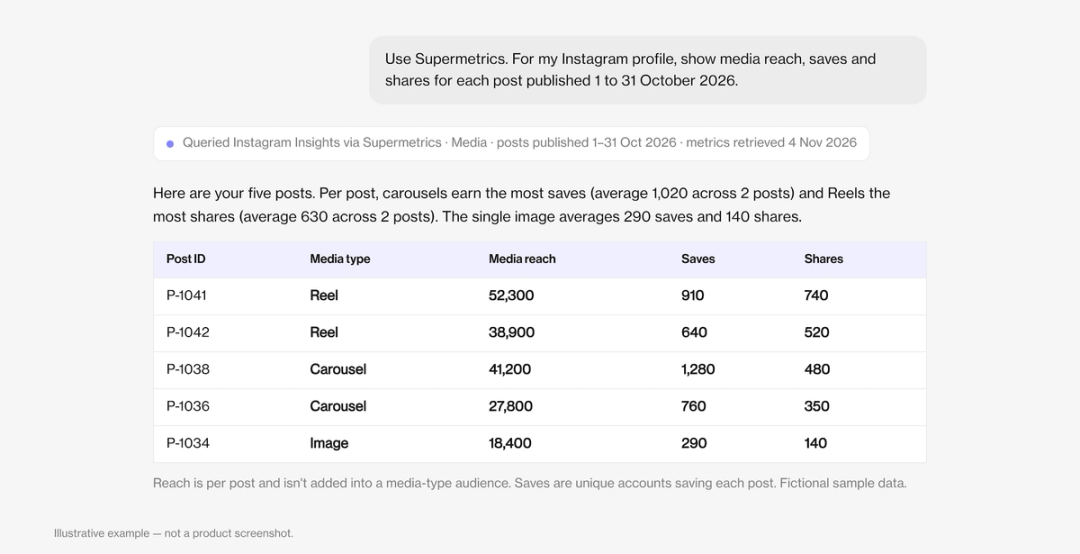
At a glance
What it does
The Supermetrics connector lets Claude read Instagram Insights over the Model Context Protocol (MCP): posts, Reels, Stories, reach, profile activity, follower demographics and comments.
Can take actions
Claude can list and moderate comments, reply, and publish or schedule posts, with an approval step for writes. It can’t create ad campaigns from this source.
Two ways to log in
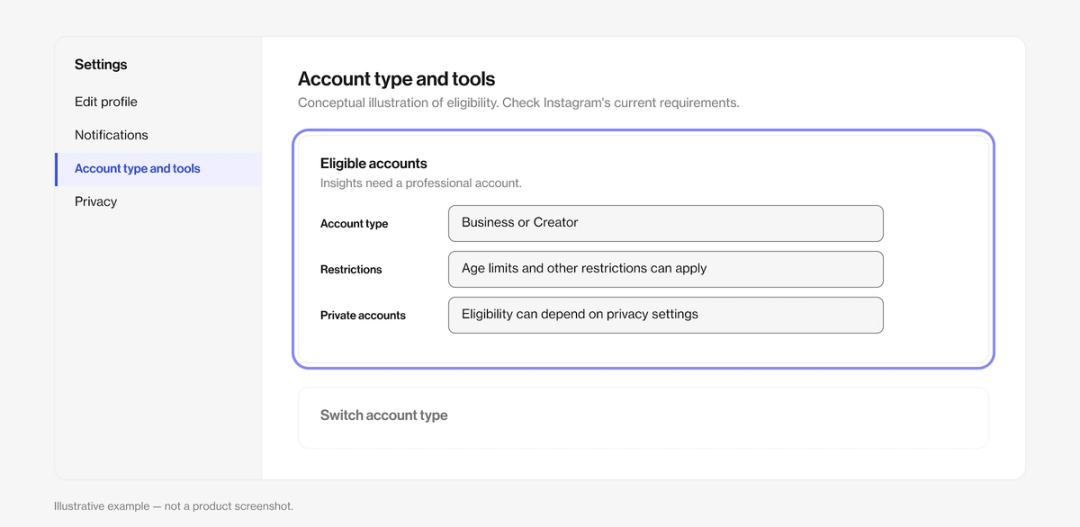
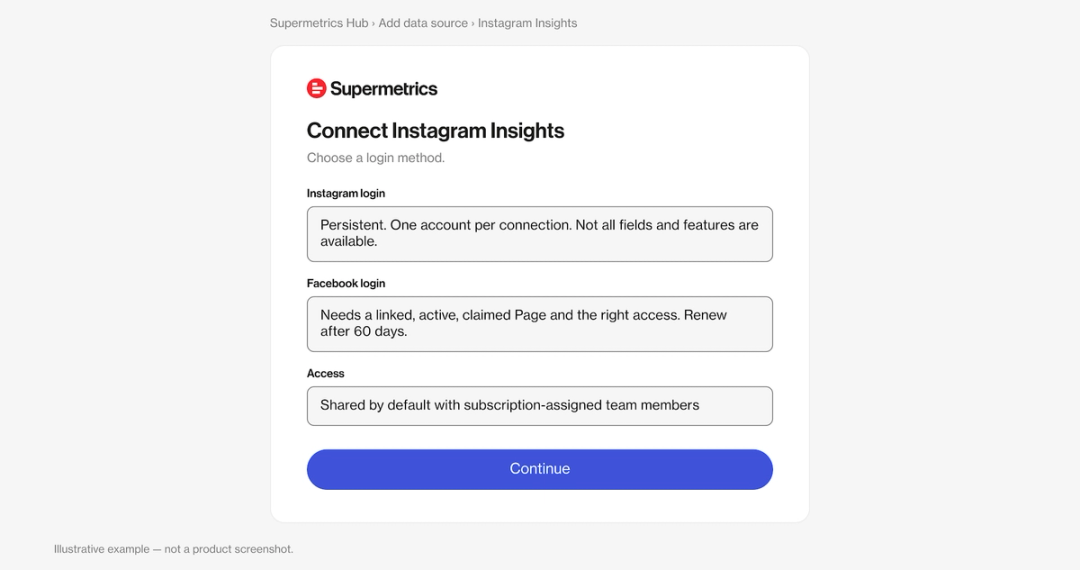
You can connect with Instagram login (recommended, persistent) or Facebook login (lasts 60 days, then needs re-authentication). The account must be Business or Creator.
Before you start
Claude
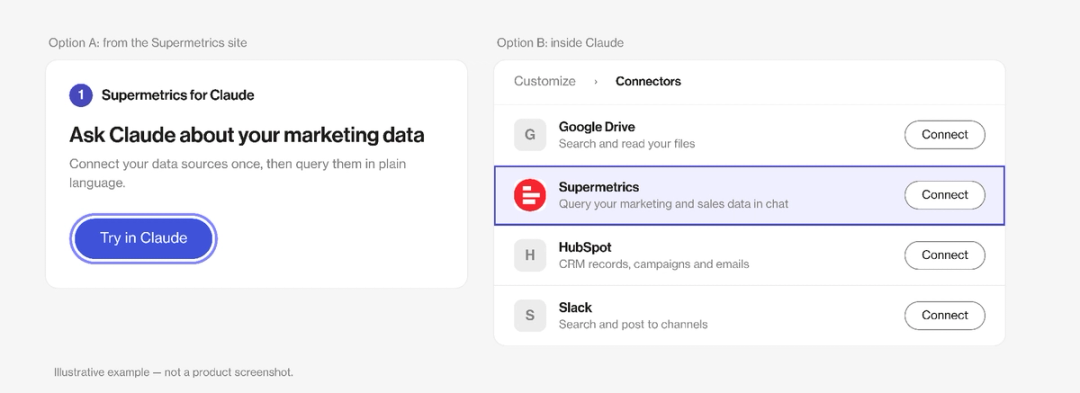
You need a Claude account that can add connectors. Supermetrics appears under Customize, then Connectors. If you can’t see Connectors, ask whoever manages Claude in your organization.
Anthropic’s custom connectors guide explains remote connectors. See the FAQ for Claude Desktop, claude.ai and Claude Code.
Supermetrics
You don’t need a Supermetrics subscription to start. A trial is created at login.
If you already pay:
- Open the Supermetrics Hub and check for an AI chats destination.
- If it’s missing, upgrade or swap an existing destination to AI chats.
The connection is tied to the subscription active at first connection (Supermetrics for Claude docs). See pricing.
Your account must be an Instagram Business or Creator account. You can connect with Instagram login (recommended) or Facebook login, which needs re-authenticating every 60 days.
Full Instagram access requirements
Do I need a specific type of Instagram account?
Yes. The account must be an Instagram Business account, or a Creator account that isn’t restricted or private. Facebook login adds one condition: the account must be linked to an active, claimed Facebook Page (Instagram Insights connection guide).
Instagram login or Facebook login?
| Instagram login (recommended) | Facebook login | |
|---|---|---|
| Permission | Switch on “Access and manage insights” | The Facebook account needs Insights permissions, and “Full control” of the Page in the new Pages experience |
| Lifetime | Persistent, no manual re-authentication | Lasts 60 days, then re-authenticate |
| Accounts per connection | One. Make separate connections for more | You pick Businesses, Pages or accounts at login |
| Caveat | Not all fields and features are available | Needs an active Facebook Page |
You can send an authentication link to whoever owns the account, which suits agencies.
Start here
How do you connect Instagram to Claude?
 1
Add Supermetrics to Claude. Open the Supermetrics for Claude page and click Try in Claude, or go to Customize, then Connectors, and search for Supermetrics.
 2
Pick your team. Sign in and select the team to use. A trial starts here if you have no subscription.
3 Connect Instagram in the Hub. Log in to Instagram with the login link Claude gives you, or open Instagram Insights in the Hub. Choose Instagram login (recommended) and enable the insights toggle, or choose Facebook login.
 4
Tell Claude what to use. If several data tools are connected, say “use Supermetrics”. Claude lists the profiles you connected. Pick one.
5 Run a small query. A date range is required. Try: “Use Supermetrics. For my Instagram profile, show media reach, saves and shares by media type for the last 30 days.”
6 Check the results. Compare one figure with Instagram’s own Insights, then try Story, Reel or comment questions.
Building your own agent or n8n workflow instead? Use the standalone Supermetrics MCP server, which needs a Supermetrics subscription with API access. For more setup help, see the AI tools connection guide.
What can you ask Claude about Instagram?
Replace the dates and profile with your own.
| Goal | Prompt | What you get |
|---|---|---|
| Reporting | Use Supermetrics. Which media type got the most saves and shares on my Instagram profile last month? | Media types ranked by saves and shares |
| Reporting | Use Supermetrics. List my top 10 Instagram posts by reach for October 2026, with caption and permalink. | Your 10 highest-reach posts, with captions and links |
| Diagnosis | Use Supermetrics. Which of my Reels from the last 30 days had the highest skip rate, and how long did people watch? | A shortlist of Reels with skip rate and average watch time |
| Comparison over time | Use Supermetrics. Show new followers per day for the last 30 days, ending yesterday. | New followers for each day |
| Cross-source | Use Supermetrics. Line up my Instagram reach by week for the last 12 weeks with site sessions from my analytics source. | Reach and sessions side by side, week by week |
| Action | Use Supermetrics. List the comments on my latest post and hide any that look like spam, after I confirm. | A comment list, then the hides you approve |
More example prompts
| Goal | Prompt | What you get |
|---|---|---|
| Diagnosis | Use Supermetrics. On my Stories from the last 30 days, where do viewers tap back or exit? | Each Story’s views, taps back and exits, so you can see where viewers drop off |
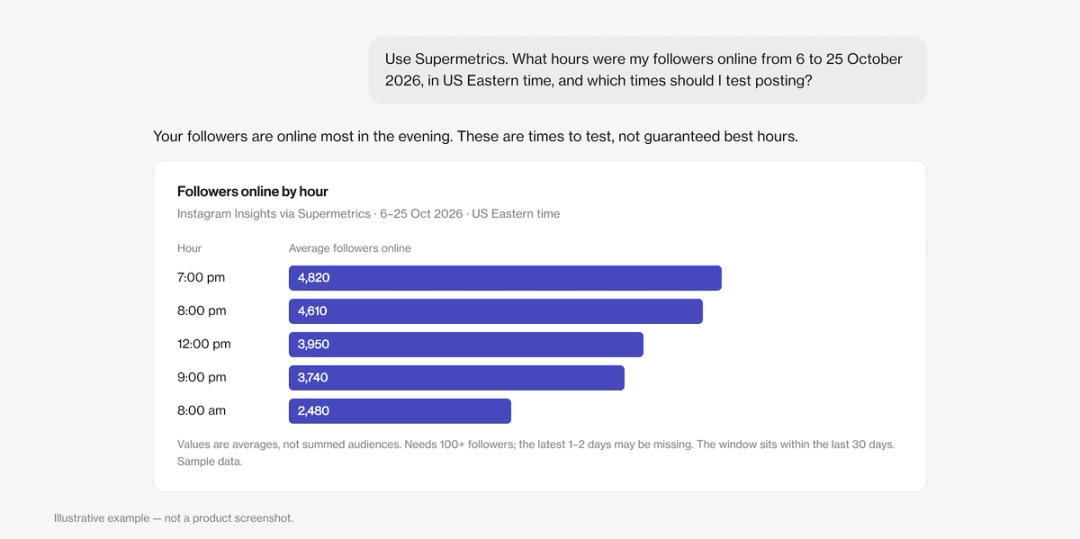
| Diagnosis | Use Supermetrics. What hours were my followers online over the last 30 days, in US Eastern time, and which hours should I post in? | Followers online by hour, with the hours that suit posting |
| Comparison over time | Use Supermetrics. Show daily profile reach for the last 28 days and mark the highest day. | Reach for each day, with the top day marked |
| Action | Use Supermetrics. Schedule this caption and image URL as a feed post tomorrow at 9:00 in my time zone. | A scheduled post, after you approve it |
More patterns: AI chats use cases.
What can you do with Instagram data in Claude?
Best format for saves
See which format earns the most saves per post by comparing the reach, saves and shares of Reels, carousels and images.
Reels that hold attention
Find out which Reels held attention, using average watch time, skip rate and total interactions instead of views alone.
Best posting times
Find the hours your followers are online, then pair them with your post times to choose posting slots.
Story drop-off
See where viewers drop off in your Stories, using views, reach, exits and taps forward and back.
Audience profile
Profile your audience by age, gender, country and city. Ask for age and gender, country and city separately.
Comment review
Review what people say in comments and spot recurring complaints or questions, then reply to, hide or delete comments after you confirm.
Can Claude post to Instagram and moderate comments?
Yes, within limits. The Supermetrics social tool can list comments, reply, and hide, unhide or delete a comment. It can also publish IMAGE, VIDEO (Reel), CAROUSEL or STORY content with a caption, now or scheduled. Writes may return a link you must approve.
Can I analyze a competitor’s Instagram account in Claude?
Not with this source, which covers your own connected account. Public profile and hashtag data is a separate source, Instagram Public Data, which offers Profile info, Profile posts and hashtag Post search report types.
How do you combine Instagram with other data in Claude?
Compare Instagram with your site, sales and ad data in one chat.
Reach and site traffic
Ask Claude to put weekly reach beside sessions or orders from a web analytics or store source, joined by week.
Organic vs paid reach
Compare organic reach from this source with Instagram ad placements in Facebook Ads in Claude.
Insights and Sprout Social
With Sprout Social in Claude, compare Instagram Insights with engagement figures from your scheduling tool.
Sources join only on shared dimensions such as date or week. A post and a sale have no shared key unless you create one, for example a tagged link, and Supermetrics doesn’t create it.
What Instagram data can Claude query?
Fields are grouped by report type, and fields in one question must come from the same group.
| Report type or field group | What it covers | Example field IDs |
|---|---|---|
| AccountCommon, AccountInfoDim | Profile totals and details | followers_count, follows_count, media_count, username, biography |
| AccountInsightsDaily, AccountInsights, AccountReach | Account-level reach and activity by day | reach, profile_views, profile_reposts, accounts_engaged |
| AccountMedia, AccountMediaVideo | Post and Reel performance | media_views, media_reach, media_saved, media_shares, interactions |
| AccountMediaCarousel | Carousel album results | media_carousel_album_reach, media_carousel_album_saved, media_carousel_album_engagement |
| AccountMediaStory | Story results | media_story_views, media_story_reach, media_story_exits, media_story_replies |
| AccountMediaProfileActivity, AccountContactButtons | Actions taken from a post or profile | media_bio_link_click, media_call_click, profile_links_taps, contact_button_type |
| FollowerDemographics (age and gender, city, country) | Who your followers are | audience_age, audience_gender, audience_country_dim, audience_city_dim |
| OnlineFollowers | Followers online by hour | online_followers, hour |
| MediaComments | Comments on posts | media_comment_text, media_comment_date, media_comments_count |
Follower demographics use three report types. audience_age and audience_gender share one, while audience_country_dim and audience_city_dim each have their own. That’s why you ask for them one at a time, and followers_count is available in all three.
Field glossary
| Field ID | Plain-English meaning | Type | Watch out |
|---|---|---|---|
| follower_count | New followers each day in the range | Metric | Last 30 days only, and not the current day. Counts new followers, not the total |
| followers_count | Total followers: unique accounts following the profile | Metric | A running total, different from follower_count |
| profile_views | Account-wide content views (Reels, posts, Stories) | Metric | Not visits to your profile page |
| reach | Unique users who viewed at least one of the profile’s posts, including promoted and paid activity | Metric | Non-aggregatable, so don’t add days together. Works only for single-day, 7-day and 28-day periods |
| accounts_engaged | Accounts that interacted with your content in the period, including in ads | Metric | Estimated metric. Non-aggregatable, and available only in AccountInsightsDaily |
| online_followers | Followers online per hour | Metric | Last 30 days, accounts with 100+ followers, latest 1–2 days may be missing |
| media_reel_avg_watch_time | Average time spent watching a Reel, named “Reels average minutes watched” | Metric | Non-aggregatable |
| media_reels_skip_rate | Percentage of viewers who swiped away | Metric | Non-aggregatable |
| media_saved | Unique accounts that saved the media | Metric | Unique accounts, not total saves |
| media_product_type | The surface where the media was published | Dimension | Use it to separate feed, Reels and Stories |
| hour | Hour of day in the query timezone | Dimension | US Pacific time if no timezone is set, and only with Online followers |
| media_comment_text | The text of a comment | Dimension | Capped per post by the comments_maximum_count setting |
Limits and data notes
| Situation | What happens | What to do |
|---|---|---|
| Date range | Required for every query | State the period and ask Claude to show the query |
| Followers online | online_followers covers 30 days, needs 100+ followers, and the latest 1–2 days may be missing | Ask for a longer window and skip the latest days |
| Time zone | hour uses the query timezone, US Pacific if none | Tell Claude your time zone |
| Comments per post | comments_maximum_count defaults to 100 and goes up to 400, and higher values may slow queries | Raise it only for comment analysis |
| Multiple accounts | Instagram login holds one account per connection | Create separate connections, or use Facebook login and select accounts |
| Invalid accounts | exclude_invalid_accounts skips disabled or inaccessible accounts, which then don’t appear | Switch it on to avoid errors |
| Publishing | Writes may need your approval, scheduling works 5 minutes to 75 days ahead, and Instagram throttles bursts | Space scheduled posts at least 5 minutes apart. Use a public https URL. Instagram sets the accepted formats (for example JPEG images, MP4 video) |
| Ad campaigns | You can’t create or change ad campaigns from this source | Create, pause or change budgets for campaigns in Facebook Ads in Claude |
How often does the Instagram data refresh in Claude?
Supermetrics fetches data when you ask. online_followers may be missing the latest 1–2 days.
What is the Instagram MCP connector for Claude?
The Instagram MCP connector for Claude is the Supermetrics connector that lets Claude read your Instagram data through the Model Context Protocol (MCP).
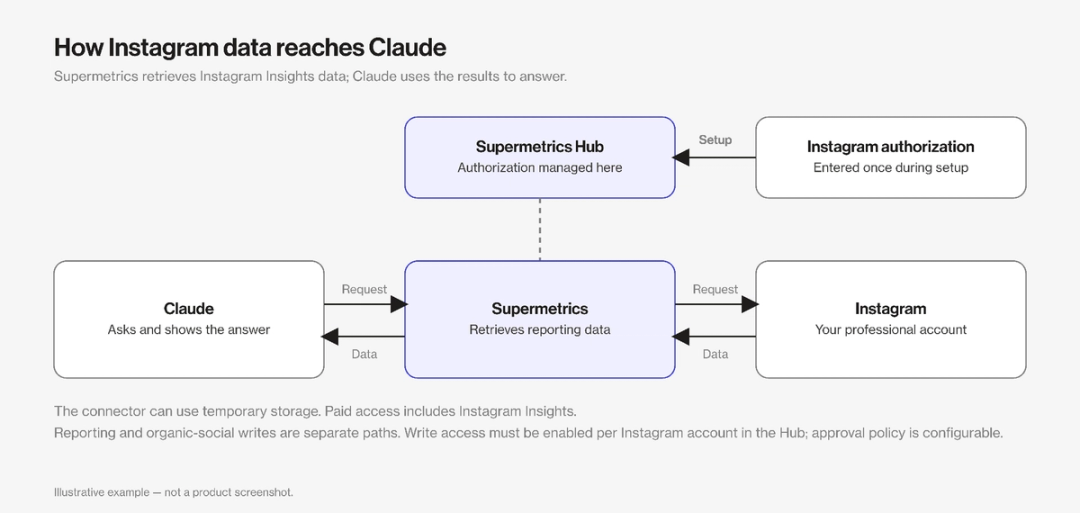
MCP, the Model Context Protocol, is an open standard for letting an AI application use outside tools and data (modelcontextprotocol.io). The Supermetrics connector is one such tool. When you ask about Instagram, Claude picks fields, Supermetrics fetches them from Instagram Insights, and Claude presents the result.
Instagram Insights lets account owners monitor their account’s performance and engagement. It covers your own Business or Creator account.
Use AI chats to ask questions in Claude. For custom agents, n8n workflows or other MCP clients, use the standalone Supermetrics MCP server.
Which way should you connect Instagram to Claude?
| Approach | Setup effort | Data scope | Blending with other sources | Suits |
|---|---|---|---|---|
| Supermetrics connector for Claude | Low: add the connector, log in to Instagram once | Instagram Insights plus other Supermetrics sources | Yes, in the same chat | Social teams and agencies who want answers and comment or publishing help in chat |
| Supermetrics MCP server (custom client) | Medium: you set up your own MCP host | Same sources | Yes, if your agent combines results | Engineers building social agents |
| Automation platform with an Instagram step | Medium: you build and maintain flows | Whatever the flow reads | Whatever you wire up | Teams already running automations |
| CSV export and upload | Low, but manual | One export at a time | Only if you merge files yourself | A one-off report |
| Direct API and custom code | High: you build and host the script | Whatever you code | Whatever you code | Teams with a developer |
Choose the Supermetrics connector for Claude if you want Insights, comment moderation and scheduling in one chat, or want Instagram beside site and sales data.
Choose the Supermetrics MCP server if you run your own agent and need control of the client.
Choose an automation platform if you need triggers that fire without anyone opening a chat.
Choose CSV or the API if you need a one-time file (CSV) or a pipeline you own (API).
When is this not the right tool?
- For competitor or hashtag data, use Instagram Public Data, a separate source.
- To keep follower and post history, send Instagram data to BigQuery.
- For a standing client dashboard, report on Instagram in Looker Studio.
- To work with post tables in a spreadsheet, analyze Instagram in Google Sheets.
- For ad campaign control, use the Facebook Ads source, where campaigns can be managed.
- For local profile data in the same chat, connect Google Business Profile to Claude.
- For every other source you can ask Claude about, see Supermetrics for Claude.
How do you check Claude’s Instagram numbers?
Run these checks against Instagram’s own Insights for the same dates. Each row shows what to compare and the usual reason the figures don’t match.
| Check | What to look for | Why numbers differ |
|---|---|---|
| Match the date range and the profile | The same dates and profile in Claude and in Instagram Insights | A different period or profile |
| Compare one total, such as reach | The same figure in Instagram Insights for the same dates | Claude summed daily reach, which is non-aggregatable |
| Check the field meaning in the glossary | profile_views versus profile visits | Views read as profile visits |
| Check the time zone for hourly data | The query timezone against the one you assumed | The hourly pattern shifts |
| Ask Claude to show the query, report type and fields | Which fields and which login the query used | Fields are missing because not all fields work with Instagram login |
Troubleshooting
| Symptom | Likely cause | Fix |
|---|---|---|
| LICENSE_NOT_FOUND | The connection uses an older email or team | Confirm the email and team on the paid subscription, disconnect Supermetrics in Claude Connectors, reconnect and choose that team |
| Claude reads the wrong team or ignores Supermetrics | A different team was chosen at first login, or other data tools compete | Reconnect with the right team and put “use Supermetrics” in the prompt |
| “No accounts found” | The login can’t see an Instagram profile | Read the docs article “How to fix No accounts found errors”, then log in again in the Hub |
| Instagram isn’t authorized | Instagram hasn’t been connected, or the authorization lapsed | Ask Claude for the login link or reconnect in the Hub |
| The profile won’t connect | The account isn’t Business or Creator, or it’s restricted or private | Switch it to a Business or Creator account that meets the guide’s conditions |
| Facebook login finds no Instagram account | No active, claimed Facebook Page is linked, or the Facebook account lacks Insights permission or Full control | Link and claim the Page, then fix permissions, as the guide describes |
| A working connection stops | Facebook login lasts 60 days | Re-authenticate in the Hub, or move to Instagram login, which is persistent |
| New followers come back empty | follower_count only covers the last 30 days and not today | Shorten the date range to end yesterday |
| Only one of my accounts appears | Instagram login supports one account per connection | Create a separate connection per account |
| Still stuck | Something else | Contact support through the Supermetrics Hub |
Is it safe? Security and data handling
- Supermetrics fetches the fields you request from Instagram Insights and returns them to Claude. Comment text and usernames can appear in the chat.
- Claude can reply to, hide or delete comments and publish or schedule posts, as described in Can Claude post to Instagram and moderate comments?
- Repeating the same write within 15 minutes returns the first result instead of posting twice.
- You choose Instagram login or Facebook login in the Hub and review the permissions.
- AI chats data-source connections are shared by default. Team members assigned to the subscription can use shared logins, so review team membership and subscription access before connecting client accounts. Anyone who can open the Claude chat can see its returned results.
- Where chat content goes depends on your Claude plan and your organization’s settings.
- For policies, see the Supermetrics Trust Center.
Related connectors
Send Instagram data to BigQuery to keep follower and post history
Report on Instagram in Looker Studio for social dashboards
Analyze Instagram in Google Sheets for spreadsheet views of post data
Connect Sprout Social to Claude to add engagement data from your scheduling tool
Connect Google Business Profile to Claude to add local profile data
Supermetrics for Claude for a list of supported data sources
FAQ
-
It’s a connection that lets an AI assistant read your Instagram data and, with your approval, act on it. The Supermetrics connector for Claude provides this for Insights and social management. The Supermetrics MCP server is for people who build their own agents.
-
The Supermetrics connector reads Instagram Insights through Supermetrics fields and works beside your other sources in the same chat.
-
Yes. Add Supermetrics through Claude’s Connectors directory. The remote connector works on the web, in Claude Desktop and in Claude Code, subject to your account and organization settings. The standalone Supermetrics MCP server is a separate option for custom integrations and requires a subscription with API access.
-
Yes, through the Supermetrics social tool, after you approve. See Can Claude post to Instagram and moderate comments?
-
Yes, it can reply to, hide, unhide or delete comments after you approve. See Can Claude post to Instagram and moderate comments?
-
Only partly. New followers per day (follower_count) covers the last 30 days only, as the field glossary notes. Total followers (followers_count) by date is also available, and you can store snapshots in BigQuery for long-run trends.
-
Yes, through the Facebook Ads source. Add the publisher_platform dimension to separate Instagram placements, as described on the Facebook Ads page.
-
You can start free with a trial created at login. If you already have a paid subscription, you need an AI chats destination, which you can check in the Supermetrics Hub. See pricing.
-
Supermetrics’ policies are in the Supermetrics Trust Center. Anthropic’s handling depends on your plan and settings, so read Anthropic’s terms for your plan.
-
Yes. AI chats work with Claude, ChatGPT, Gemini Enterprise and Microsoft Copilot. Each tool has its own steps, covered in the connection guide for AI tools.