Connect X Ads (Twitter Ads) to Claude
Connect X Ads to Claude with Supermetrics and turn your X Ads data into answers, reports, and next steps without leaving Claude.
Don’t take our word. Try it free today.
At a glance
What it does
Claude can analyze your X Ads spend, impressions, clicks, engagements, video views, conversions, audience reach and promoted tweet details.
What you need
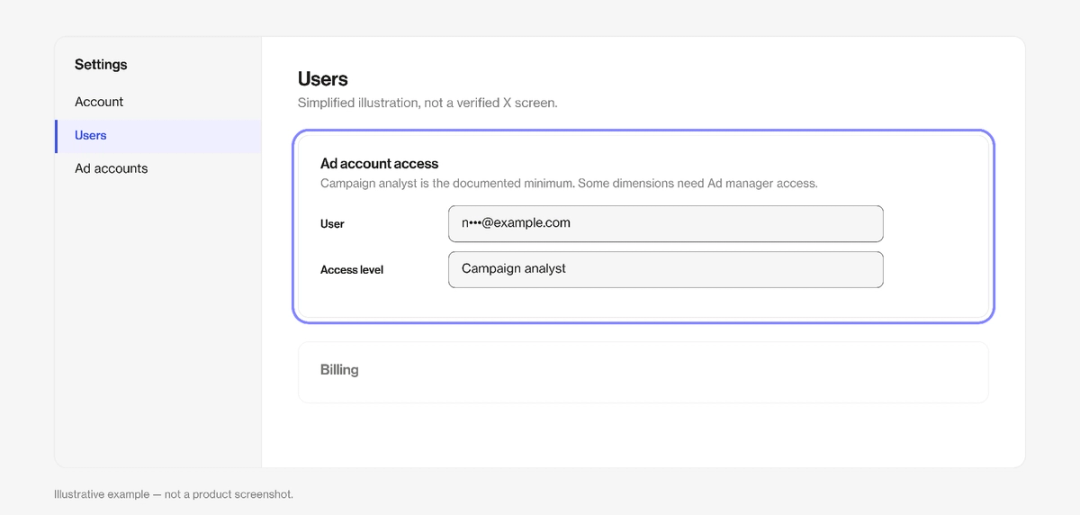
Your X Ads account needs Campaign analyst access to pull data. Some dimensions may also need Ad manager access.
Read-only
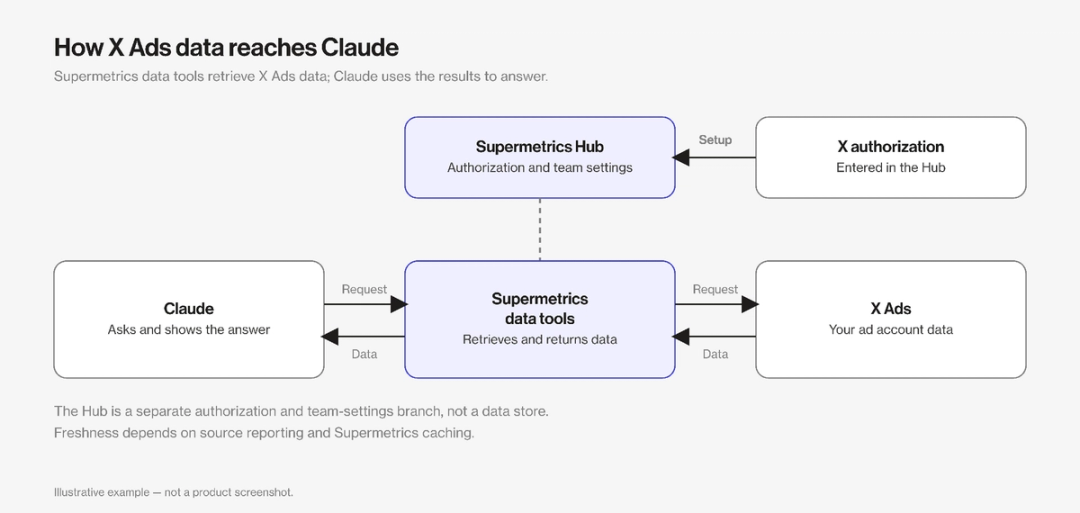
Claude can read X Ads data but can’t edit budgets, bids, targeting or tweets.
Fresh data each time
Setup happens in Claude and the Supermetrics Hub, and every question you ask runs a new query.
Before you start
Claude
You need a Claude account with permission to add connectors. Anthropic’s custom connectors guide explains how remote connectors work.
Supermetrics
No subscription is needed to start, because a trial is created at login. If you’re an existing customer, check the Supermetrics Hub for an AI chats destination, and upgrade or swap one in if it’s missing. See pricing for plans.
X Ads
Your X Ads account needs Campaign analyst access to pull data with Supermetrics. Some dimensions may also need Ad manager access to an ad account (X Ads connection guide). X explains how to grant ad account access in its own help center.
Agencies whose client holds the ad account access can use the Hub to share an authentication link. It works for a data source you don’t have direct access to.
Start here
How do you connect X Ads to Claude?
 1
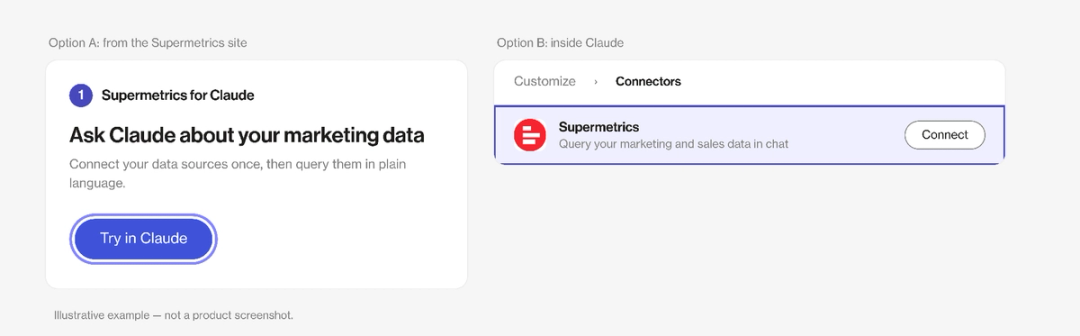
Add Supermetrics to Claude. Press Try in Claude on the Supermetrics for Claude page, or open Customize, then Connectors, in Claude and search for Supermetrics.
 2
Pick your team. Log in to Supermetrics and choose a team.
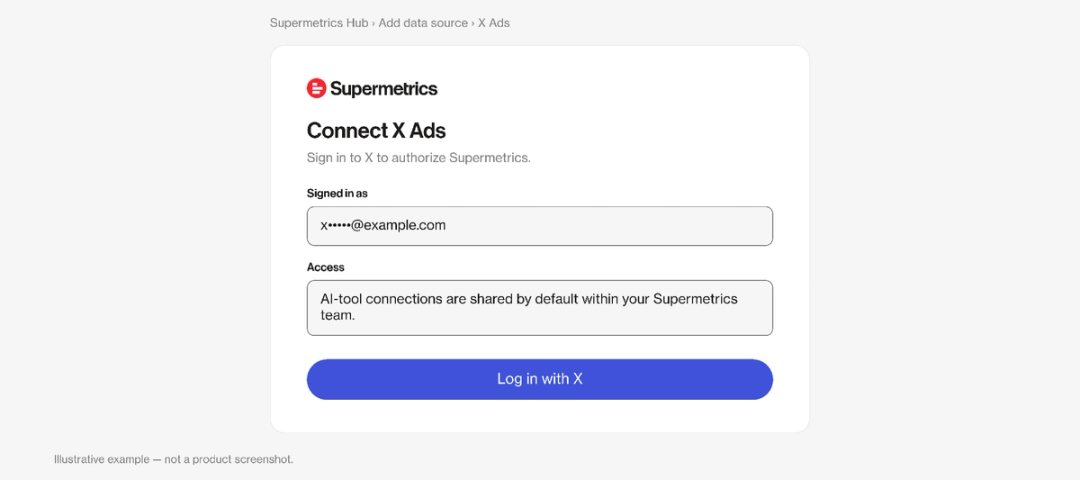
3 Authorize X Ads in the Hub. Follow the login link Claude offers, or find X Ads in the Supermetrics Hub. Click Start, enter your credentials and click Sign in.
 4
Name Supermetrics in your prompt. If several data tools are connected, write “use Supermetrics” so the right connector answers. Then ask Claude to list your X Ads ad accounts and choose one.
 5
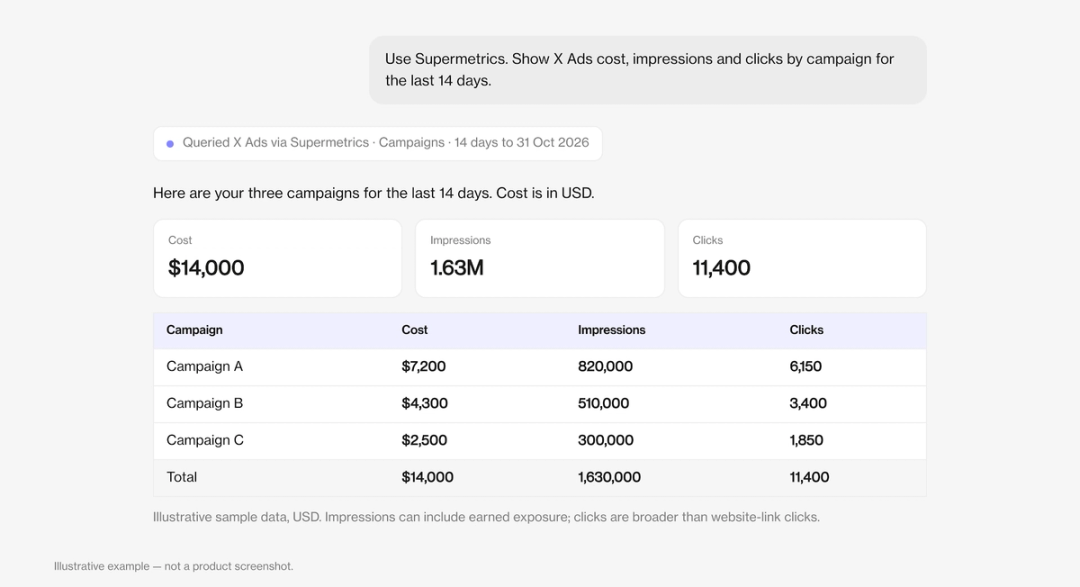
Run one small query. Every X Ads query needs a date range. Try: “Use Supermetrics. Show X Ads cost, impressions and clicks by campaign for the last 14 days.”
6 Check it, then go deeper. Compare the totals with X Ads Ads Manager for the same dates and currency. If they match, move on to promoted tweets, video views or audience reach, or ask Claude for a dashboard.
Building your own agent or n8n workflow instead? Use the standalone Supermetrics MCP server, which needs a Supermetrics subscription with API access. For more setup help, see the AI tools connection guide.
What can you ask Claude about X Ads?
Swap in your own dates and campaign names. Start each prompt with “Use Supermetrics” if several data tools are connected.
| Goal | Prompt | What you get |
|---|---|---|
| Reporting | Show X Ads cost, impressions, clicks and CTR by campaign for the ad account I picked, September 1–30, 2026. | One row per campaign with spend, impressions, clicks and CTR |
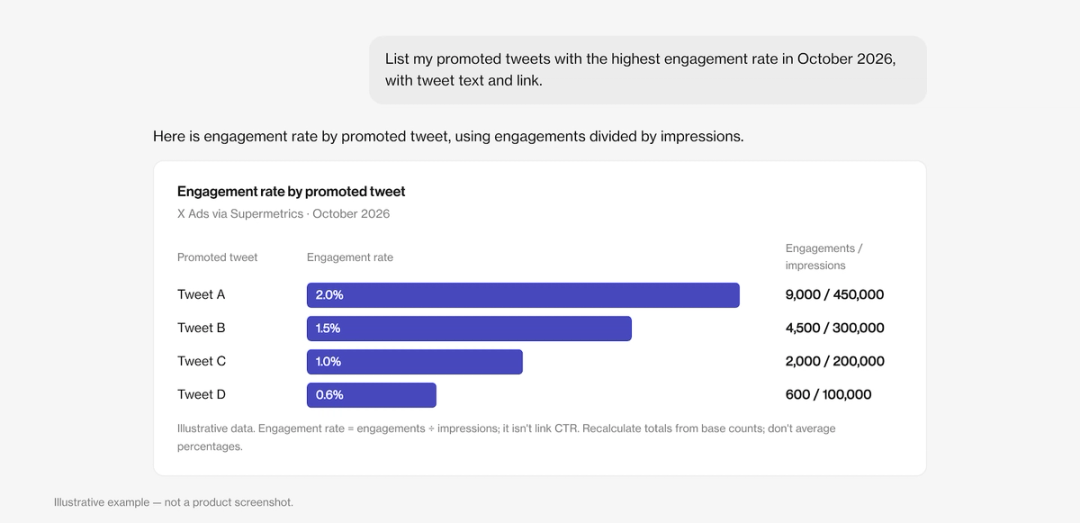
| Reporting | List my 10 promoted tweets with the highest engagement rate in October 2026, with tweet text and link. | A ranked list of tweets, best first, each with its link |
| Diagnosis | Which 5 X Ads ad groups spent the most in the last 30 days but brought the fewest site visits? | Ad groups ordered by spend, with site visits beside each |
| Comparison over time | Compare X Ads cost per engagement by week for Q3 2026 against Q2 2026. | A week-by-week table for both quarters |
| Cross-source | Put X Ads spend next to Spotify Ads spend by week for September 2026, and tell me which channel’s cost per click changed more. | Both channels lined up by week, with the bigger cost per click change named |
| Action | Build a dashboard of X Ads spend, engagements and video completions for the last 90 days, and push it to Supermetrics Studio. | A dashboard in Studio. Viewing and sharing work with AI chats, and editing needs a Studio destination subscription |
More example prompts
| Goal | Prompt | What you get |
|---|---|---|
| Diagnosis | Where do viewers stop watching the promoted videos in my video campaigns for Q3 2026? | A drop-off table across starts and completions |
| Comparison over time | Include Twitter Audience Network, then compare X and Audience Network results by campaign for the last 30 days. | Two rows per campaign with spend and CPM |
| Cross-source | Show daily X Ads impressions for October 2026 beside the viewability results from my verification data. | Daily impressions with viewability results alongside |
For more prompt patterns, see AI chats use cases.
What can you do with X Ads data in Claude?
See which tweet copy earns the most engagement
Rank promoted tweets by engagement per impression, with each tweet’s text and link, a tweet-level view specific to X Ads.
Check whether ad group bids match their goals
Compare each ad group’s objective, bid type and bid amount with what you spent.
Ad frequency
Find out whether people see your ads too often. Ask for total audience reach and average frequency by campaign.
X vs Audience Network
Compare results on X with Twitter Audience Network, a split specific to X Ads. Turn on Include Twitter Audience Network, split by placement, then compare CPM and CTR.
Video drop-off
Find where viewers drop off in your promoted videos. Compare video starts with 25%, 50%, 75% and 100% views, plus cost per view.
Spot campaigns whose funding runs out soon
Compare X Ads funding credit remaining and funding end dates with each campaign’s daily budget.
How do you combine X Ads with other data in Claude?
X Ads can sit beside your other Supermetrics sources in one chat. These pairings work when the other source is available in AI chats.
Cost per click vs Spotify
Compare cost per click across X Ads and Spotify Ads. With Spotify Ads in Claude, ask which channel delivers the cheaper click each week.
Viewability and brand safety
Put X Ads impressions beside viewability and brand safety results. Add DoubleVerify in Claude to the same chat.
Spend across channels
Compare X Ads spend with Google Ads, LinkedIn Ads, TikTok Ads, Microsoft Ads or Meta Ads spend. Then add GA4 sessions per channel by week.
Promoted bursts and sales
Check whether a promoted tweet burst lines up with orders or leads. Join X Ads cost with Shopify or HubSpot results by date.
X Ads and another source only join on a shared dimension. Date works because both have it. Campaign names or UTM campaign values only match if both systems use the same text, and Supermetrics doesn’t create that match for you.
What X Ads data can Claude query?
Some X Ads data can’t be combined in one question, such as tweet-level and funding data. Every query also needs a date range.
Supermetrics lists 199 X Ads fields: 83 metrics and 116 dimensions. There’s no report type selector for X Ads. Each field works in one or more of the report types below, and fields in one query must share a report type.
| Report type | What it covers | Example field IDs |
|---|---|---|
| account | Account-level totals by date and demographic breakdowns | cost, impressions, clicks, AGE, GENDER |
| campaigns | Campaign setup, budget, status and results | campaign_name, campaign_status, campaign_daily_budget_amount, campaign_currency, cost_usd |
| line_items | Ad groups: objective, goal, bid and budget | line_item_name, line_item_objective, line_item_goal, line_item_bid_type, line_item_total_budget_amount |
| promoted_tweets | Each promoted tweet with its text, URL, card and UTM values | promoted_tweet_text, tweet_url, promoted_tweet_media_type, utm_campaign, engagements |
| media_creatives | Images and videos used in ads | media_creative_id, media_creative_type, media_name, media_url |
| reach | Unique audience and frequency | total_audience_reach, average_frequency |
| audience | Audience category data from X | audienceName, audienceCategory, audienceType, matchRate, percentage |
Three fields carry a note that they’ll be removed: promoted_tweet_card_id, promoted_tweet_card_display_url and line_item_optimization.
How report type tags work
Supermetrics tags each field with the report types it works in. Funding fields such as funding_instrument_type and funding_instrument_credit_remaining are tagged to campaigns, line_items, media_creatives and reach. That’s why they can’t share a query with tweet-level fields from promoted_tweets.
Fields with no report type tag, such as dataSourceName and today, work everywhere. The conversion fields, including conversion_purchases and the mobile_conversion_* family, carry no tag either.
Field glossary
| Field ID | Plain-English meaning | Type | Watch out |
|---|---|---|---|
| impressions | The number of times your ad is shown to users, including earned | Metric | Counts earned impressions too, so it can be higher than paid delivery |
| cost | Spend | Metric | The cost_usd, cost_eur and cost_gbp variants are tagged to campaigns, line_items and promoted_tweets only |
| engagements | All clicks on your tweet, including retweets, replies, likes, poll votes and hashtag clicks, and earned clicks you aren’t billed for | Metric | clicks is defined separately (links, hashtags, Website Card, likes and profile clicks), so the two overlap. billed_engagements is its own field |
| engagementsRate | Engagements divided by impressions | Metric | A rate. See How do you check Claude’s X Ads numbers? |
| CPM | Cost per thousand impressions | Metric | A rate. See How do you check Claude’s X Ads numbers? |
| promoted_video_total_views | Video views, counted when the video is watched in 50% view for 2 seconds or more, or a user expands or unmutes it. Includes views you aren’t billed for | Metric | Use promoted_video_starts for starts |
| total_audience_reach | The total number of people reached by the campaign | Metric | Reach report only |
| placement | Shows whether metrics are for ads that served on or off X | Dimension | Tagged to campaigns, line_items and promoted_tweets. Pair it with the Include Twitter Audience Network setting |
| promoted_tweet_text | The text of the promoted tweet | Dimension | Promoted tweets report only |
| campaign_currency | The currency used for spend fields | Dimension | Check it before adding spend across accounts |
What is the X Ads MCP connector for Claude?
The X Ads MCP connector for Claude is the Supermetrics connector that lets Claude read your X Ads data through the Model Context Protocol (MCP).
MCP, the Model Context Protocol, is an open standard that lets an AI application call outside tools and data sources (modelcontextprotocol.io). The Supermetrics connector is one of those tools. When you ask an X Ads question, Claude picks the fields it needs and Supermetrics fetches them from X Ads.
Use AI chats to ask questions in Claude. For custom agents, n8n workflows or other MCP clients, use the standalone Supermetrics MCP server.
Which way should you connect X Ads to Claude?
Six routes get X Ads numbers in front of Claude.
| Approach | Setup effort | Data scope | Blending with other sources | Maintenance | Suits |
|---|---|---|---|---|---|
| Supermetrics connector for Claude | Low: add the connector, authorize X Ads once | X Ads plus the other sources in your Supermetrics account | Yes, in the same chat | Supermetrics maintains the connection | Social and paid media teams who want answers in chat |
| Supermetrics MCP server (custom client) | Medium: you set up your own MCP host | Same sources as above | Yes, if your agent combines results | You maintain the client | Engineers building agents or automations |
| X’s own MCP or AI integration, if the platform offers one | Depends on the platform | X only | No, unless you add other tools | Depends on the platform | X-only work |
| Manual CSV export and upload | Low, but repeated every time | One file at a time | Only if you merge files yourself | You re-export each period | One-off questions |
| Scheduled pulls into Google Sheets or BigQuery | Medium: set up the sheet or warehouse once | X Ads in a spreadsheet or warehouse table | Yes, with other tabs or tables | A refresh schedule you manage | Teams who want a stored copy, or who live in spreadsheets |
| X Ads API with custom code or a third-party MCP server | High: you build and host it | Whatever you code | Whatever you code | You handle tokens and API changes | Teams with an engineer who need full control |
- Choose the Supermetrics connector for Claude if you want X Ads answers in chat without code, next to your other paid channels.
- Choose the standalone Supermetrics MCP server for a custom agent, n8n workflow or another MCP host. It requires a subscription with Supermetrics API access. The ready-made remote connector also works in Claude Code.
- Choose Google Sheets or BigQuery if you want a stored copy that refreshes on a schedule. See X Ads in Google Sheets and X Ads in BigQuery.
- Choose the X Ads API directly if you need an object or action the field list doesn’t expose.
The ready-made remote connector works on the web, in Claude Desktop and in Claude Code. Use the standalone Supermetrics MCP server when configuring a custom agent, n8n workflow or another MCP host. That separate route requires a Supermetrics subscription with API access rather than an AI chats destination.
When is this not the right tool?
- You need tweet-level history beyond the field list. Use the X Ads API directly (see the X API documentation).
- You need a stored, scheduled copy. Chat answers aren’t a store, so use X Ads to BigQuery.
- You need a refreshing dashboard. Try X Ads in Looker Studio.
- You need organic post data. Ad results don’t cover your unpaid tweets, so use the X Organic source instead.
How do you check Claude’s X Ads numbers?
Most mismatches come from a missing setting or a rate averaged by hand. The other common cause is reading clicks as engagements. Work through these checks to line up Claude’s answer with X Ads Ads Manager.
| Check | What to know | What to do |
|---|---|---|
| Date range | Every X Ads query requires one | State the period, and confirm it matches what you meant to ask |
| Ad accounts | Supermetrics lists your ad accounts, and Claude queries the ones you pick | Name the accounts in your prompt. Turn on Exclude invalid accounts to skip disabled or inaccessible ones, which then won’t appear in results |
| Deleted items | The Include deleted campaigns, ad groups, media creatives setting controls whether they’re queried | Ask Claude to turn it on when you need spend from removed items |
| Audience Network | The Include Twitter Audience Network setting controls whether it’s queried | Ask Claude to turn it on, then split by placement |
| Audience report | Date isn’t available in the audience report type | Use campaigns or account for time series, and audience for a snapshot of categories |
| Currency | The campaign and funding instrument currency fields give the currency. cost_usd, cost_eur and cost_gbp are converted variants | Name one cost field in your prompt, and confirm Claude used it |
| Rates and averages | CTR, CPM, CPC, CPA and engagement rate can’t be added or averaged across rows | Ask for the grouping you want, such as CPM by month, instead of averaging rows |
| One total | One matching total shows the setup is right | Compare one total, such as spend for a single campaign, with X Ads Ads Manager for the same period |
| Engagements and clicks | Engagements include clicks plus retweets, replies and other actions, so the two overlap | Check the field glossary before comparing them |
| The query | Claude can show what it ran | Ask Claude to show the query and the fields it used |
Troubleshooting
| Symptom | Likely cause | Fix |
|---|---|---|
| LICENSE_NOT_FOUND | Claude is connected under a previous email address or a team without your paid plan | Check which email and team own the subscription, then disconnect Supermetrics in Claude Connectors, reconnect and select that team |
| Answers come from the wrong team, or Supermetrics is skipped | The first login selected another team, or a different connector took the question | Reconnect Supermetrics in Claude Connectors with the right team, and add “use Supermetrics” to the prompt |
| “No accounts found” | The X login you authorized can’t see any ad account | Follow How to fix No accounts found errors, then authorize X Ads again with a login that has access |
| X Ads isn’t authorized | X Ads isn’t connected in the Hub, or the authorization needs renewing | Ask Claude for the X Ads login link, or reconnect in the Hub and rerun |
| Ad account is listed but returns no data | Your access level may be below Campaign analyst | Ask an admin on the ad account to raise your access to Campaign analyst |
| Some dimensions come back empty or fail | Some dimensions may need Ad manager access | Ask for Ad manager access on that ad account, or drop the dimension |
| Claude says fields can’t be combined | The fields belong to different report types, such as audience match rate with promoted tweet text | Run two queries, or ask Claude to check which fields work in the report type you want |
| Spend from Audience Network or deleted campaigns is missing | The matching setting wasn’t turned on | See How do you check Claude’s X Ads numbers? |
| A disabled ad account breaks the whole query | An invalid or inaccessible account is in the list | Turn on Exclude invalid accounts. See How do you check Claude’s X Ads numbers? |
| Still stuck | Something else | Contact support through the Supermetrics Hub |
If a working query stops, reconnect X Ads in the Hub first.
Is it safe? Security and data handling
- Each query retrieves only the fields it names from X Ads. Authorize only the accounts you need.
- Claude reads X Ads data and can’t change campaigns, budgets, bids or tweets. The one write-like action is pushing a dashboard to Supermetrics Studio.
- AI chats data-source connections are shared by default. Team members assigned to the subscription can use shared logins, so review team membership and subscription access before connecting client accounts. Anyone who can open the Claude chat can see its returned results.
- Anthropic decides how chats are stored and used, based on your Claude plan and organization settings.
- For policies and certifications, see the Supermetrics Trust Center.
Related connectors
Send X Ads data to BigQuery for campaign history in a warehouse
Report on X Ads in Looker Studio for refreshing stakeholder dashboards
Analyze X Ads in Google Sheets for spreadsheet views of promoted tweets
Connect Spotify Ads to Claude for audio and X spend in one chat
Connect DoubleVerify to Claude for viewability and brand safety results
Supermetrics for Claude for every source you can ask Claude about
FAQ
-
It’s a Model Context Protocol endpoint an AI client uses to read X Ads data. In Claude, the Supermetrics connector handles this for you. Technical users building their own agents can use the standalone Supermetrics MCP server, compared in Which way should you connect X Ads to Claude?
-
This page covers the Supermetrics connector. It reads X Ads through Supermetrics report types and fields, next to the other sources in your Supermetrics account, and Supermetrics maintains the connection.
-
Yes. Add Supermetrics through Claude’s Connectors directory. The remote connector works on the web, in Claude Desktop and in Claude Code, subject to your account and organization settings. The standalone Supermetrics MCP server is a separate option for custom integrations and requires a subscription with API access.
-
No. Claude can read results but can’t change budgets, bids, targeting or tweets.
-
Each question in chat runs a new query through Supermetrics. For scheduled refreshes, use a Sheets or Looker Studio connection.
-
Yes. Supermetrics lists your ad accounts and you choose which to query, so an agency can review several clients in one prompt if each is authorized. Turn on Exclude invalid accounts if a disabled one causes errors.
-
You can start without a subscription, because a trial is created at login. After that, your plan needs an AI chats destination, so check the Supermetrics Hub and see pricing. Editing dashboards in Supermetrics Studio needs a Studio destination subscription.
-
It depends on your Claude plan. The Supermetrics docs say Claude Free, Pro, Max and Team accounts use data for training unless you opt out, while Enterprise and API accounts don’t. Check Anthropic’s terms for your plan.
-
There are six steps: add the connector, pick your team, authorize X Ads, name Supermetrics in your prompt, run one small query and check the result.
-
You can analyze spend, delivery (impressions and clicks), engagement (engagements, likes, retweets and replies), video views, conversions and reach. See What X Ads data can Claude query? for the full list.
-
CPM can’t be added or averaged across rows, so each row is right only for its own grouping. Ask Claude for the grouping you want, such as CPM by month.