Connect Amazon DSP to Claude
Connect Amazon DSP to Claude with Supermetrics and turn your Amazon DSP data into answers, reports, and next steps without leaving Claude.
Don’t take our word. Try it free today.
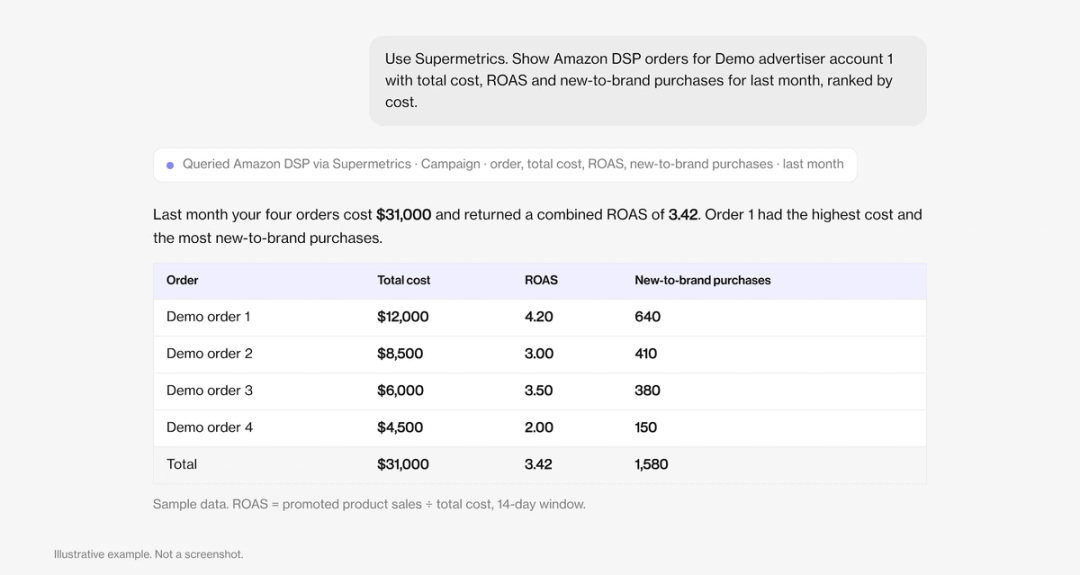
At a glance
What it does
The Supermetrics connector lets Claude read Amazon DSP data over the Model Context Protocol (MCP). That covers orders, line items, creatives, inventory, audiences and promoted products.
Four report types
Supermetrics lists 702 Amazon DSP fields in four report types: Campaign, Inventory, Audience and Product. All four need a date range.
What you need
Your Amazon user needs reporting access to an Amazon DSP advertiser account. The connector reads data only.
Check AI chats access
Check that your team can use Amazon DSP in AI chats before you start (see Before you start).
Before you start
Claude
You add Supermetrics under Customize > Connectors, so your Claude account needs permission to add connectors. A managed workspace may give that right only to administrators. Anthropic’s custom connectors guide explains remote connectors.
Supermetrics
You don’t need a subscription to start. Logging in creates a trial if you have none. If you already pay, check the Supermetrics Hub for an AI chats destination, and upgrade or swap an existing destination if it isn’t listed.
A connection keeps the email and team from your first login. Buying later under another email can trigger LICENSE_NOT_FOUND (Supermetrics for Claude docs). See pricing.
Amazon DSP
You need an Amazon user account with access to an Amazon DSP advertiser account. On the advertiser account, that means the Admin or ADSP reports permission. The user also needs View or Edit permissions for that advertiser account.
The guide points to the Amazon Ads Advanced Tools Center for access details.
Amazon DSP availability in AI chats
The Amazon DSP connection guide says that, due to Amazon’s policies, Amazon DSP is available only in Excel, data warehouse and API destinations. Check with Supermetrics that your team can use it in AI chats before you rely on it.
Linked accounts cap for agencies
Amazon DSP can fetch at most 50 linked accounts per manager account because of an Amazon API limitation. The guide suggests spreading accounts across manager accounts linked hierarchically. Whether that works depends on your account structure.
Start here
How do you connect Amazon DSP to Claude?
 1
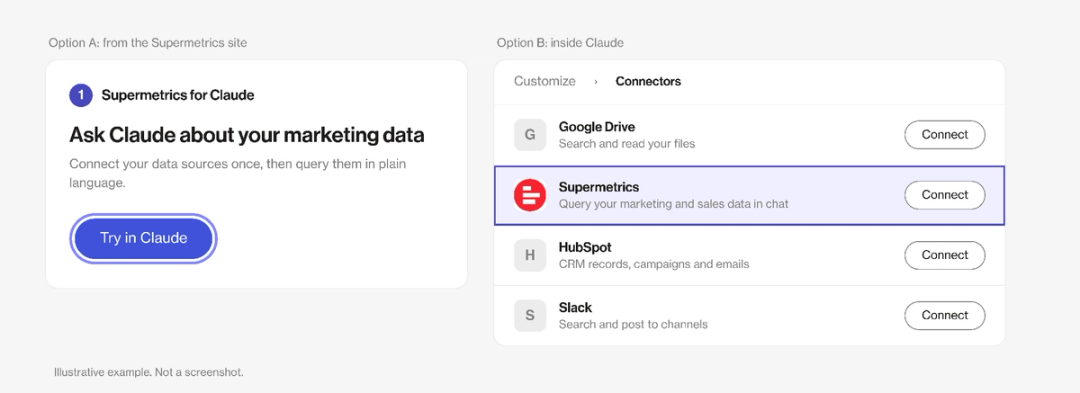
Add Supermetrics to Claude. Open the Supermetrics for Claude page and click Try in Claude. Or go to Customize > Connectors in Claude and search for Supermetrics.
 2
Pick a team. Sign in to Supermetrics and choose the team. A trial begins here if you have no subscription.
3 Authorize Amazon DSP. Open Amazon DSP in the Hub, or use the login link Claude shows. Log in to Amazon and click Allow to give the Supermetrics app access to your profile data. Select the account region, name the login anything you like. If you can’t log in yourself, share an authentication link with someone who can.
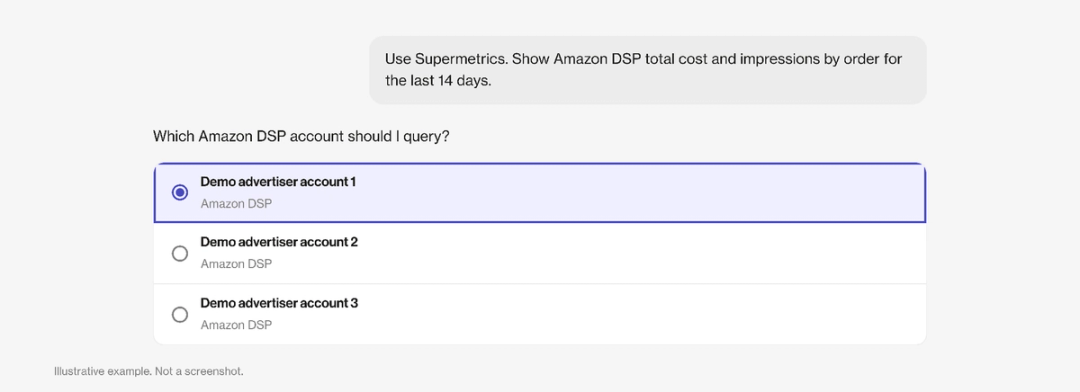
4 Name Supermetrics and the account. If other data tools are connected, write “use Supermetrics”. Amazon DSP has an account list, so say which account to query or let Claude list them.
5 Run one small query. Pick a report type and a date range. For example: “Use Supermetrics. Show Amazon DSP total cost and impressions by order for the last 14 days.”
 6
Verify, then go further. Compare the totals with the Amazon DSP console for the same dates and currency. If they agree, move on to creatives, inventory and products, or ask for a dashboard.
Building your own agent or n8n workflow instead? Use the standalone Supermetrics MCP server, which needs a Supermetrics subscription with API access. For more setup help, see the AI tools connection guide.
What can you ask Claude about Amazon DSP?
Use these as starting points. Replace [account name] with the advertiser account you want to query.
| Goal | Prompt | What you get | Fields used |
|---|---|---|---|
| Reporting | Use Supermetrics. Show Amazon DSP orders for [account name] with total cost, product sales and ROAS for last month, ranked by cost. | A table of last month’s orders, highest cost first, with promoted-product sales and ROAS | campaign__order_name, campaign__total_cost, campaign__sales_14d, campaign__roas_14d |
| Reporting | Which Amazon DSP line items had the most new-to-brand purchases this quarter? Add the cost per new-to-brand purchase. | Line items ranked by new-to-brand purchases, with the cost of each | campaign__line_item_name, campaign__new_to_brand_purchases_14d, campaign__new_to_brand_ecpp_14d |
| Diagnosis | Which Amazon DSP creatives had the lowest click-through rate over the past 30 days, and what size and type are they? | Creatives sorted by click-through rate, lowest first, with size and type | campaign__creative_name, campaign__creative_size, campaign__creative_type, campaign__ctr |
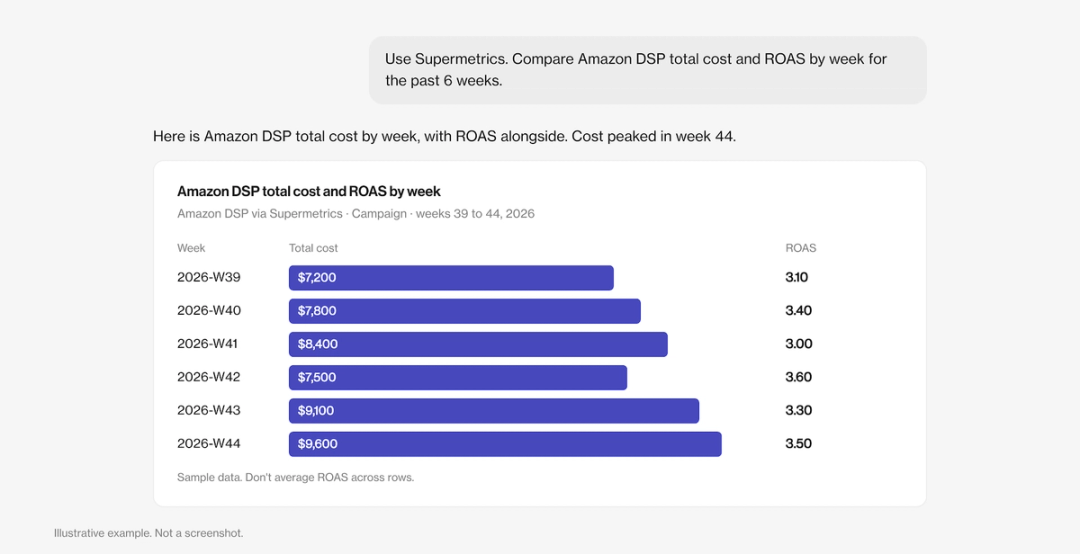
| Comparison over time | Compare Amazon DSP total cost and ROAS by week for the past 8 weeks for [account name]. | A table with one row per week | campaign__year_week_iso, campaign__total_cost, campaign__roas_14d |
| Cross-source | Use Supermetrics. Compare weekly Amazon DSP viewability with DoubleVerify results for the past 8 weeks. | Amazon DSP and DoubleVerify results side by side, one row per week | campaign__viewability_rate, campaign__year_week_iso, plus DoubleVerify fields |
| Action | Build a dashboard of cost, ROAS and new-to-brand purchases by order for this quarter and push it to Supermetrics Studio. | A dashboard in Studio. You can view and share it with AI chats, and editing needs a Studio destination subscription | campaign__total_cost, campaign__roas_14d, campaign__new_to_brand_purchases_14d |
More example prompts
| Goal | Prompt | What you get | Fields used |
|---|---|---|---|
| Diagnosis | Of the 20 sites with the highest Amazon DSP spend last month, which had the lowest viewability rate? | A list of high-spend sites sorted by viewability rate | inventory__site_name, inventory__viewability_rate, inventory__total_cost |
| Comparison over time | How did Amazon DSP video starts and completes change month by month over the past 6 months? Calculate the completion rate. | Monthly starts and completes, plus a completion rate Claude calculates | campaign__video_start, campaign__video_complete, campaign__year_month |
| Reporting | Which parent ASINs got the most purchases and detail page views from Amazon DSP last month? | Products ranked by purchases, with detail page views | product__parent_asin, product__purchases_14d, product__dpv_14d |
| Diagnosis | Break down this quarter’s Amazon DSP spend by supply source into platform, audience and agency fees. | A fee table with one row per supply source | inventory__supply_source_name, inventory__amazon_platform_fee, inventory__amazon_audience_fee, inventory__agency_fee |
Find more ways to benefit by reading our complete list of AI chats use cases.
What can you do with Amazon DSP data in Claude?
Compare orders on return
Rank orders by spend, sales and ROAS to see which return the most sales for their cost.
Count new-to-brand purchases
See which line items bring in the most new-to-brand purchases and what each one costs.
Check line item delivery
Set each line item’s budget and start and end dates beside its spend.
Review creatives
Group creatives by name, size and type, then compare click-through rate with video completions.
Audit fees by supply source
Put Amazon platform, audience and agency fees beside total cost for each site and supply source.
Trace results to advertised products
See purchases, detail page views and new-to-brand product sales by parent ASIN and product name.
What Claude calculates for you
Some metrics have no field of their own, so Claude works them out from fields that do exist.
- New-to-brand ROAS, from new-to-brand product sales (Product report type) divided by cost from a separate Campaign query
- Video completion rate, as the share of video starts that reach a completed view
- Line item pacing, from each line item’s budget, dates and spend
How do you combine Amazon DSP with other data in Claude?
Amazon DSP is one channel among several, so the questions that shape budgets often span sources.
Audio vs DSP budget
To decide whether to shift budget between audio and DSP, connect Spotify Ads in Claude. Ask whether weeks with heavier audio spend show more Amazon DSP new-to-brand purchases.
Viewability cross-check
To decide whether to trust Amazon DSP viewability before you move spend, connect DoubleVerify in Claude. Compare Amazon DSP viewability with DoubleVerify results by week.
DSP spend and sales
To see whether DSP spend lines up with retail sales, add the source that holds your sales data. Ask Claude to compare DSP spend with sales by day.
Joins happen on shared dimensions only. Date works for Campaign, Inventory and Product. Order and line item names match another platform’s campaign names only if you used the same naming, and Supermetrics doesn’t create that link.
What Amazon DSP data can Claude query?
Amazon DSP has four report types. Fields in one query must share a report type.
| Report type | What it covers | Example field IDs |
|---|---|---|
| Campaign | Performance by order, line item and creative, with costs, conversions, video and viewability | campaign__total_cost, campaign__impressions, campaign__roas_14d, campaign__creative_name |
| Inventory | Performance and fees by supply source, site and deal | inventory__site_name, inventory__supply_source_name, inventory__deal, inventory__viewability_rate |
| Audience | Performance by audience segment type and source | audience__segment_type, audience__segment_source, audience__click_throughs, audience__supply_cost |
| Product | Conversions by advertised product and ASIN | product__parent_asin, product__product_category, product__purchases_14d, product__sales_14d |
All four report types need a date range. Audience results can’t be broken down by date, because Audience has no date dimension.
Campaign (campaign__date), Inventory (inventory__date) and Product (product__date) each have a date dimension. Metrics ending in _14d use Amazon’s 14-day window as Amazon defines it.
Data notes
| Situation | What happens | What to do |
|---|---|---|
| Date range | Required for all four report types | State the period and ask Claude to show the query |
| Linked accounts | Amazon’s API returns a maximum of 50 linked accounts per manager account | Spread accounts across manager accounts, if your structure allows it |
| Account region | You select a region when authorizing | Pick the region your advertiser accounts sit in |
| Availability in AI chats | Covered in Before you start | Confirm access before you plan around it |
| Currency | campaign__total_cost has USD, EUR and GBP versions, and the order has a campaign__order_currency dimension | Choose one version and state it |
| Date breakdown | The Audience report type has no date dimension | Use Campaign for time trends |
| Rates and ratios | Viewability, CTR, ROAS and eCPP fields are non-aggregatable | Ask for the grouping you need, and never average rows |
| Promoted against total | Fields come in promoted and brand-total versions, such as sales | Say which version you want |
| Invalid or disabled accounts | They can cause errors unless excluded, and excluded accounts drop from results | Tick “Exclude invalid accounts” only if missing accounts are acceptable |
| Read or write | The connector reads data only. It can’t edit line items, budgets or creatives | Make changes in the Amazon DSP console |
See the Amazon DSP connection guide for details.
Field glossary
| Field ID | Plain-English meaning | Type | Watch out |
|---|---|---|---|
| campaign__total_cost | Total amount of money spent | Metric | Monetary. See Currency in the data notes |
| campaign__impressions | Number of times the ad was shown | Metric | Compare with campaign__viewable_impressions for viewability |
| campaign__viewability_rate | Viewability rate | Metric | Non-aggregatable. Don’t average rows |
| campaign__click_throughs | Clicks | Metric | campaign__gross_click_throughs is the gross count |
| campaign__invalid_click_throughs | Clicks removed by traffic filtering | Metric | Read next to gross clicks |
| campaign__sales_14d | Sales in local currency of promoted products | Metric | Described as sales of promoted products. campaign__total_sales_14d is described as sales of the brands’ products |
| campaign__roas_14d | Return on advertising spend | Metric | Non-aggregatable. Total ROAS is a separate field |
| campaign__new_to_brand_purchases_14d | New-to-brand purchases | Metric | Counts purchases. Check Amazon’s definition before calling them customers |
| campaign__new_to_brand_ecpp_14d | Effective cost to acquire a new-to-brand purchase | Metric | Non-aggregatable and monetary |
| campaign__line_item_budget | Budget of the line item | Dimension | A dimension, so it won’t sum like a metric |
| inventory__agency_fee | Agency fee, a percentage or flat fee removed from spend | Metric | Inventory report type only |
| product__parent_asin | Parent Amazon Standard Identification Number | Dimension | Product report type only |
What is the Amazon DSP MCP connector for Claude?
The Amazon DSP MCP connector for Claude is the Supermetrics connector that lets Claude read your Amazon DSP data through the Model Context Protocol (MCP).
MCP, the Model Context Protocol, is an open standard that lets an AI application call outside tools and data (modelcontextprotocol.io). The Supermetrics connector is one of those tools. You ask about your programmatic buying, and Claude picks a report type and fields. Supermetrics fetches them from Amazon DSP, and the answer appears in the chat.
Claude can read Amazon DSP performance by order, line item and creative (Campaign) and by supply and site (Inventory). It can also read results by audience segment (Audience) and by advertised product (Product).
Use AI chats to ask questions in Claude. For custom agents, n8n workflows or other MCP clients, use the standalone Supermetrics MCP server.
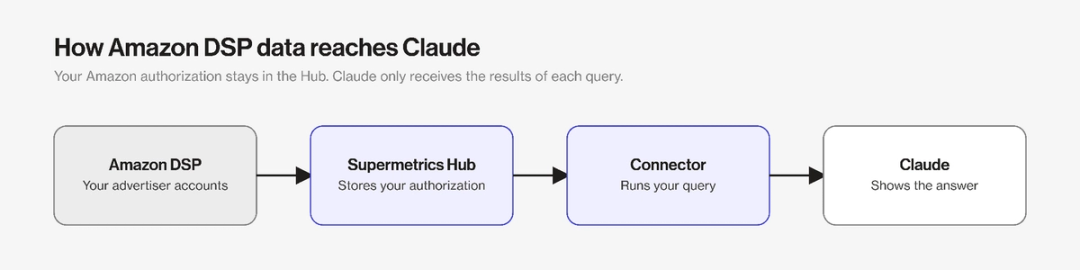
Which way should you connect Amazon DSP to Claude?
| Approach | Setup effort | Data scope | Blending with other sources | Maintenance | Suits |
|---|---|---|---|---|---|
| Supermetrics connector for Claude | Low: add the connector, log in to Amazon and click Allow | Amazon DSP plus other sources on your Supermetrics account | Yes, in one chat | Supermetrics handles the connection | Programmatic buyers and analysts who want answers fast |
| Supermetrics MCP server (custom client) | Medium: you configure an MCP host | The same sources | Yes, where your agent merges results | You operate the client | Engineers building agents |
| CSV export and upload | Low, but manual each time | One report at a time | Only after you join files | Every refresh is a new export | A single audit |
| Direct API and custom code | High: you build and host it | Only what you script | Only what you script | You track API access and report formats | Teams with developers and a fixed spec |
Choose the Supermetrics connector for Claude if you want to ask about order, line item and creative results in chat, or compare DSP with other channels.
Choose the Supermetrics MCP server if an automation, rather than a person in Claude, needs the numbers.
Choose a CSV export if you need a one-time report for a single audit.
Choose the API if your developers want a fully owned pipeline built to a fixed spec.
Using a custom MCP client
The standalone MCP server works with any valid Supermetrics subscription that includes Supermetrics API access. It doesn’t need an AI chats destination. Setup is at mcp.supermetrics.com and in the MCP server doc.
When another tool fits better
- To change budgets, targeting or creatives, use the Amazon DSP console. The connector reads data only.
- To keep a stored copy, use Amazon DSP to BigQuery. Chat answers aren’t storage.
- To work in workbooks, use Amazon DSP in Excel.
- For household-level reach, use Amazon’s own tools. Supermetrics has no household reach or frequency average field for Amazon DSP.
How do you check Claude’s Amazon DSP numbers?
Most mismatches with the Amazon DSP console come from a different period, field version or account. Work through these checks before you share a result.
| What to check | How to check it | Why numbers can differ |
|---|---|---|
| Period, account and report type | State the period and ask Claude to show the query | A different date range, account or report type changes every total |
| One total against the console | Compare total cost with the Amazon DSP console for the same dates | Confirms the query matches what you see in Amazon |
| Promoted or total versions | See whether the sales and ROAS field IDs contain total_ | Promoted and brand-total conversions are separate fields |
| Currency version | Look for the _usd, _eur or _gbp suffix, or the order currency | Each cost currency is a separate field |
| Gross or filtered clicks | Compare campaign__gross_click_throughs with campaign__click_throughs | Gross clicks include clicks that traffic filtering removes |
| Conversion window | Look for the _14d suffix | These metrics use Amazon’s 14-day window as Amazon defines it |
| Missing accounts | See whether “Exclude invalid accounts” was ticked | Excluded accounts drop from results |
| Query and fields | Ask Claude to print the query and fields | Shows exactly what Claude ran |
Troubleshooting
| Symptom | Likely cause | Fix |
|---|---|---|
| LICENSE_NOT_FOUND | Claude is connected under an earlier email or a team without the paid plan | Identify the email and team on the subscription, disconnect Supermetrics in Claude Connectors, reconnect and choose that team |
| Claude answers from the wrong team or skips Supermetrics | The first login selected another team, or other data tools took the question | Reconnect in Connectors with the right team, and begin the prompt with “use Supermetrics” |
| “No accounts found” | The login can’t see an advertiser account, or the wrong region was selected | Follow the Supermetrics docs article “How to fix No accounts found errors”. Then authorize again with the right login and region |
| Amazon DSP isn’t authorized | The Allow step wasn’t finished, or the connection needs renewing | Use the Amazon DSP login link from Claude, or reconnect in the Hub |
| The advertiser account isn’t visible | A missing Amazon DSP permission | Ask an Amazon DSP admin to grant the permissions listed in Before you start |
| Some accounts are missing for an agency | The 50-linked-accounts cap (see Before you start) | Split accounts across manager accounts linked hierarchically |
| Amazon DSP isn’t offered for your destination | The destination limit described in Before you start | Ask Supermetrics support through the Hub whether AI chats is available for your team |
| A query fails when fields are mixed | Fields come from different report types, such as product__parent_asin with campaign__total_cost | Run one query per report type |
| Still stuck | Something else | Contact support through the Supermetrics Hub |
If a working query stops, reconnect in the Hub first.
Is it safe? Security and data handling
| Topic | What to know |
|---|---|
| What’s read | Supermetrics fetches only the fields you ask for from Amazon DSP and returns them to Claude, so they appear in the chat. Pick the account you need. Audience, order and creative names may be commercially sensitive. |
| What can be written | Claude reads Amazon DSP data. It can’t edit a line item, change a budget or swap a creative through Supermetrics. The only thing it creates is a dashboard in Supermetrics Studio, if you ask for one. |
| Authorization | The Hub login asks you to click Allow so the Supermetrics app can access your Amazon profile data. |
| Who can see what | AI chats data-source connections are shared by default. Team members assigned to the subscription can use shared logins, so review team membership and subscription access before connecting client accounts. Anyone who can open the Claude chat can see its returned results. |
| Where chat content goes | Anthropic’s storage and use of chat content depends on your Claude plan and organization settings, outside Supermetrics. |
| Policies and certifications | See the Supermetrics Trust Center. |
Related connectors
Send Amazon DSP data to BigQuery: keep order and line item history in a warehouse
Analyze Amazon DSP in Excel: order and creative tables in a workbook
Connect Amazon Ads to Claude: put sponsored ads results beside DSP
Connect Spotify Ads to Claude: bring audio spend beside DSP results
Connect DoubleVerify to Claude: compare verification with DSP viewability
Supermetrics for Claude: every source you can ask Claude about
FAQ
-
Supermetrics doesn’t offer a separate Amazon DSP MCP server. In Claude, the Supermetrics connector gives Claude access to Amazon DSP data. The standalone Supermetrics MCP server is for people building their own agents.
-
For Amazon’s own options, check the Amazon Ads documentation. The Supermetrics connector reads Amazon DSP through four report types and sits beside your other sources in one chat.
-
Yes. Add Supermetrics through Claude’s Connectors directory. The remote connector works on the web, in Claude Desktop and in Claude Code, subject to your account and organization settings. The standalone Supermetrics MCP server is a separate option for custom integrations and requires a subscription with API access.
-
No. The connector reads data only. It can’t edit line items, budgets or creatives.
-
Each question runs a new query against Amazon DSP. To confirm recent days, compare them with the console.
-
Yes. You can query any account your login can see, within the linked accounts cap described in Before you start. Name the account in your prompt, or ask Claude to list them.
-
No. You log in to Amazon, click Allow and pick a region in the Hub. You only need code if you choose the standalone MCP server or the API.
-
You can start with a trial. Ongoing use needs an AI chats destination on your Supermetrics subscription, which may mean upgrading or swapping a destination. See pricing.
-
Anthropic’s handling depends on your Claude plan and settings. Check the terms for yours.
-
Ask in plain language: “Show new-to-brand purchases and cost per new-to-brand purchase by line item for last month.” The field counts purchases, so check Amazon’s definition before calling them customers.