Connect TikTok Ads to Claude
Connect TikTok Ads to Claude with Supermetrics and turn your TikTok Ads data into answers, reports, and next steps without leaving Claude.
Don’t take our word. Try it free today.
At a glance
What it does
The Supermetrics connector lets Claude read TikTok Ads data over the Model Context Protocol (MCP), then answer in tables, charts or plain text.
What you can analyze
You can analyze campaigns, ad groups, ads, audiences, video retention, Smart+ campaigns and TikTok Shop GMV Max results. Every query needs a date range.
What you need
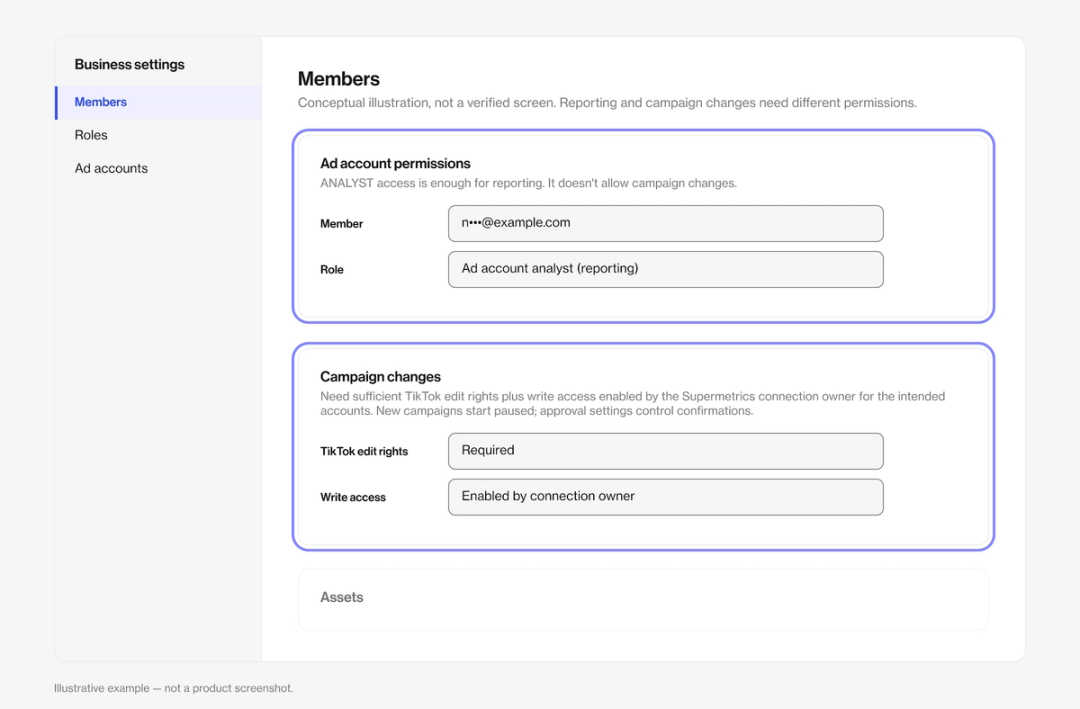
Connecting needs at least Ad account analyst access in TikTok. Owner, Admin and Operator roles also work.
Can make changes
Claude can also create and update TikTok campaigns, and new campaigns start paused so you can review them.
Before you start
Claude
Your Claude account must be able to add connectors (Customize, then Connectors). Anthropic’s custom connectors guide explains remote connectors.
Supermetrics
No subscription is needed to start, because a trial is created at login. Existing customers should open the Supermetrics Hub and check for an AI chats destination, then upgrade or swap an existing destination if it’s missing. The connection is tied to the subscription active at first connection (Supermetrics for Claude docs). Current plans are on the pricing page.
TikTok Ads
Your TikTok account needs at least Ad account analyst access. Owner, Admin and Operator also work. Permissions are managed in the TikTok Business Center (TikTok Ads connection guide).
Start here
How do you connect TikTok Ads to Claude?
 1
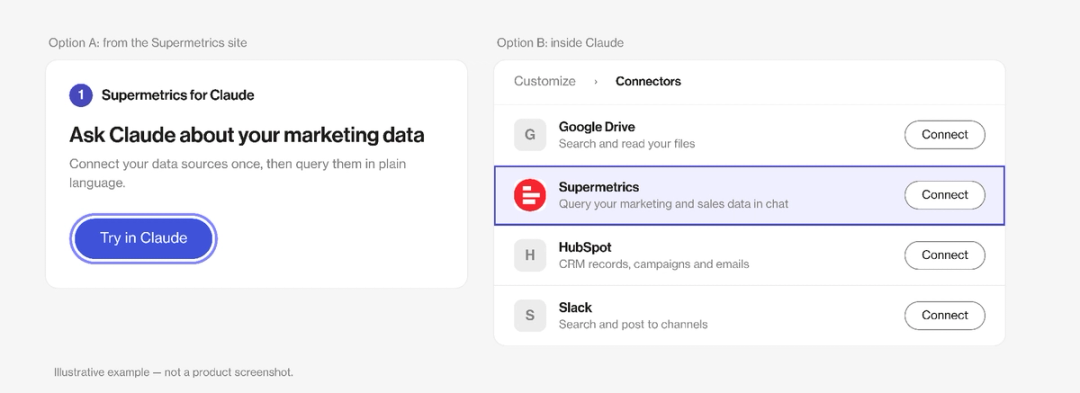
Add Supermetrics to Claude. Open the Supermetrics for Claude page and click Try in Claude. Or open Claude, go to Customize, then Connectors, and search for Supermetrics.
 2
Select your team. Sign in to Supermetrics and choose a team. If you have no subscription, the trial starts here.
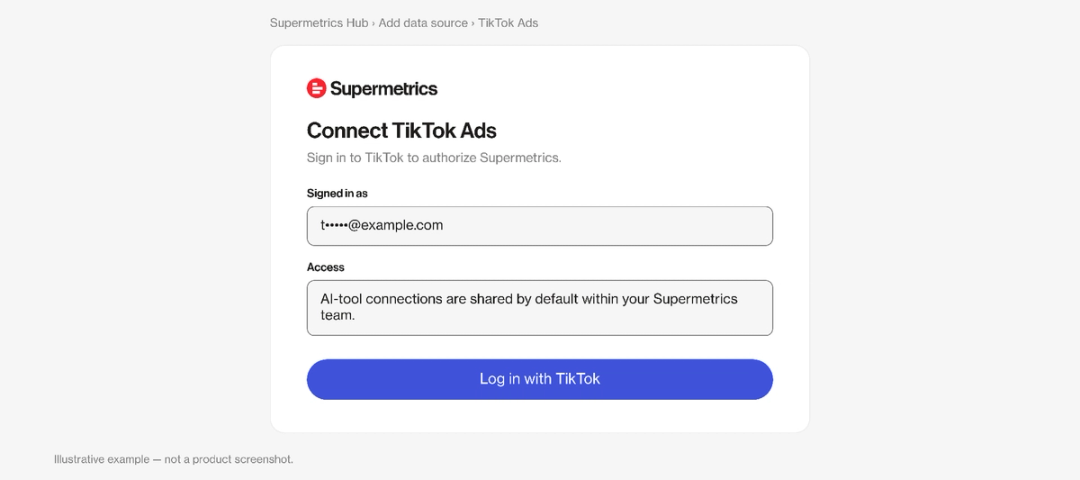
3 Authorize TikTok Ads in the Hub. Open TikTok Ads in the Supermetrics Hub, or use the login link Claude gives you. Click Start, log in with your TikTok email and password, then click Agree and Confirm.
 4
Pick the ad accounts. Choose the ad accounts to include. If several data tools are connected, write “use Supermetrics” in your prompt so Claude picks the right connector.
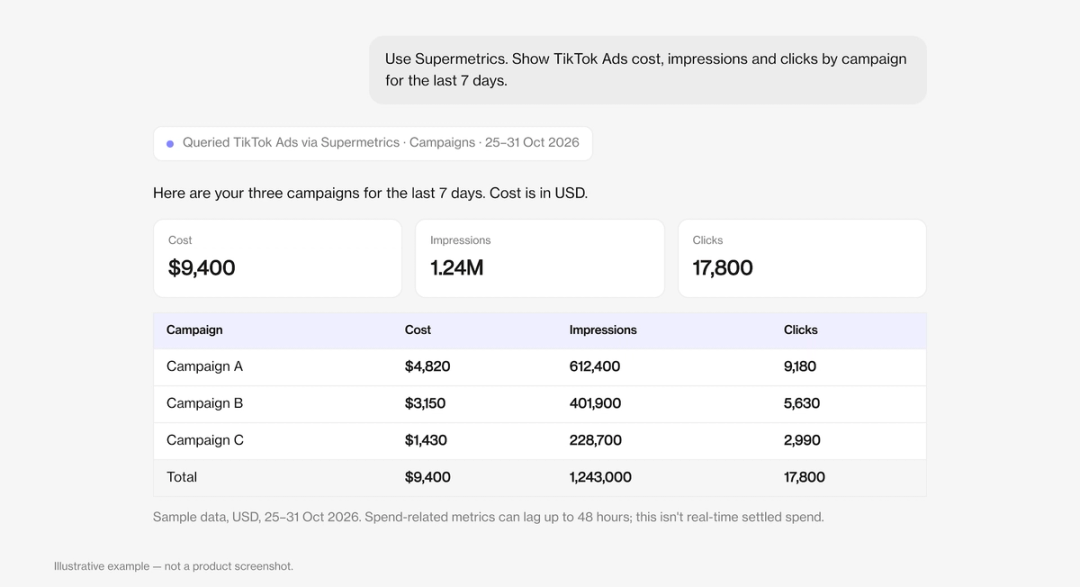
5 Run one small query. TikTok queries need a date range. Try: “Use Supermetrics. Show TikTok Ads cost, impressions and clicks by campaign for the last 7 days.”
6 Check it, then go deeper. Compare the totals with TikTok Ads Manager for the same dates, then move on to ads, audiences and video retention, or ask Claude for a dashboard.
Building your own agent or n8n workflow instead? Use the standalone Supermetrics MCP server, which needs a Supermetrics subscription with API access. For more setup help, see the AI tools connection guide.
What can you ask Claude about TikTok Ads?
| Goal | Prompt | What you get | Fields used |
|---|---|---|---|
| Reporting | Use Supermetrics. For the last 30 days, show TikTok cost, impressions, clicks and CTR by campaign, sorted by cost. | A table of campaigns ranked by cost, with impressions, clicks and CTR | cost, impressions, clicks, ctr, campaign_name |
| Shop | For the last 30 days, which livestreams cost the most per LIVE view, and how many LIVE views did each get? | A livestream table with cost per LIVE view and total LIVE views | gmv_max_live_name, gmv_max_cost_per_live_view, gmv_max_live_views |
| Creative | In my Smart+ campaigns over the last 30 days, which creatives have the highest engagement rate, and what does each cost per conversion? | Smart+ creatives ranked by engagement rate, with cost per conversion | engagement_rate, cost_per_conversion, main_material_name |
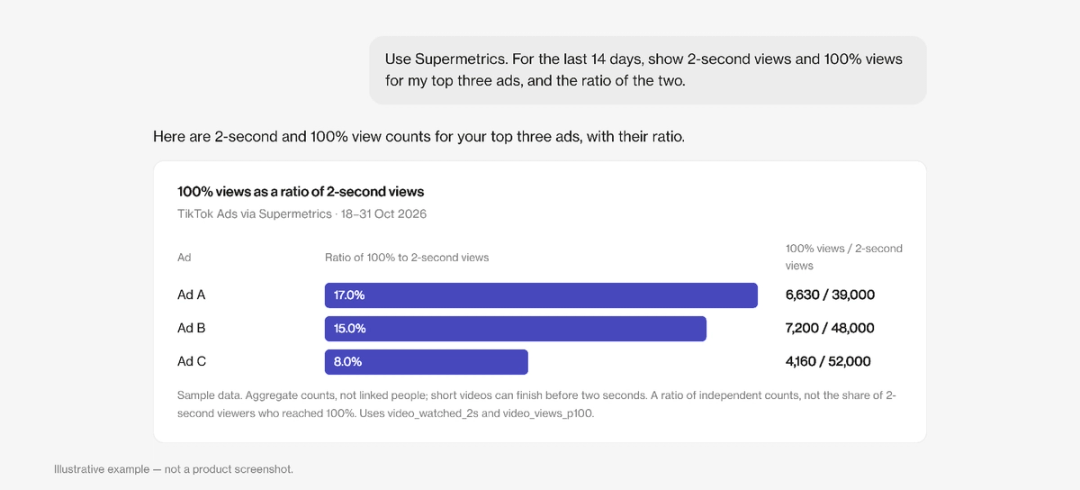
| Diagnosis | For the last 14 days, where do viewers leave my top three videos between 2 seconds and 100%? | A retention table per video showing views at each step | video_watched_2s, video_views_p25, video_views_p50, video_views_p75, video_views_p100 |
| Audience | Last month, which age and gender groups drove the most purchase events, and which only drove spend? | A segment table of purchases and cost by age and gender | age, gender, total_purchase, cost |
| Cross-source | For the last 30 days, put TikTok cost by day next to spend from my other ad accounts and flag days TikTok took more than half. | Daily spend shares across sources, with flagged days | cost, date, plus the other source’s cost field |
More example prompts
| Goal | Prompt | What you get | Fields used |
|---|---|---|---|
| Reporting | List my ten ads with the most video views at 100% last week, with ad text and video ID. | A leaderboard of your ten most-completed ads | video_views_p100, ad_name, ad_text, video_id |
| Shop | Which TikTok Shop products had the best GMV Max ROI last month, and how many orders did each drive? | Products ranked by ROI, with order counts | gmv_max_roi, gmv_max_orders, gmv_max_product_name |
| Action | Pause the ad group with the highest cost per conversion over the last 7 days and show me the change before applying it. | A proposed status change for you to confirm | ad_group_name, cost_per_conversion, ad_group_status |
| Action | Build a dashboard of cost, CTR and video completion by campaign for the last 30 days and push it to Supermetrics Studio. | A dashboard in Studio. Viewing and sharing work with AI chats, and editing needs a Studio destination subscription | cost, ctr, video_views_p100 |
What can you do with TikTok Ads data in Claude?
Ask in plain words. Claude picks the report and fields, and can return a table, a chart, a React artifact or a dashboard in Supermetrics Studio.
Compare campaign efficiency to see which campaigns pay back on spend
Use cost, reach and clicks by campaign, and add return on ad spend when payments are reported to TikTok.
Top ads and formats
Rank ads and video formats by click-through rate and cost per conversion, including duets and stitches. For Smart+ campaigns, rank creatives by engagement rate.
Video retention
Measure video retention to see where viewers drop off, from 2-second and 6-second views through to completed views. Check average watch time per view too.
Budget pacing
Check budget pacing to see how much of each budget has been used by day. First confirm whether the budget is set at campaign or ad group level, which matters if you use Campaign Budget Optimization.
Audience breakdown
Break results down by audience to see which age groups, genders, interests and regions convert, and which only drive spend.
TikTok Shop results
Report on TikTok Shop with GMV Max to see which products and livestreams earn their spend through orders, revenue and ROI.
Video retention quartiles and GMV Max shop metrics are specific to TikTok.
Can Claude identify top-performing TikTok ads and creatives?
Yes. Ask for click-through rate, completed views and cost per conversion by ad, then have Claude flag ads that spend heavily with weak results. You’ll see which hooks hold viewers past six seconds and which only attract clicks.
Can Claude find ad groups that overspend?
Yes. Ask for cost and cost per conversion by ad group over the last 14 days, next to each ad group budget. Claude can flag ad groups that spend heavily at a high cost per conversion, and you decide whether to lower the budget.
Can Claude manage TikTok Ads campaigns, not just read data?
Yes. Claude can create, update and view TikTok campaigns from the chat, and new campaigns start paused so you can review them before they spend. Ask Claude to show each change before you confirm it.
Can Claude help agencies with several clients?
Yes, if each client’s ad account is connected. You pick accounts after logging in, and the Hub can share an authentication link, so a client can authorize TikTok without handing you a login. Name the ad account in your prompt, or ask Claude to group results by business center or advertiser.
How do you combine TikTok Ads with other data in Claude?
TikTok Ads can sit beside your other Supermetrics sources in one chat.
Viewability and brand safety
Add DoubleVerify in Claude to compare TikTok delivery with viewability and brand safety.
Audio vs short video CPM
Add Spotify Ads in Claude to compare audio and short video CPM in the same date window.
Spend and site sessions
Put TikTok cost and your analytics source’s sessions side by side by day to see whether days with higher TikTok spend also bring more site sessions.
Claude queries each source separately and lines results up by a shared field such as date. Campaign names match only if both platforms name campaigns the same way, and Supermetrics doesn’t create that match. Don’t add currencies together without converting.
What TikTok Ads data can Claude query?
Claude can query delivery, cost, engagement, video, conversion and revenue data at every level of your TikTok account, split by audience, plus Smart+ and TikTok Shop GMV Max reporting. Every query needs a date range. Fields in one query must share a report type, so Claude picks a report type that holds all the fields you ask for.
| Report type or field group | What it covers | Example field IDs |
|---|---|---|
| Advertiser, Campaign, AdGroup, Ad | Delivery and cost at each level of the account | cost, impressions, clicks, ctr, cpm, campaign_name, ad_group_name, ad_name |
| Audience variants (AdAudience, AdGroupAudience, CampaignAudience, AdvertiserAudience) | The same metrics split by who saw the ad and where | interest_category_name, dma_name, language, platform, country_name |
| Video and engagement fields | Watch depth and paid social actions | video_watched_2s, video_views_p50, video_views_p100, likes, shares, profile_visits |
| Conversion and revenue fields | Results, events and ROAS | results, conversions, total_purchase, total_purchase_value, complete_payment_roas |
| SmartPlusAd, SmartPlusCreative, SmartPlusCreativeOverview | Smart+ asset groups and creatives | gross_impressions, engagement_rate, conversion_rate_v2, main_material_name |
| GMV Max report types (AdvertiserGmvMaxAds, CampaignGmvMaxAds, CreativeGmvMaxAds, LivestreamGmvMaxAds, ProductGmvMaxAds) | TikTok Shop spend, orders and revenue | gmv_max_cost, gmv_max_orders, gmv_max_gross_revenue, gmv_max_roi, gmv_max_live_views |
| AdvertiserGmvMaxLegacy, CampaignGmvMaxLegacy | The older GMV Max reporting | gmv_max_ads_spend, gmv_max_ads_billed_cost |
Time dimensions such as date work in every report type except SmartPlusCreativeOverview.
Data notes
| Situation | What happens | What to do |
|---|---|---|
| Date range | Every TikTok Ads query requires one | State the period in your prompt |
| History depth | The connection guide states no historical data limit | See the connection guide and test a long range |
| Multiple ad accounts | You select accounts after logging in | Name the account in your prompt, or ask Claude to list the accounts first |
| Disabled or inaccessible accounts | The exclude_invalid_accounts setting ignores them to prevent errors, and ignored accounts don’t appear in results | Turn it on for large lists, and remember that missing rows may be missing accounts |
| Deleted objects | The include_deleted_items setting fetches campaigns, ad groups and ads of any status, including deleted | Use it only when you need history for removed items, because it may slow queries |
| Audience breakdowns | Audience dimensions work only in the audience report types | See Troubleshooting |
| Two GMV Max generations | TikTok Ads has current and Legacy GMV Max report types. The Legacy ones carry gmv_max_ads_spend and gmv_max_ads_billed_cost | Ask Claude to try the current types first, then the Legacy ones if your account returns no rows |
| Time zone and currency | Each account has its own advertiser_timezone and advertiser_currency | Check both before comparing accounts |
| Refresh timing | No delay is stated | Compare very recent days with TikTok Ads Manager |
Field glossary
| Field ID | Plain-English meaning | Type | Watch out |
|---|---|---|---|
| cost | Estimated total spend | Metric | Read advertiser_currency for the currency. cost_usd, cost_eur and cost_gbp exist for the standard report types but not Smart+ |
| ctr | Share of impressions that led to a click | Metric | A rate. See Checking results |
| reach | Unique users who saw your ads | Metric | Only in Ad, AdGroup, Advertiser and Campaign |
| results | Count of times the ad achieved an outcome | Metric | Ad and AdGroup only. Read it next to optimize_goal |
| conversions | Count of times an ad achieved a conversion outcome | Metric | Not available in the audience report types |
| complete_payment_roas | Return on ad spend for complete payment events | Metric | Meaningful only where payments are reported to TikTok |
| video_views_p100 | Video views that reached 100% | Metric | Compare with video_play_actions for a completion share |
| cost_voucher | Estimated amount spent through vouchers, beside cost_cash | Metric | Advertiser report type only, so not by campaign |
| campaign_budget | The budget set on the campaign | Dimension | A budget setting. Compare it with cost for actual spend |
| gmv_max_roi | Return on investment for GMV Max ads | Metric | GMV Max report types only |
| advertiser_timezone | Time zone of the ad account | Dimension | Check it when hours or days differ from TikTok Ads Manager |
What is the TikTok Ads MCP connector for Claude?
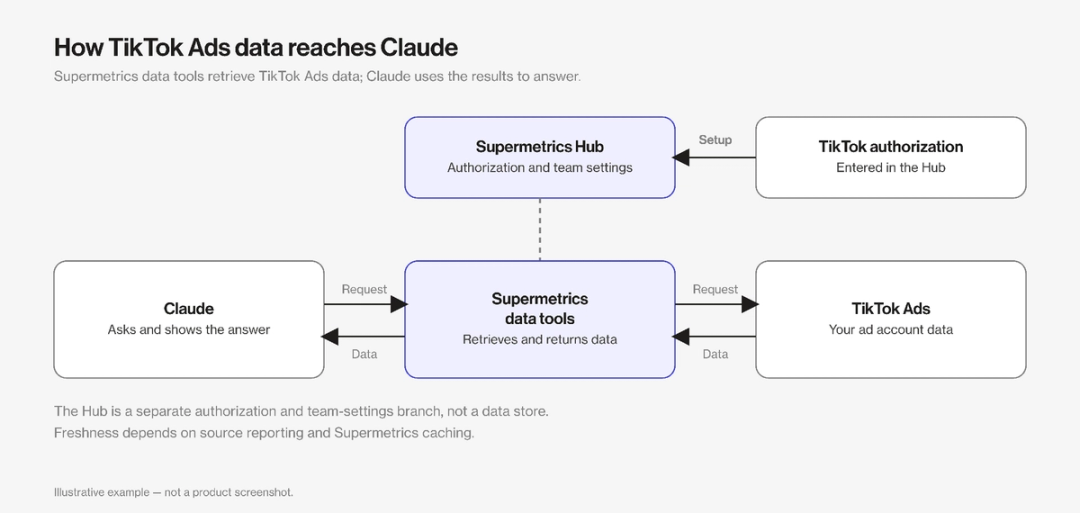
The Supermetrics connector lets Claude read your TikTok Ads data through MCP. MCP, the Model Context Protocol, is an open standard that lets an AI application call outside tools and data (modelcontextprotocol.io). When you ask a TikTok question, Claude chooses the data it needs, Supermetrics fetches it from your ad accounts, and Claude presents the result.
It covers the full TikTok account structure (advertiser, campaign, ad group, ad), plus audience breakdowns, Smart+ campaigns and the GMV Max reports used for TikTok Shop.
Use AI chats to ask questions in Claude. For custom agents, n8n workflows or other MCP clients, use the standalone Supermetrics MCP server.
Which way should you connect TikTok Ads to Claude?
Supermetrics offers two routes. AI chats is the ready-made connector described on this page; remote connectors work on the web, in Claude Desktop and in Claude Code. The standalone Supermetrics MCP server is a separate option for custom agents, n8n workflows and other MCP hosts, requiring a subscription with Supermetrics API access rather than an AI chats destination.
| Approach | Setup effort | Data scope | Blending with other sources | Suits |
|---|---|---|---|---|
| Supermetrics connector for Claude | Low: add the connector, authorize TikTok Ads once | TikTok Ads plus your other Supermetrics sources | Yes, inside one chat | Paid social managers and agencies |
| Supermetrics MCP server (custom client) | Medium: you set up your own client | Same sources as the connector | Yes, if your agent joins the results | Engineers building agents or scheduled automations |
| CSV export and upload | Low, but repeated by hand | One file per upload | Only if you merge files yourself | A single audit or a one-off question |
| Direct API and custom code | High: you write, host and maintain a script | Whatever you code | Whatever you code | Teams with a developer who want full control |
Pick the Supermetrics connector for Claude if you want TikTok answers in chat with no code, and may want to compare TikTok with other channels later.
Pick the Supermetrics MCP server if your team already runs n8n or its own agent.
Pick CSV or the API if you need a frozen audit snapshot (CSV) or a pipeline you own (API).
When is this not the right tool?
- You need the video files. The connector returns only video IDs and thumbnail URLs. Use TikTok Ads Manager for assets.
- You need stored history. Use TikTok Ads to BigQuery.
- You need always-on dashboards for stakeholders. Try TikTok Ads in Looker Studio.
- You work mainly in spreadsheets. Use TikTok Ads in Google Sheets.
How do you check Claude’s TikTok Ads numbers?
Confirm that Claude used the dates and ad accounts you intended, then compare one total, such as cost, with TikTok Ads Manager for the same period. You can ask Claude to show its query and field list. If numbers still differ, work through this table.
| Common reason results differ | Check |
|---|---|
| Wrong dates or accounts | The period and ad accounts Claude used match your prompt |
| Fields from different report types | The field group table above, to see which report type each field needs |
| Rates averaged by hand | Rates such as CTR and cost per conversion are calculated per row, so don’t sum or average rows. Ask Claude for the grouping you need directly |
| Deleted items or skipped accounts | Whether include_deleted_items or exclude_invalid_accounts was on |
| Different time zone or currency | advertiser_timezone and advertiser_currency against what you view in TikTok Ads Manager |
Troubleshooting
| Symptom | Likely cause | Fix |
|---|---|---|
| LICENSE_NOT_FOUND | The connection was made with an earlier email address or team | Confirm the email and team that match the paid subscription, then disconnect Supermetrics in Claude Connectors, reconnect and pick that team |
| Claude queries another team’s data, or never calls Supermetrics | You picked a different team at first login, or several data tools compete for the question | Disconnect Supermetrics in Claude Connectors, reconnect with the right team, and begin the prompt with “use Supermetrics” |
| “No accounts found” | The TikTok login you used owns or can see no ad account | Work through the docs article “How to fix No accounts found errors”, then authorize TikTok Ads again with the login that holds access |
| Claude says TikTok Ads isn’t authorized | No Hub connection exists yet, or the old one lapsed | Ask Claude for the TikTok login link, or reconnect in the Hub, then rerun the query |
| The connection is refused | Your TikTok role is below Ad account analyst | Ask whoever manages your TikTok Business Center permissions to raise your role, or have a user with enough access authorize through a shared authentication link from the Hub |
| An audience breakdown fails or comes back empty | age, gender and other audience dimensions work only in the audience report types | Use an Audience report type and a metric from it, such as total_purchase, rather than conversions |
| Reach or frequency vanish from an audience query | reach and frequency work only in Ad, AdGroup, Advertiser and Campaign | Run reach as a separate query without audience dimensions |
| Removed campaigns don’t show | Deleted items are excluded unless include_deleted_items is on | Enable it for that query and accept slower runs |
| Still stuck | Something else | Contact support through the Supermetrics Hub |
If a working query stops, reconnect TikTok Ads in the Hub.
Is it safe? Security and data handling
- Supermetrics fetches the fields you ask for and returns them to Claude, so anything in the result is visible in the chat. Fields such as advertiser_email and advertiser_phone_number are contact details, so leave them out unless needed.
- Claude can create and update TikTok campaigns, and it can create dashboards in Supermetrics Studio. New campaigns start paused, so review and confirm each proposed change yourself.
- You log in to TikTok once in the Hub, and the access you hold in TikTok limits what the connection can see.
- AI chats data-source connections are shared by default. Team members assigned to the subscription can use shared logins, so review team membership and subscription access before connecting client accounts. Anyone who can open the Claude chat can see its returned results.
- Anthropic’s storage and use of chat content depends on your Claude plan and organization settings, outside Supermetrics’ control.
- For security policies, see the Supermetrics Trust Center.
Related connectors
Send TikTok Ads data to BigQuery to keep campaign history in a warehouse
Report on TikTok Ads in Looker Studio with shareable paid social dashboards
Analyze TikTok Ads in Google Sheets with spreadsheet views of spend and creative results
Connect Spotify Ads to Claude to compare audio reach with short video
Connect DoubleVerify to Claude to add viewability and brand safety checks
Supermetrics for Claude for every source you can ask Claude about
FAQ
-
A TikTok Ads MCP is a Model Context Protocol connection that lets an AI client read TikTok Ads data. For Claude, the Supermetrics connector covers this with no MCP setup on your side. Organic TikTok is a separate source. For custom builds, use the Supermetrics MCP server.
-
The Supermetrics connector reads TikTok Ads through its own report types and fields, beside your other Supermetrics sources in one chat. For TikTok’s own developer tooling, see TikTok’s developer docs.
-
Yes. Add Supermetrics through Claude’s Connectors directory. The remote connector works on the web, in Claude Desktop and in Claude Code, subject to your account and organization settings. The standalone Supermetrics MCP server is a separate option for custom integrations and requires a subscription with API access.
-
Yes. Claude can create and update campaigns, and new campaigns start paused so you can review them before they spend.
-
Supermetrics fetches data when you ask, so you aren’t reading a stored export. Check very recent days against TikTok Ads Manager.
-
Yes. You choose accounts after logging in. For client work, ask each client to authorize through a shared link from the Hub.
-
A trial is created at login, so you can start without paying. Ongoing use needs a Supermetrics subscription that includes an AI chats destination. If yours doesn’t, upgrade or swap an existing destination in the Hub. Editing dashboards in Supermetrics Studio needs a Studio destination subscription. See pricing for plans.
-
The Supermetrics docs don’t say. Anthropic’s handling depends on your Claude plan and settings, so check Anthropic’s terms for your plan.
-
age works only in the audience report types, and conversions doesn’t. Use total_purchase or complete_payment_roas with audience breakdowns.
-
Rates such as CTR, CPC and cost per conversion are calculated per row, so summing or averaging returned rows gives a wrong answer. Ask Claude for the grouping you need directly.