Connect Taboola to Claude
Connect Taboola to Claude with Supermetrics and turn your Taboola data into answers, reports, and next steps without leaving Claude.
Don’t take our word. Try it free today.
At a glance
What it does
Ask Claude about Taboola spend, conversions, ROAS, publisher sites, top content and campaign settings, and get answers in the chat with no export. The connector reads the data over the Model Context Protocol (MCP).
What you can query
Claude can query more than 120 fields across 43 report types. You pick one report type per query, and every type except Campaign management needs a date range.
What you need
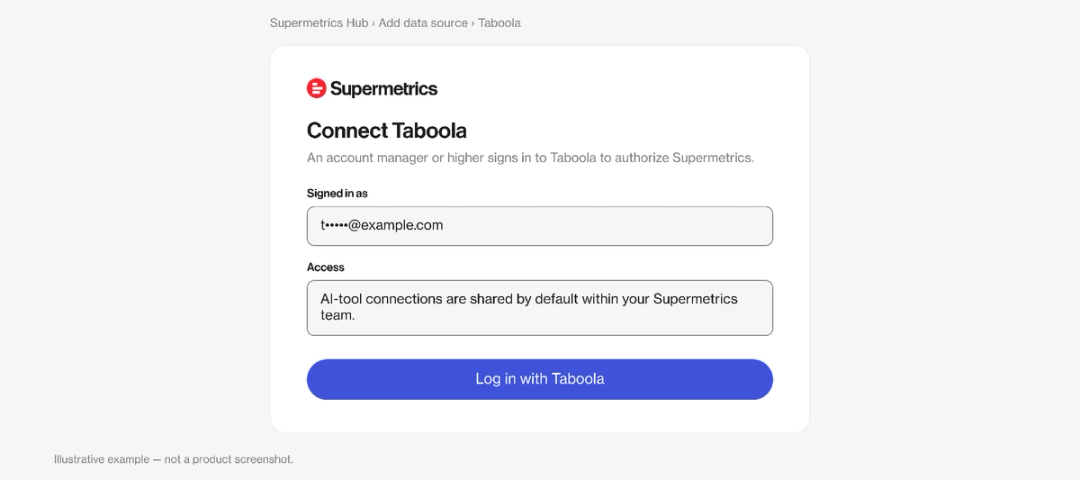
Connecting needs at least the Account manager user role in Taboola.
Read-only
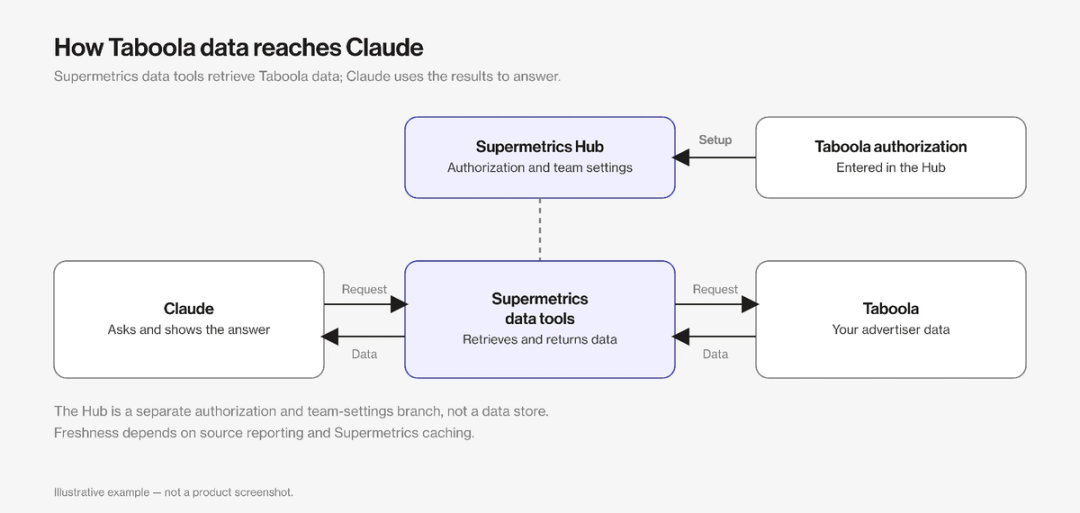
The connector is read only. Claude can read campaign settings but can’t change bids, budgets or blocklists.
Before you start
Claude
You need a Claude account where you can add connectors. Supermetrics is listed under Customize > Connectors. Anthropic’s custom connectors guide explains remote connectors in detail.
Supermetrics
You can start without a subscription. If your company already has one, open the Supermetrics Hub and check for an AI chats destination. If it’s missing, upgrade or swap an existing destination to AI chats.
Log in with the email and team that hold your subscription. If you see LICENSE_NOT_FOUND, the fix is in Troubleshooting. Plans are on the pricing page.
Taboola
Your Taboola account needs at least the Account manager user role (Taboola connection guide). Taboola explains its user roles in its account administration article.
Agencies and anyone working for a client can use the Hub’s shared authentication link. The person who holds the Taboola login then authorizes it themselves, and one connection can cover more than one advertiser account.
Start here
How do you connect Taboola to Claude?
 1
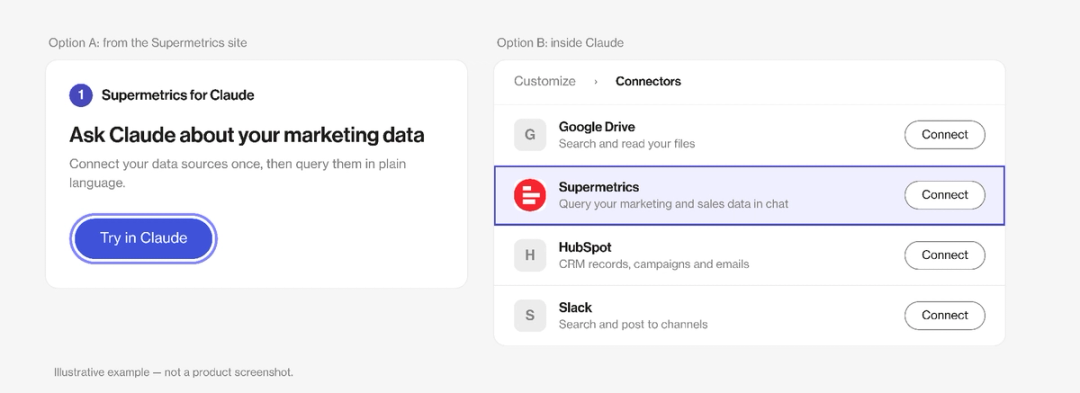
Add Supermetrics to Claude. Open the Supermetrics for Claude page and click Try in Claude. Or go to Customize > Connectors in Claude and search for Supermetrics.
 2
Pick your team. Log in to Supermetrics and select your team. A trial starts here if you don’t have a subscription.
3 Connect Taboola in the Hub. Open Taboola in the Supermetrics Hub, or use the login link Claude gives you. Click Start, enter your Taboola credentials and select your profiles.
 4
Tell Claude what to use. If other data tools are connected, write “use Supermetrics” so Claude picks the right connector. Claude can list your Taboola advertiser accounts, so name the one you want if there are several.
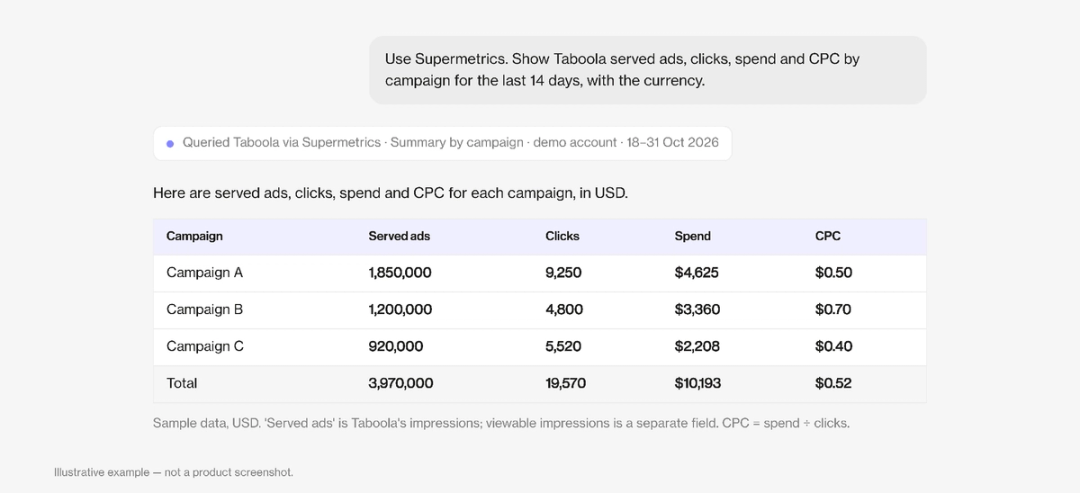
5 Run a small query: “Use Supermetrics. Show Taboola served ads, clicks, spend and CPC by campaign for the last 14 days, with the currency.” Claude picks the Summary by campaign report type.
6 Check the results. Compare the totals with Taboola’s own reporting for the same dates and currency, using the checks below. If they agree, move on to sites, content or a dashboard.
Full setup reference: How to connect Supermetrics to AI tools.
Building your own agent or n8n workflow instead? Use the standalone Supermetrics MCP server, which needs a Supermetrics subscription with API access. For more setup help, see the AI tools connection guide.
What can you ask Claude about Taboola?
Replace the bracketed names and the dates with your own. Claude picks the report type from the fields you mention.
| Goal | Prompt | What you get |
|---|---|---|
| Reporting | Use Supermetrics. Show Taboola served ads, clicks, spend and CPC by campaign for [account name] last month, with the account currency. | A campaign table with spend in the account currency |
| Reporting | List my top 10 Taboola content items by clicks in the last 30 days, with ad name, item name, thumbnail URL and CTR. | Your 10 best-clicked items, ranked |
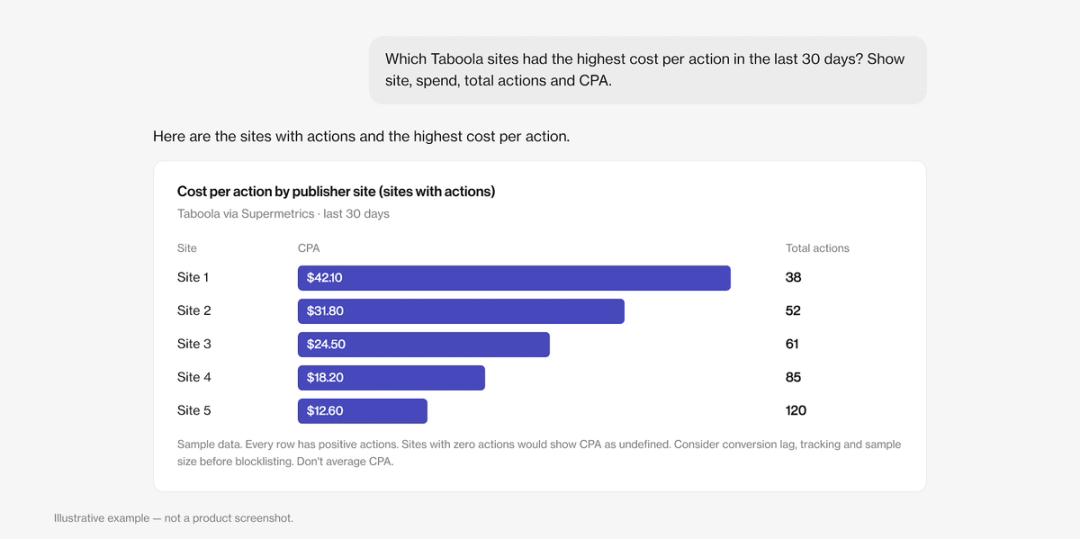
| Diagnosis | Which Taboola sites spent the most in the last 30 days without producing actions? Show site, spend, total actions and CPA. | A shortlist of sites to review |
| Comparison over time | Chart daily spend, conversion value and ROAS for [campaign name] over the last 30 days. | A daily trend that shows where returns flatten |
| Cross-source | Show Taboola spend by day for the last 30 days next to Google Analytics 4 sessions for the same days. | Spend and sessions lined up by date |
| Dashboard | Build an interactive dashboard of Taboola spend, clicks and ROAS by campaign for this month. | A Claude artifact dashboard that other Claude users in your organization can open in a browser (they need a Supermetrics account and source connections) |
More example prompts
| Goal | Prompt | What you get |
|---|---|---|
| Diagnosis | For the last 30 days, compare served ads with the Impressions count by site and rank the 10 biggest gaps. | Sites ranked by the gap between the two counts |
| Diagnosis | List active Taboola campaigns in [account name] with bid type, daily cap, marketing objective and approval state. Flag any without a daily cap. | A settings table with uncapped campaigns flagged |
| Comparison over time | Compare Taboola spend by country this quarter vs last quarter. | A country table with both quarters side by side |
| Cross-source | Set daily Taboola spend for the last 30 days beside revenue from my payments data, and calculate ROAS from that revenue. | A daily spend-to-revenue comparison |
More patterns: AI chats use cases and the Taboola help center.
What can you do with Taboola data in Claude?
Each task below starts from a question you’d otherwise answer with an export and a spreadsheet.
Find publisher sites to cut
Ask Claude to rank sites by spend, clicks, total actions and cost per action. You get a shortlist of sites that spend without converting, ready to add to a blocklist in Taboola.
See where returns flatten before you raise a budget
Have Claude chart one campaign’s daily spend, conversion value and ROAS. Look for the point where extra spend stops lifting returns, and decide on the budget from there.
Compare headlines and thumbnails by clicks and CTR
The Top campaign content report type returns each item’s name, ad name and thumbnail with its clicks and CTR. Claude can also group headlines by tone. Treat that grouping as Claude’s judgment, since Taboola doesn’t measure tone.
Check ROAS against revenue from your own records
Taboola reports ROAS, conversion value and cost per action. For a second view, use Stripe in Claude to set daily Taboola spend beside payments for the same days. That ROAS rests on revenue from your own records instead of Taboola-reported conversion value.
Audit campaign settings
The Campaign management report type returns status, approval state, bid type, daily cap, spending limit, marketing objective and targeting, such as country and platform. Ask Claude to find active campaigns with no daily cap or the wrong objective.
Compare served ads with Impressions by site
Taboola reports two impression counts, and the summary report types return both. Claude can set them side by side by site and rank the biggest gaps. The field glossary explains which count is which.
How do you combine Taboola with other data in Claude?
Taboola can sit in the same chat as any other source on your Supermetrics account.
- Clicks vs sessions. With Google Analytics 4 in Claude, compare Taboola clicks with sessions from the same campaigns.
Two sources join only on a shared dimension, and date is the usual one. Campaign names match only when both systems use the same naming, and Supermetrics creates no join key for you.
What Taboola data can Claude query?
Taboola uses a report type setting, and you choose one per query. There are 43 report types in six groups.
| Report type group | What it covers | Example field IDs |
|---|---|---|
| Campaign management (1) | Campaign settings, budgets, status and targeting. No date range needed | status, bid_type, daily_cap, marketing_objective, country_targeting |
| Top campaign content (1) | Items and ads in a campaign | item_name, ad_name, thumbnail_url, url, content_provider_name |
| Campaign summary (8) | Performance by campaign, day, site, country, platform or audience | impressions, clicks, spent, cpa, roas, campaign_name |
| Publisher revenue summary (11) | Revenue by day, week, month, site, placement, page type, country or platform | ad_revenue, ad_rpm_revenue, ctr_revenue, page_views_with_ads_revenue |
| Publisher visits (13) | Visits by referral, landing page, platform, country, campaign or tracking code | visits, bounce_rate, views_visit, landing_page_url, tracking_code_campaign |
| Publisher recirculation summary (9) | Recirculation by day, week, month, site, placement, page type, country or platform | ctr_recirculation, average_views_after_click, page_views |
The Campaign summary group splits into Summary by campaign, campaign & day, campaign, site & day, day, site, country, platform and audience. Each field works only in the report types that support it, so a site field needs a by-site report.
Taboola field glossary
| Field ID | Plain-English meaning | Type | Watch out |
|---|---|---|---|
| impressions | Total times your campaign was served (labeled Served ads) | Metric | A different count from the field labeled Impressions |
| viewable_impressions | Labeled Impressions in the field list | Metric | Confirm the definition in Taboola |
| spent | Spend in the account currency | Metric | Add currency to see the unit |
| spent_usd | Expenditure converted to US dollars | Metric | Only in Summary by campaign & day, campaign, site & day, and day. spent_eur and spent_gbp work the same way |
| cpa_actions_num | Total number of actions (labeled Total action) | Metric | The count behind cpa |
| cpa | Average cost per action | Metric | Non-aggregatable |
| roas | Return on ad spend | Metric | Non-aggregatable, so don’t average rows |
| cvr | Average conversion rate (%) | Metric | Only in Top campaign content. cpa_conversion_rate carries the same label in the summary types |
| ctr | Average click-through rate (%) | Metric | Campaign summary and Top campaign content. Revenue and recirculation reports use ctr_revenue and ctr_recirculation |
| site_name | Site name | Dimension | Only in Summary by campaign, site & day and Summary by site |
| status | Campaign status | Dimension | Campaign management only |
Watch the two impression labels. The field labeled Impressions is viewable_impressions, while impressions is labeled Served ads, so tell Claude which count you mean and compare like with like.
The list has 126 fields in total: 35 metrics and 91 dimensions. Ratios such as ctr, cpc, cpm, cpa and roas are non-aggregatable, which means each returned row is right, but adding rows yourself isn’t. Ask for the grouping you want in the query.
What is the Taboola MCP connector for Claude?
The Taboola MCP connector for Claude is the Supermetrics connector that lets Claude read your Taboola data through the Model Context Protocol (MCP).
MCP, the Model Context Protocol, is an open standard that lets an AI application call outside tools and data sources (modelcontextprotocol.io). The Supermetrics connector for Claude is one of those tools. You ask about Taboola, Claude chooses a report type and fields, Supermetrics retrieves them from your Taboola advertiser accounts, and Claude writes up the result.
Taboola is a native advertising platform, where businesses create and display sponsored content on websites and apps. The connector covers campaign summaries, top campaign content and campaign settings. It also holds publisher-side revenue, visits and recirculation reports.
Use AI chats to ask questions in Claude. For custom agents, n8n workflows or other MCP clients, use the standalone Supermetrics MCP server.
Which way should you connect Taboola to Claude?
The Supermetrics connector (AI chats) and the Supermetrics MCP server reach the same data. The difference is who runs the client.
| Approach | Setup effort | Data scope | Cross-source blending | Maintenance | Suits |
|---|---|---|---|---|---|
| Supermetrics connector for Claude | Low: add the connector, sign in to Taboola once | Taboola plus all other sources in your Supermetrics account | Yes, in one chat | Supermetrics keeps the connector current | Performance marketers and agency teams who want answers in chat |
| Supermetrics MCP server (custom client) | Medium: you run your own MCP host | Same sources | Yes, if your agent merges results | Your team owns the client | Engineers building agents |
| CSV export and upload | Low, but repeated for each question | One file at a time | Only if you merge files yourself | Manual | A single snapshot |
| Direct API and custom code | High: auth, report calls and hosting | Whatever you build | Whatever you build | You maintain it | Teams with developers and unusual requirements |
Go with the Supermetrics connector for Claude if you want Taboola spend beside revenue, analytics or other ad channels, without writing queries.
Go with the Supermetrics MCP server if you run an agent framework and want to control the client yourself.
Go with CSV or the API if you need a one-off file, or a pipeline you fully own.
When is this not the right tool?
- You need to block a site or change a bid. Make that change in Taboola.
- You need stored history. A chat isn’t an archive, so use Taboola to BigQuery for a warehouse copy.
- You need a dashboard that refreshes by itself. Use Taboola in Looker Studio.
- You live in spreadsheets. Taboola in Google Sheets keeps data where you edit it.
- You need a metric Taboola doesn’t expose. Claude can only reason over fields in the list, and it can’t recover what the source never returns.
How do you check Claude’s Taboola numbers?
Before you share a number from Claude, compare one total with Taboola’s own reporting for the same period. If they differ, work down this table.
| Check | What can go wrong | What to do |
|---|---|---|
| Date range | Every report type except Campaign management needs one | Confirm the period in Claude’s answer, or choose Campaign management for settings |
| Advertiser account | Taboola has an account list labeled Advertiser accounts | Name the account in the prompt, or ask Claude to list them |
| Report type | Each query uses one report type, and fields only work in the report types that support them | Let Claude find the right report type, or name it yourself |
| One total | Spend doesn’t match Taboola | Compare spent with Taboola’s reporting for the same period and account |
| Impressions field | Served ads and the Impressions-labeled count got mixed up | Check which field Claude used against the field glossary |
| CTR field | Different CTR fields per report family | Check ctr versus ctr_revenue and ctr_recirculation |
| Conversion rate | The rate came from the wrong report | Check cvr (Top campaign content) versus cpa_conversion_rate (summaries) |
| Currency | currency holds the account currency, and spent_eur, spent_gbp and spent_usd convert spend | Add currency to money queries, and use a converted field only in the three report types that carry it |
| Query and fields | You can’t tell how Claude got the number | Ask Claude to show the query and the fields it used |
| Read only | Claude can’t change Taboola | Change bids, budgets and blocklists in Taboola |
Troubleshooting
| Symptom | Likely cause | Fix |
|---|---|---|
| LICENSE_NOT_FOUND | The connection keeps the email and team from your first login, so an earlier email or team is in use | Confirm the email and team behind your paid subscription, then disconnect Supermetrics in Claude Connectors, reconnect and pick that team (Supermetrics for Claude docs) |
| Claude uses another team or skips Supermetrics | The first login chose a different team, or another data tool answered | Disconnect and reconnect Supermetrics in Claude Connectors, choose the right team and open the prompt with “use Supermetrics” |
| “No accounts found” | The Taboola login behind the connection can’t see an advertiser account | Follow the Supermetrics article “How to fix No accounts found errors,” then reconnect Taboola and select the profiles again |
| Taboola isn’t authorized | The Hub connection is missing or expired | Request the Taboola login link from Claude, or reconnect in the Hub and rerun the query |
| The Hub refuses the Taboola login | The user’s role is below Account manager | Ask a Taboola admin to raise the role, or have an Account manager authorize through a shared link |
| Claude returns campaign settings, not daily numbers | The Campaign management report type was selected | Ask for Summary by campaign & day for performance, and keep Campaign management for settings |
| A field is “not available” in a query | Fields work only in specific report types, such as site_name in by-site reports | Ask Claude to check which report type holds the field |
| Still stuck | Something else | Contact support through the Supermetrics Hub |
If a working query stops, follow the reauthentication guide.
Is it safe? Security and data handling
- Supermetrics fetches the fields your prompt asks for from the Taboola profiles you chose and hands them to Claude. Anyone who can open the chat can see what comes back.
- Studio dashboards need a Studio destination subscription to edit.
- Tracking codes, landing page URLs and targeting lists can reveal how you run campaigns, so leave them out of shared chats.
- Someone with at least the Account manager role authorizes Taboola once in the Hub. AI chats data-source connections are shared by default. Team members assigned to the subscription can use shared logins, so review team membership and subscription access before connecting client accounts. Anyone who can open the Claude chat can see its returned results.
- Anthropic’s storage and use of chat content depends on your Claude plan and your organization’s settings.
- For policies and certifications, see the Supermetrics Trust Center.
Related connectors
Connect Google Analytics 4 to Claude: line up Taboola clicks with sessions
Connect Stripe to Claude: set Taboola spend beside payments
Supermetrics for Claude: every source you can ask Claude about
FAQ
-
It’s a Model Context Protocol endpoint that lets an AI client read Taboola data. Supermetrics offers the connector for Claude for that job, and the standalone Supermetrics MCP server for people who build their own agents.
-
In Claude, go to Customize > Connectors and search for Supermetrics. You can also start from the Supermetrics for Claude page and click Try in Claude.
-
Claude can analyze spend and recommend actions, but the connector is read only. Bids, budgets and blocklists stay in Taboola.
-
Claude queries live data each time.
-
Yes. Taboola has an account list labeled Advertiser accounts, and you select profiles when you connect. Name the account in each prompt, or ask for several at once.
-
You can start without a subscription, because a trial is created at login. With a paid subscription, you need an AI chats destination in the Supermetrics Hub. If it’s missing, upgrade or swap an existing destination to AI chats. Plans are on the pricing page.
-
Setup is six steps: add the connector, pick a team, sign in to Taboola, name Supermetrics, run a query and check the totals.
-
Anthropic’s handling of chat content depends on your Claude plan and settings. Check Anthropic’s terms for your plan.
-
Taboola uses separate fields per report family, so campaign, revenue and recirculation reports each have their own CTR. Impressions come as two counts, Served ads and Impressions, and the field glossary explains which is which.
-
Yes. Claude can rank sites by spend, total actions and cost per action and suggest candidates. You apply the block in Taboola.