Connect Kwai Ads to Claude
Connect Kwai Ads to Claude with Supermetrics and turn your Kwai Ads data into answers, reports, and next steps without leaving Claude.
Don’t take our word. Try it free today.
At a glance
What it does
Ask Claude about Kwai Ads delivery, cost, conversions, video play depth, in-app events and retention in plain language.
What you need
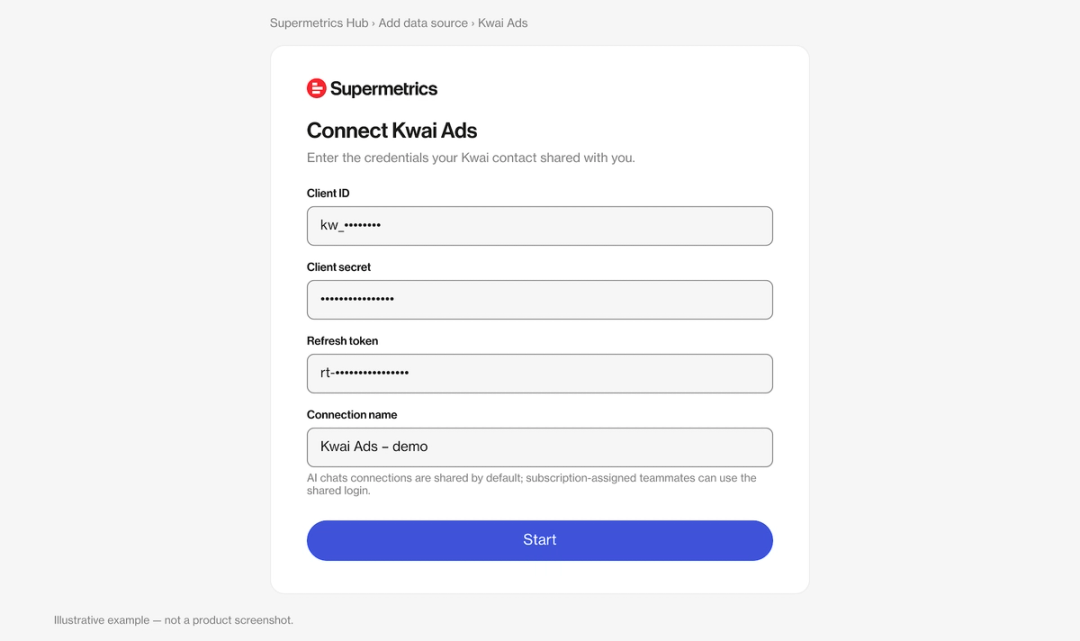
Kwai issues your credentials. Before you start, ask your Kwai contact for a client ID, a client secret and a refresh token.
Four report types
Supermetrics lists 104 Kwai Ads fields across four report types. Every query needs a date range, and some fields can’t be combined in one query.
Mind currency and ratios
The cost field is in USD, with cost_eur and cost_gbp as converted versions. Ratios such as CTR, CPM and CPA can’t be summed or averaged across rows.
Before you start
Claude
You need a Claude account that can add connectors. The Supermetrics docs place them under Customize, then Connectors. Anthropic’s custom connectors guide explains remote connectors.
Supermetrics
You need a Supermetrics login. If you already pay for Supermetrics, check the Supermetrics Hub for an AI chats destination. If it’s missing, upgrade or swap an existing destination, and see pricing for plans.
The connection keeps the email and team from your first login. Buying with a different email is the usual cause of LICENSE_NOT_FOUND (Supermetrics for Claude docs).
Kwai Ads
Kwai Ads doesn’t use a plain sign-in. The connection guide tells you to ask your contact at Kwai to create and share a client ID, a client secret and a refresh token. Kwai also publishes a Supermetrics-Kwai integration manual, linked from the guide.
Each account can reach only the Kwai datasets Kwai has approved. Request permission from Kwai for every dataset you want to use in Supermetrics.
Start here
How do you connect Kwai Ads to Claude?
 1
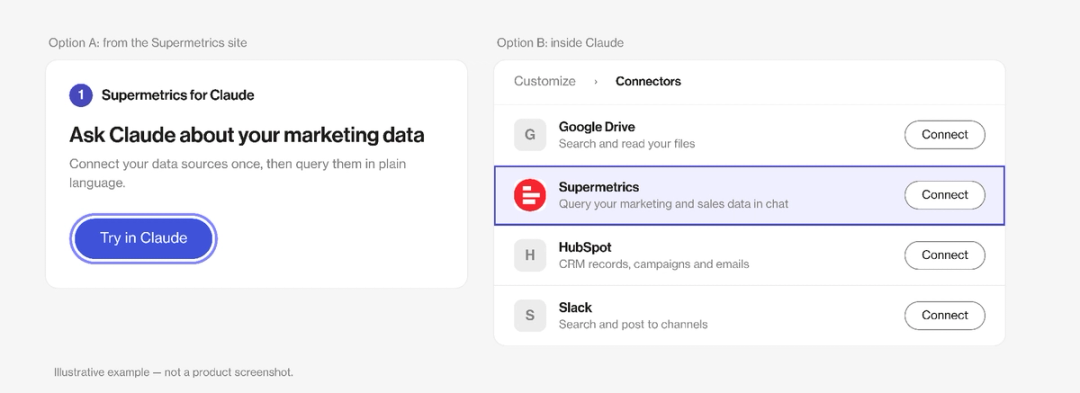
Add Supermetrics to Claude. Open the Supermetrics for Claude page and click Try in Claude. You can also go to Customize, then Connectors in Claude and search for Supermetrics.
 2
Pick your team. Sign in to Supermetrics and pick the team to use.
3 Connect Kwai Ads in the Hub. Open Kwai Ads in the Hub, or follow the login link Claude shares. Enter the client ID, client secret and refresh token, give the account a name you’ll recognize and click Start. If you can’t connect it yourself, the Hub can share an authentication link.
 4
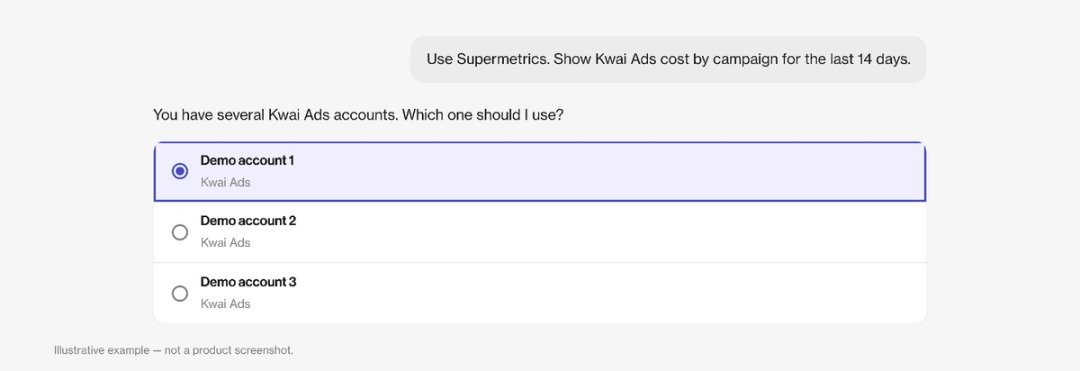
Tell Claude what to use. If other data tools are connected, say “use Supermetrics” in your prompt. If you have several Kwai accounts, Claude asks which one to use, or you can name it in your prompt.
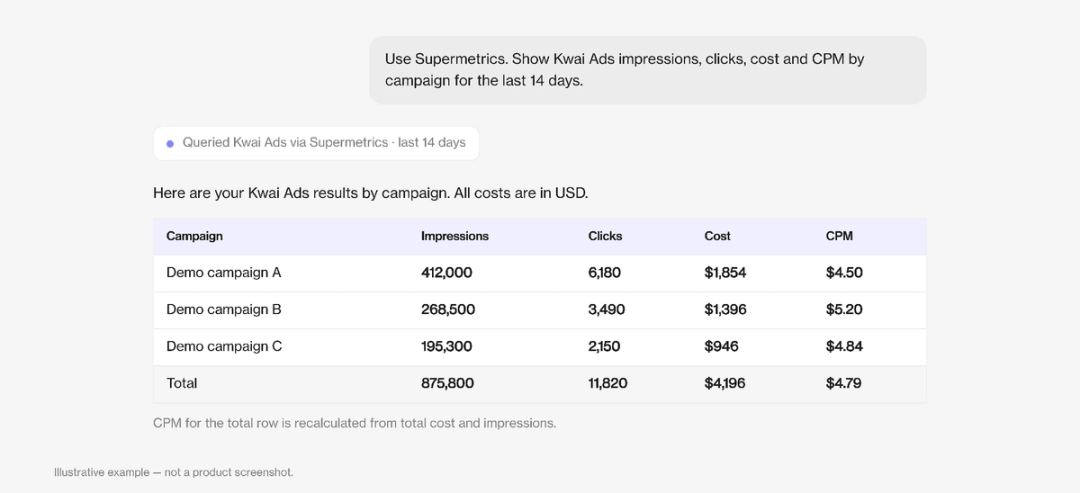
5 Run a small query. Kwai Ads needs a date range, so try: “Use Supermetrics. Show Kwai Ads impressions, clicks, cost and CPM by campaign for the last 14 days.”
 6
Check the results. Check one campaign against Kwai’s own reporting before you widen to video plays, conversions and retention. See How do you check Claude’s Kwai Ads numbers?
Building your own agent or n8n workflow instead? Use the standalone Supermetrics MCP server, which needs a Supermetrics subscription with API access. For more setup help, see the AI tools connection guide.
What can you ask Claude about Kwai Ads?
Replace the dates, account and campaign names with your own.
| Goal | Prompt | What you get | Fields used |
|---|---|---|---|
| Reporting | Use Supermetrics. Show Kwai Ads impressions, clicks, cost and CPM by campaign for the last 14 days. | One row per campaign, with cost in USD | campaign_name, impressions, clicks, cost, cpm |
| Reporting | Use Supermetrics. Which apps and countries took the most Kwai Ads spend this month so far? Rank them by cost. | Apps and countries ranked by spend | app_name, country_code, cost, impressions |
| Diagnosis | For each video in my main Kwai Ads account, how many plays reached 3 seconds, 25%, 50%, 75% and completion in the last 30 days? | A drop-off curve for each video | video_id, video_plays_3s, video_plays_25, video_plays_50, video_plays_75, video_completions |
| Comparison over time | Compare Kwai Ads cost per registration by campaign this week against last week. | Each campaign’s cost per registration for both weeks | campaign_name, cost_per_registration, registration |
| Cross-source | Put Kwai Ads cost by day for the last 30 days beside cost by day from my other short-video ad source. | Two daily cost series, side by side | cost, date, plus the other source’s cost field |
| Action | Build a dashboard of Kwai Ads cost, completions and conversions by campaign for the last 30 days and push it to Supermetrics Studio. | A Studio dashboard | cost, video_completions, conversions |
More example prompts
| Goal | Prompt | What you get | Fields used |
|---|---|---|---|
| Diagnosis | Which Kwai Ads ad sets had a high CTR but a low conversion rate in the last 30 days? | A shortlist of ad sets to review | ad_set_name, ctr, conversion_rate |
| Diagnosis | Which operating system had the highest Kwai Ads cost per conversion last month? | Operating systems ranked by CPA | operating_system, cpa, conversions |
| Comparison over time | Compare day 1 retention by campaign for the last 30 days against the 30 days before. | Retention by campaign for both periods | campaign_name, total_day_one_retention, total_day_one_retention_rate |
| Cross-source | Compare Kwai Ads app launches by day for the last 14 days with installs from my mobile attribution source. | Daily launches next to daily installs | app_launch, date, plus the attribution source’s installs field |
Note: you can view and share Studio dashboards with AI chats. Editing them needs a Studio destination subscription.
More patterns are in the AI chats use cases.
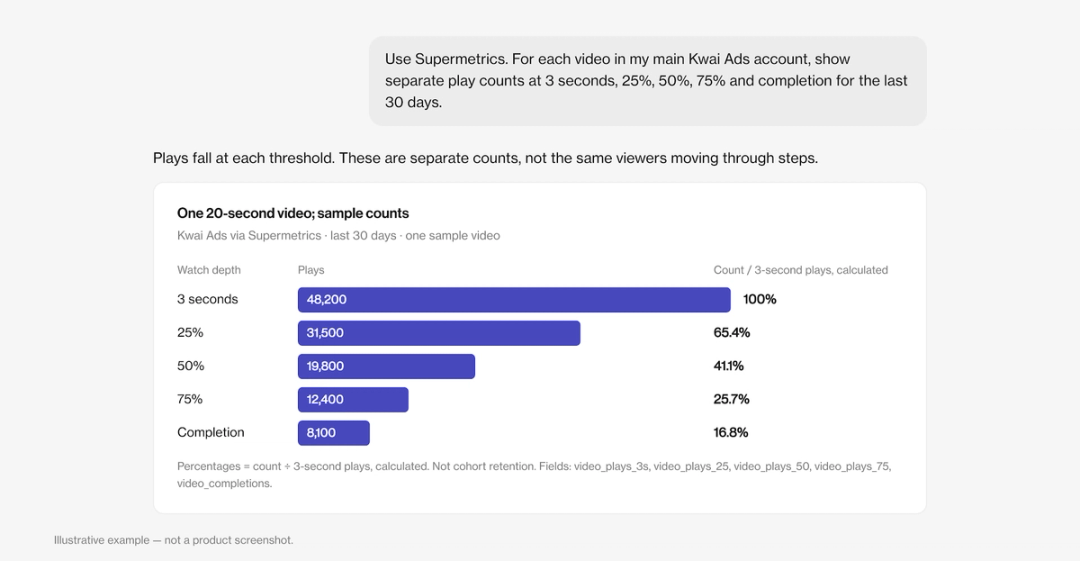
What can you do with Kwai Ads data in Claude?
You can use it to:
See where viewers stop watching each video
Compare plays at 3 and 5 seconds, at 25%, 50% and 75%, and at completion.
See which funnel step costs most
Line up registrations, add-to-carts, content views and purchases with the cost of each.
Check whether installs stick
Compare app launches, key in-app events and day 1 retention by campaign.
Spend by app and country
See where spend lands by app and country.
Cheapest operating system
Find the operating system that converts cheaper, using conversions, cost per conversion and cost.
Top campaigns and ads
See which campaigns, ad sets and ads perform best on CTR, CPM and conversion rate.
The video drop-off and install retention tasks are most useful if you run short-video or app-install campaigns.
How do you combine Kwai Ads with other data in Claude?
Kwai Ads can share a chat with your other Supermetrics sources. Here are four ways to combine them:
Kwai vs TikTok
Put Kwai cost and conversions next to another short-video platform’s by day, with TikTok Ads in Claude.
Launches and installs
Compare Kwai app launches with attributed installs by date, with Adjust in Claude.
Ad quality check
Check ad quality with DoubleVerify verification data for the same days, if DoubleVerify is available in your Supermetrics setup. Its Claude page sets out a destination caveat to check first.
Audio and video cost
Compare audio and video cost and delivery by week, if Spotify Ads is available in your Supermetrics setup (its page).
Two sources join only on a shared dimension. Date works, but campaign names match only when both platforms use identical names, and Supermetrics doesn’t create that match. Check each source’s currency before adding costs together (see Limits and data notes).
What Kwai Ads data can Claude query?
Some Kwai Ads fields can’t be combined in one query. Each field can belong to one or more of four report types, and fields with no report type work in all of them. There’s no report type setting to choose, and every query needs a date range.
Supported report types
Supermetrics lists 104 Kwai Ads fields: 75 metrics and 29 dimensions.
| Report type | What it covers | Example field IDs |
|---|---|---|
| basic | Campaign, ad set and ad level delivery, cost and conversion events | campaign_name, ad_set_name, ad_name, registration, add_to_cart |
| video | Video-level play depth and conversions by video ID | video_id, through_plays, video_plays_25, video_plays_75, content_view |
| app_country | Spend and delivery by app and country | app_name, app_id, country_code |
| operating_system_report | Delivery split by operating system | operating_system, country_code |
| All report types | Delivery, cost, ratios, headline conversions and early video plays | impressions, clicks, cost, cpm, conversions, video_plays_3s, video_completions |
Limits and data notes
| Situation | What happens | What to do |
|---|---|---|
| Date range | Every query needs one | State the period, and ask Claude to show its query |
| History depth | Check how far back your data goes before you rely on it | Test a long date range, and see the connection guide |
| Dataset permissions | Each account reaches only the datasets Kwai has approved | See Kwai Ads under Before you start |
| Report types | Some fields can’t be combined in one query. campaign_name is basic only, video_id is video only, and operating_system is operating_system_report only. country_code works in every type except video | Ask for them in separate queries and compare the results by date |
| Currency | cost is in USD, with EUR and GBP versions | Use cost_eur or cost_gbp, or add account_currency |
| Non-aggregatable metrics | Ratios and cost-per fields are pre-aggregated at the source | Ask for the grouping you need instead of summing rows |
| Several accounts | Claude asks which Kwai account to use | Name the account in your prompt, or answer Claude’s question |
| Invalid accounts | The exclude_invalid_accounts setting ignores disabled and inaccessible accounts | Turn it on to prevent errors, knowing those accounts drop out of results |
| Writes | Claude can read Kwai Ads data but can’t change budgets, pause campaigns or upload creatives | Make campaign changes in Kwai |
| Time zone and refresh | Supermetrics doesn’t document them for Kwai Ads | Ask Claude which date field it used |
What do the main Kwai Ads fields mean?
| Field ID | Plain-English meaning | Type | Watch out |
|---|---|---|---|
| cost | Total spend in USD | Metric | cost_eur and cost_gbp are converted versions |
| account_currency | The currency the account uses | Dimension | Add it to see the account’s own currency |
| ctr | Click-through rate | Metric | Non-aggregatable, so don’t average rows |
| cpm | Cost per 1,000 impressions | Metric | Non-aggregatable |
| conversions | Total conversions | Metric | Separate from named events such as registration |
| cpa | Cost per conversion or acquisition | Metric | Non-aggregatable |
| video_plays_3s | Plays that reached 3 seconds | Metric | Available in every report type |
| video_completions | Video plays that reached the end | Metric | Pair with video_plays_25 and video_plays_75 to see the drop-off |
| through_plays | Applies to videos 15 seconds or shorter | Metric | Tagged basic and video only |
| video_id | ID of the ad video | Dimension | Video report only |
| operating_system | Operating system, returned as a code (0 = Unknown system, and so on) | Dimension | Ask Claude to translate the codes |
| total_day_one_retention | Total day 1 retention | Metric | Tagged basic and video only. Its rate field is non-aggregatable |
What is the Kwai Ads MCP connector for Claude?
The Supermetrics connector lets Claude read your Kwai Ads data over the Model Context Protocol (MCP). MCP is an open standard for letting AI applications call outside tools and data (modelcontextprotocol.io). When you ask about your campaigns, Claude selects the fields, Supermetrics fetches them from Kwai, and Claude shows the results.
Supermetrics describes this source as ad campaign performance data from Kwai, a short video-sharing app. Claude can read delivery and cost, conversion events and video play depth, plus splits by app, country and operating system.
Use AI chats to ask questions in Claude. For custom agents, n8n workflows or other MCP clients, use the standalone Supermetrics MCP server.
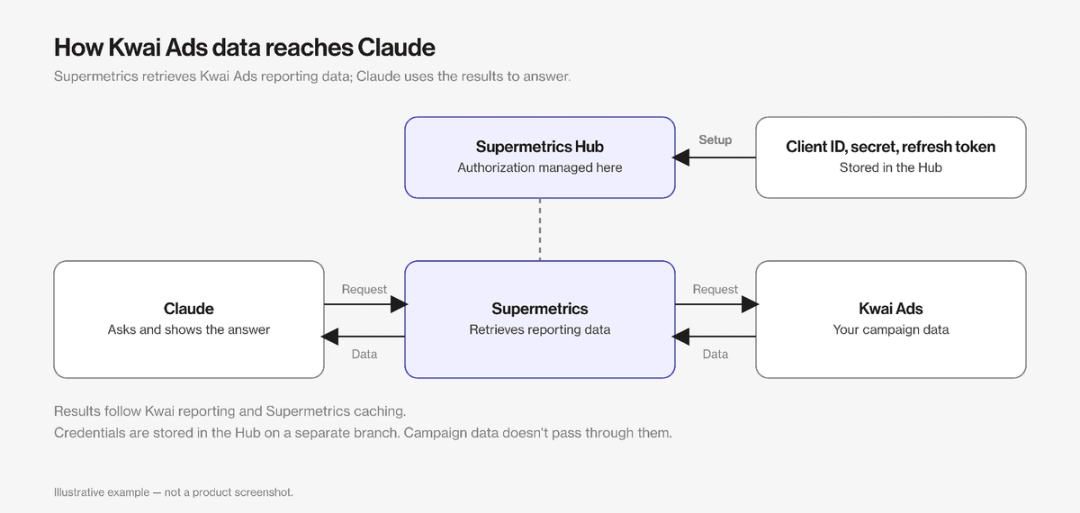
Which way should you connect Kwai Ads to Claude?
Supermetrics has two routes into MCP. AI chats is the connector for Claude on this page, so you set up no MCP yourself. The Supermetrics MCP server is a separate product for technical users with n8n flows, custom agents or any MCP-compatible host.
If chatting with your data in Claude is the goal, the Supermetrics docs steer you to AI chats.
| Approach | Setup effort | Data scope | Blending with other sources | Suits |
|---|---|---|---|---|
| Supermetrics connector for Claude | Small: add the connector, enter Kwai’s credentials once | Kwai Ads and the other sources in your Supermetrics account | Yes, in one chat | Performance marketers who want fast answers in chat |
| Supermetrics MCP server (custom client) | Moderate: you operate an MCP host | The same sources | Yes, if your agent merges results | Developers building agents or automations |
| CSV export and upload | Small, but repeated each time | One file per upload | Only if you merge the files | A quick one-time check |
| Direct API and custom code | Large: you build, host and maintain it | Whatever you build | Whatever you build | Teams with an engineer and a very specific need |
Choose the Supermetrics connector for Claude if you want Kwai answers in chat with no code, or Kwai cost beside other short-video or app data.
Choose the MCP server if your analysis runs in an agent you host.
Choose CSV or the API if you want a single snapshot (CSV) or a pipeline you fully control (API).
To use Kwai Ads data in another MCP client, set up the standalone MCP server. It’s open to anyone with a valid Supermetrics subscription that includes Supermetrics API access, and it doesn’t need an AI chats destination. Setup is at mcp.supermetrics.com and in the MCP server doc.
When is this not the right tool?
- To change campaigns or budgets, work in Kwai. Claude has no write route for this source.
- For creative-level assets or thumbnails, check what Kwai itself offers. The fields return IDs and metrics only.
- To keep stored history for repeated analysis, load it into a warehouse with Kwai Ads to BigQuery.
- For a dashboard that refreshes on a schedule, use Kwai Ads in Looker Studio.
- If your team lives in spreadsheets, try Kwai Ads in Google Sheets.
To ask Claude about other sources alongside Kwai Ads:
- Connect Spotify Ads to Claude for audio campaign data, if Spotify Ads is available in your Supermetrics setup.
- Connect DoubleVerify to Claude for verification data, subject to the destination caveat on that page.
- Supermetrics for Claude lists every source you can ask Claude about.
How do you check Claude’s Kwai Ads numbers?
Run these checks on your first queries, and again whenever a figure looks off. Each row also names a common reason numbers differ.
| Check | What to look for |
|---|---|
| Date range and account | Both match your question |
| One campaign’s cost | It matches Kwai’s own reporting for the same dates |
| Currency | Which of cost, cost_eur or cost_gbp Claude used. Reading cost in the wrong currency is a common cause of mismatches |
| Rates | ctr or conversion_rate came straight from a query at that grouping. Rates averaged by hand won’t match |
| Report type | Whether the metric is tagged to basic and video only. Event counts compared across report types often differ |
| Skipped accounts | Whether exclude_invalid_accounts dropped some accounts from the results |
| The query itself | Ask Claude to show the query and the fields it used |
Troubleshooting
| Symptom | Likely cause | Fix |
|---|---|---|
| LICENSE_NOT_FOUND | An earlier email address or another team is in use | Confirm the email and team that match the paid subscription, then disconnect and reconnect Supermetrics in Claude’s Connectors |
| Claude uses the wrong team, or ignores Supermetrics | A different team was chosen at first login, or other data tools are connected | Reconnect Supermetrics in Connectors, pick the right team, and write “use Supermetrics” in your prompt |
| “No accounts found” | The credentials entered don’t reach a Kwai account | Use the docs article “How to fix No accounts found errors”, then check the credentials with your Kwai contact |
| Kwai Ads isn’t authorized | The Hub login hasn’t been made, or needs entering again | Ask Claude for the login link, or enter the credentials again in the Hub |
| You can’t start because you have no credentials | Kwai hasn’t issued a client ID, client secret and refresh token | Ask your contact at Kwai to create and share all three |
| A report returns nothing or an access error | Kwai may not have granted that dataset to the account | Request permission from Kwai for every dataset you want in Supermetrics |
| Errors from disabled or inaccessible accounts | Some accounts in the list can no longer be reached | Turn on exclude_invalid_accounts, accepting that they drop out |
| A field returns nothing next to another | The two fields belong to different report types | Query them separately, for example campaign_name and operating_system |
| Still stuck | Something else | Contact support through the Supermetrics Hub |
If a working query stops, re-enter the credentials in the Hub first.
Is it safe? Security and data handling
- A query fetches only the fields you ask for and returns the rows to Claude, so results are visible in the chat. Spend and conversion data is commercially sensitive, so share the chat with care.
- Claude reads Kwai Ads through Supermetrics and can’t change budgets, pause campaigns or upload creatives. The only write-like action is pushing a dashboard to Supermetrics Studio.
- Enter the client ID, client secret and refresh token in the Hub, never in a chat. Treat the secret and the token like passwords.
- AI chats data-source connections are shared by default. Team members assigned to the subscription can use shared logins, so review team membership and subscription access before connecting client accounts. Anyone who can open the Claude chat can see its returned results.
- Anyone who can open the chat sees what Claude returned.
- How Anthropic stores and uses chats depends on your Claude plan and organization settings, outside Supermetrics.
- For policies and certifications, see the Supermetrics Trust Center.
Related connectors
Send Kwai Ads data to BigQuery to keep campaign history in a warehouse
Report on Kwai Ads in Looker Studio for video campaign dashboards
Analyze Kwai Ads in Google Sheets for spreadsheet views of cost and conversions
Connect Spotify Ads to Claude for audio campaign data if Spotify Ads is available in your Supermetrics setup
Connect DoubleVerify to Claude for verification data, subject to the destination limits described on that page
Supermetrics for Claude for a list of supported data sources
FAQ
-
It’s a Model Context Protocol endpoint that lets an AI client read Kwai Ads data. In Claude, the Supermetrics connector handles it for you. For the standalone server, see Which way should you connect Kwai Ads to Claude?
-
Supermetrics doesn’t document an official Kwai Ads MCP. The Supermetrics connector reads Kwai Ads through Supermetrics report types and fields, and sits next to your other ad sources in the same chat.
-
Yes. Add Supermetrics through Claude’s Connectors directory. The remote connector works on the web, in Claude Desktop and in Claude Code, subject to your account and organization settings. The standalone Supermetrics MCP server is a separate option for custom integrations and requires a subscription with API access.
-
No. Claude can read Kwai Ads data but can’t change budgets, pause campaigns or upload creatives. Make those changes in Kwai.
-
A client ID, a client secret and a refresh token, which your contact at Kwai creates and shares with you. Ask for access to every dataset you plan to use at the same time.
-
Kwai may not have granted the account that dataset, so check with your Kwai contact. If you combined fields from different report types, such as campaign_name with operating_system, split the question into two queries.
-
It can show cost in USD, or the converted cost_eur and cost_gbp. Those are the only converted cost fields, and account_currency reports the account’s own currency as a dimension.
-
Each question runs a new Supermetrics query. How soon new delivery appears depends on Kwai.
-
Yes. The Hub asks you to name each account you add, and Claude asks which one to use, or you can name it in your prompt. Supermetrics doesn’t document a limit on how many accounts you add.
-
Starting is free: a trial is created at login. Ongoing use needs an AI chats destination on your Supermetrics plan. If your plan doesn’t have one, upgrade or swap an existing destination, and see pricing.
-
For Supermetrics policies, see the Supermetrics Trust Center. Anthropic’s handling depends on your Claude plan and settings, so check Anthropic’s terms for your plan.