Connect Yahoo DSP to Claude
Connect Yahoo DSP to Claude with Supermetrics and turn your Yahoo DSP data into answers, reports, and next steps without leaving Claude.
Don’t take our word. Try it free today.
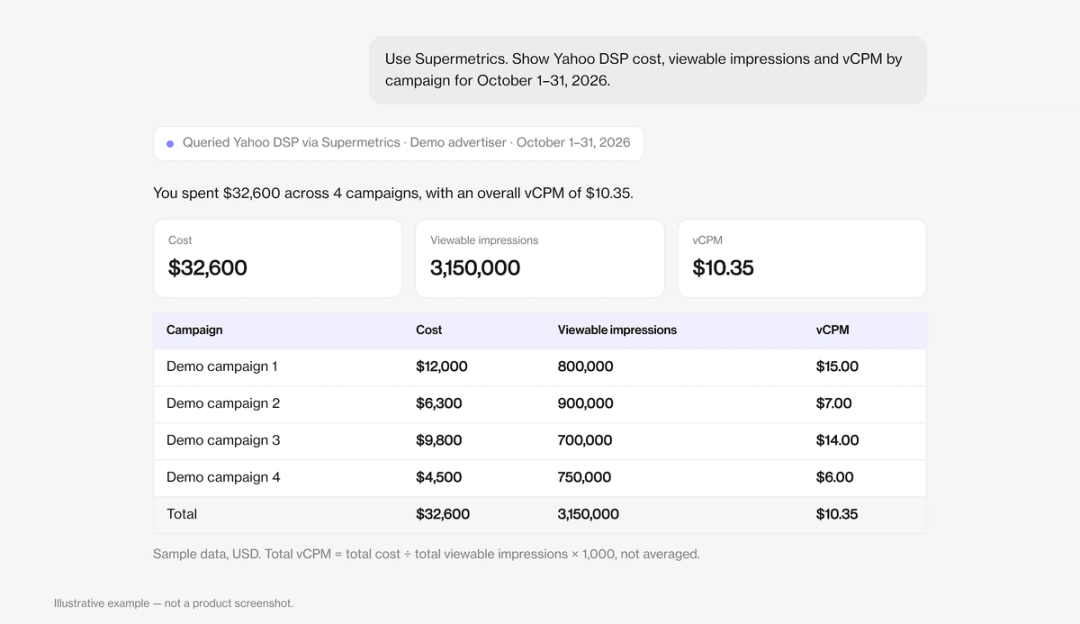
At a glance
What it does
Claude can answer questions about Yahoo DSP delivery, spend, fees, viewability, video completion, CTV reach and conversions through the Supermetrics connector.
What you need
You need API access to Yahoo DSP, including a client ID and a client secret.
Accounts are Advertisers
Supermetrics calls each Yahoo DSP account you can query an Advertiser.
Read-only
Claude can read Yahoo DSP data but can’t change lines, bids or budgets.
Before you start
Claude
You need a Claude plan that lets you add connectors. Anthropic explains remote connectors in its custom connectors article.
Supermetrics
If you don’t have a subscription, signing in creates a trial, so you can try the connector first. If you already pay for Supermetrics, check the Supermetrics Hub for an AI chats destination. If it’s missing, upgrade or swap a destination, and see the pricing page for current plans.
Yahoo DSP
You need API access to Yahoo DSP, including a client ID and a client secret. Without them, the connection can’t start. The Yahoo DSP connection guide links to Yahoo’s own documentation on getting that access.
Ask whoever administers your Yahoo DSP account to issue API credentials. If a colleague holds the credentials, the Hub can share an authentication link so they can connect on your behalf.
Start here
How do you connect Yahoo DSP to Claude?
 1
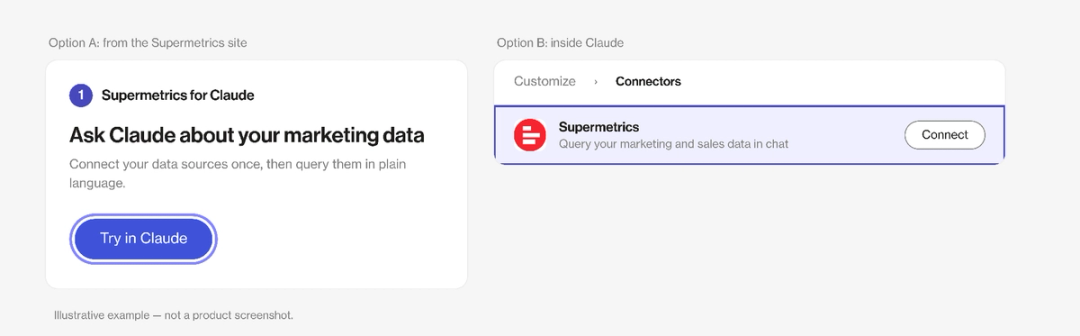
Add Supermetrics to Claude. Press Try in Claude on the Supermetrics for Claude page, or find Supermetrics in Claude under Customize, then Connectors.
 2
Pick your team. Log in to Supermetrics and select your team. If you don’t have a subscription, your trial starts here.
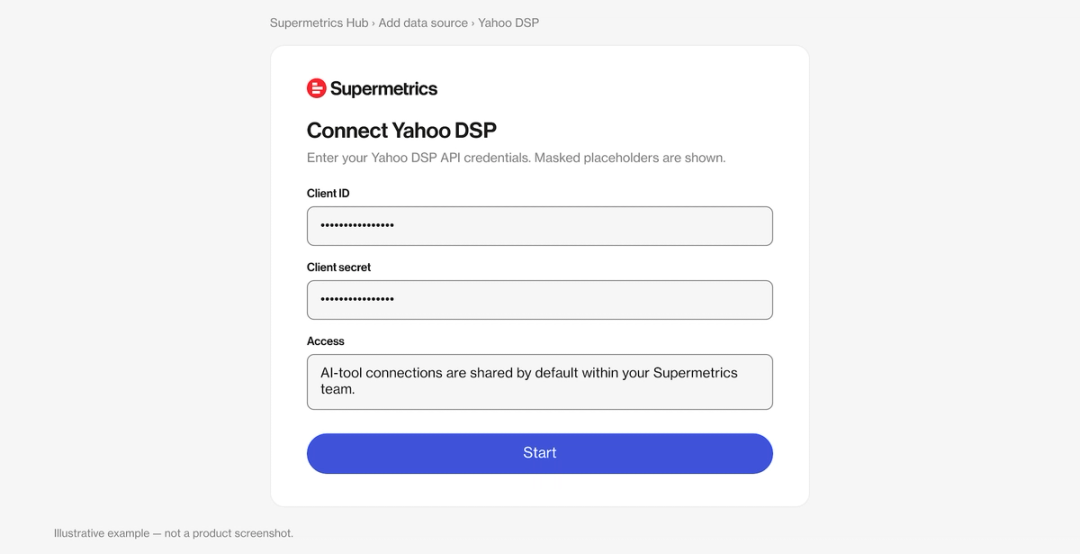
3 Connect Yahoo DSP in the Hub. Open the login link from Claude, or find Yahoo DSP in the Supermetrics Hub. Enter your client ID and client secret and click Start, then select the Advertiser to pull from.
 4
Tell Claude what to use. Start your prompt with “use Supermetrics” when more than one data tool is connected. Then ask Claude to list your Yahoo DSP Advertisers and pick one.
5 Try a first query. Run one small query with a date range, because every Yahoo DSP query needs one. Try: “Use Supermetrics. Show Yahoo DSP cost, impressions and clicks by campaign for the last 14 days.”
6 Check the results. Compare the totals with the Yahoo DSP reporting screen for the same dates, using the checks below. When they match, ask about viewability, video completion, fees or CTV reach, or ask Claude for a dashboard.
Building your own agent or n8n workflow instead? Use the standalone Supermetrics MCP server, which needs a Supermetrics subscription with API access. For more setup help, see the AI tools connection guide.
What can you ask Claude about Yahoo DSP?
Edit the dates and campaign filters to match your account before you send these.
| Goal | Prompt | What you get |
|---|---|---|
| Reporting | Use Supermetrics. Show Yahoo DSP cost, impressions, clicks and CTR by campaign for October 1–31, 2026. | A table with one row per campaign |
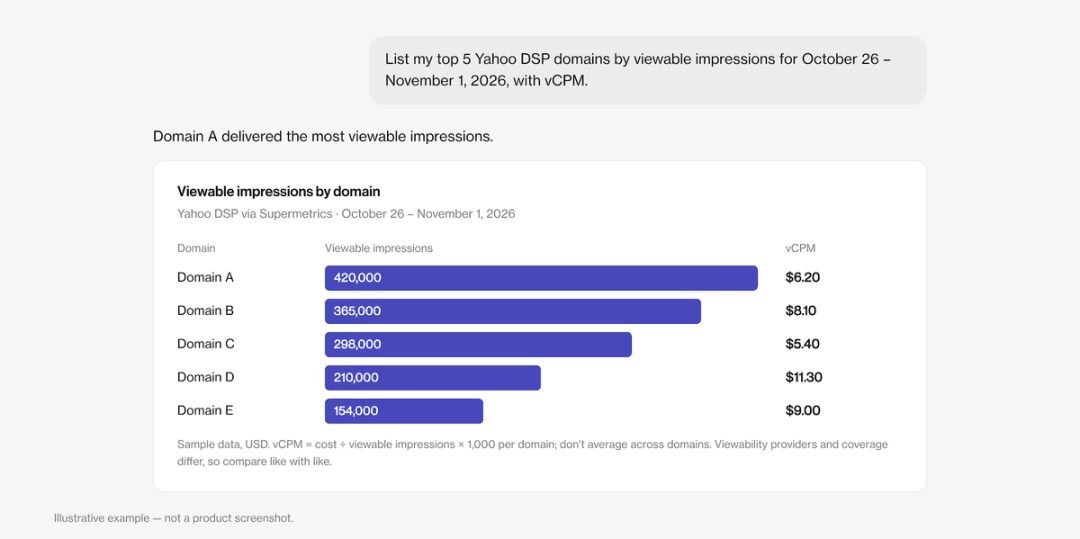
| Reporting | List my top 15 Yahoo DSP domains by viewable impressions for October 26 – November 1, 2026, with vCPM. | A ranked list of domains with viewable impressions and vCPM |
| Reporting | Show cost next to total budget for each campaign with “Q4” in its name, since October 1, 2026. | Each campaign’s spend beside its set budget |
| Diagnosis | Which publishers had high cost but a low viewable share of measurable impressions in October 2026? | Publishers with their cost, viewable impressions and measurable impressions |
| Comparison over time | Compare click-through conversions with view-through conversions by week for October 2026. | A weekly table with both conversion types |
| Cross-source | Put Yahoo DSP viewable impressions beside the viewability results from my verification source for the same campaigns, by date, for October 2026. | Both sources’ viewability compared by campaign and date |
More example prompts
| Goal | Prompt | What you get |
|---|---|---|
| Diagnosis | Where do viewers stop watching on my CTV video lines in October 2026? Show starts, 50% completions and full completions per line. | A completion table per line |
| Diagnosis | For each campaign in Q3 2026, how much of the estimated billable amount was fees rather than media cost? | A fee breakdown per campaign |
| Comparison over time | Show cost by hour of day for October 26 – November 1, 2026. | An hourly cost table |
| Cross-source | Compare Yahoo DSP cost per click with Spotify Ads cost per click by week for Q3 2026. | A weekly cost-per-click comparison |
For more patterns, see the AI chats use cases.
What can you do with Yahoo DSP data in Claude?
Six tasks fit this connector.
Fee breakdown
Break down fees to see how much of your billable amount is seat, data and order management fees, and what each campaign really costs.
Viewability by publisher
Audit viewability by publisher or domain, comparing viewable and non-viewable impressions with vCPM and the Moat viewability rates.
CTV household reach
Count unique households reached on CTV lines, plus the unique people and viewers each campaign reached.
Video drop-off
Find where video viewers drop off by comparing video starts, quartile completions and full completions with cost per completed view.
Spend without delivery
Find sites and placements that spend without delivering, broken down by publisher, domain, package and layout.
View-through conversions
See how many conversions came from views rather than clicks, including cross-device conversions and conversion value.
How do you combine Yahoo DSP with other data in Claude?
Yahoo DSP can share a chat with other sources in your Supermetrics account. Each pairing below answers a specific question.
Verification gap
Find the verification gap by comparing Yahoo DSP’s own viewable and Moat figures with DoubleVerify in Claude results for the same campaigns.
Audio vs programmatic clicks
Use Spotify Ads in Claude to see whether audio or programmatic buys deliver the cheaper click.
Cost per session by channel
Compare cost per session by channel by setting Yahoo DSP cost beside Google Ads, Microsoft Advertising or LinkedIn Ads spend, then adding GA4 sessions.
Yahoo DSP and another source join only on a shared dimension. Date works for every source. Campaign names match only when both platforms use identical text, and Supermetrics doesn’t build that match for you.
What Yahoo DSP data can Claude query?
Supermetrics lists 102 Yahoo DSP fields: 43 metrics and 59 dimensions. A query always needs a date range.
| Field group | What it covers | Example field IDs |
|---|---|---|
| Delivery | Impressions, clicks and response rates | impressions, clicks, ctr, unique_viewers |
| Spend and fees | Media cost, publisher payments, seat and data fees, billable amount | cost, publisher_earnings, seat_tech_fee, yahoo_data_fees, estimated_billable_amount |
| Viewability | Measurable, viewable and non-viewable impressions, including Moat | viewable_impressions, vcpm, moat_viewability_rate, non_viewable_impressions |
| Video and CTV | Starts, quartiles, completions, households and people | video_views, video_completions_50, vcr, unique_households, unique_people |
| Conversions | Click, view and cross-device conversions and value | conversions, click_conversions, view_conversions, conversion_value, cvr |
| Structure | Advertiser, campaign, line, ad and creative, with budgets | advertiser, campaign, line, creative, campaign_total_budget |
| Audience and geography | Country, region, city, postal code, age and gender | country, region, city, postal_code, age |
| Inventory and tech | Publisher, domain, package, layout, device, browser and OS | publisher_name, domain, package_name, device_category_name, browser_type_name |
| Targeting and pixels | Segment groups and conversion rules | target_segment_groupa_name, pixel_name |
Field glossary
| Field ID | Plain-English meaning | Type | Watch out |
|---|---|---|---|
| measurable_impressions | Impressions that could be measured for viewability | Metric | Use it as the denominator for a viewable share |
| viewable_impressions | Impressions counted as viewable | Metric | Compare with moat_viewable_impressions rather than adding them |
| vcpm | Cost per thousand viewable impressions | Metric | A rate, so see rates before you total it |
| cpcv | Cost per completed video view | Metric | A rate, so see rates before you total it |
| cost | Media cost | Metric | See cost versus billable amount |
| profit | Network profit | Metric | Check the value against Yahoo DSP before you report it |
| unique_households | Unique households reached on CTV lines | Metric | Don’t add campaigns together (see unique counts) |
| conversion_value | The ROAS conversion value | Metric | Monetary, so state the currency |
| video_views | Video view starts, the number of times a video was started | Metric | Not completed views, which are video_completions |
| campaign_total_budget | The total budget allocated to the campaign | Dimension | This is the campaign’s set budget, so the same value shows on every row |
| advertiser_currency | The currency used by the advertiser | Dimension | See currency |
| hour | Hour of the day | Dimension | Use short date ranges |
What is the Yahoo DSP MCP connector for Claude?
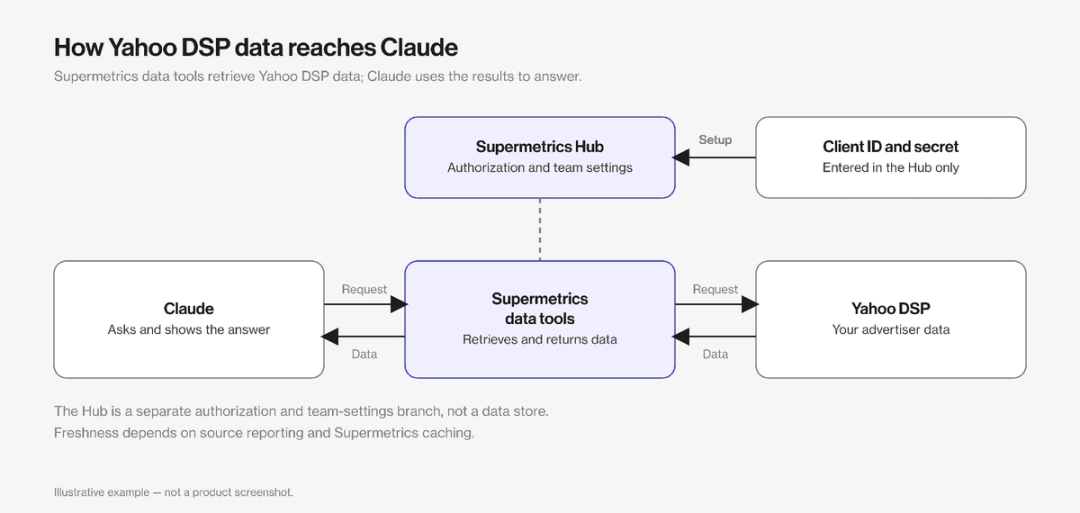
The Yahoo DSP MCP connector for Claude is the Supermetrics connector that lets Claude read your Yahoo DSP data through the Model Context Protocol (MCP).
MCP, short for Model Context Protocol, is an open standard that lets AI applications reach outside tools and data (modelcontextprotocol.io). The Supermetrics connector is one of those tools. When you ask about your Yahoo DSP line items:
Use AI chats to ask questions in Claude. For custom agents, n8n workflows or other MCP clients, use the standalone Supermetrics MCP server.
Which way should you connect Yahoo DSP to Claude?
Use the Supermetrics connector for quick answers in chat, and pick another route when you need stored tables or data outside the field list.
| Approach | Setup effort | Data scope | Blending with other sources | Maintenance | Suits |
|---|---|---|---|---|---|
| Supermetrics connector for Claude | Low once you hold the client ID and secret | Yahoo DSP plus the other sources in your Supermetrics account | Yes, in one chat | Supermetrics looks after the connection | Planners and analysts who want quick answers |
| Supermetrics MCP server (custom client) | Medium: your own MCP host | Same sources as above | Yes, if your agent merges results | You look after the client | Engineers building agents |
| Yahoo’s own MCP or AI features, if the platform offers them | Depends on the platform | Yahoo DSP only | Not without extra tools | Depends on the platform | DSP-only questions |
| CSV export and upload | Low, but repeated each time | One report at a time | Only if you merge files | You re-run reports | One-off checks |
| Direct API and custom code | High: you build, host and secure it | Whatever you code | Whatever you code | You handle credentials and API changes | Teams with an engineer |
Choose the Supermetrics connector for Claude if you want delivery, fee and viewability answers in chat. It also suits teams that may add another DSP or an ad verification source later.
Choose the Supermetrics MCP server if your workflow lives in n8n or a custom agent.
Choose BigQuery or Sheets if finance or data teams need a stored table, for example to join with finance data. See Yahoo DSP to BigQuery and Yahoo DSP to Google Sheets.
Choose Looker Studio if you want a dashboard that refreshes. See Yahoo DSP in Looker Studio.
Choose the Yahoo DSP API if you need log-level or bid-level data, or anything outside the field list. The connector returns aggregated reporting. For a single snapshot, a CSV export is enough.
How do you check Claude’s Yahoo DSP numbers?
Before you share a figure, pick one campaign and compare its cost with the Yahoo DSP reporting screen for the same Advertiser and dates. Ask Claude to show the query and field list it used. Most gaps come from a fee counted in one figure but not the other. Moat figures read as the DSP’s own and rates averaged by hand cause the rest.
| Situation | What happens | What to do |
|---|---|---|
| Date range | Every Yahoo DSP query needs one | Name the period, and ask Claude to show the query |
| Several Advertisers | Supermetrics lists Advertisers and Claude queries the ones you choose | Name the Advertisers in your prompt, and check they match your intent |
| Currency | advertiser_currency holds each Advertiser’s currency, and cost and fee fields are monetary | State the currency, and don’t add spend across Advertisers that use different currencies |
| Cost versus billable amount | cost is media cost. estimated_billable_amount is media cost plus fees | Say which one you want. To reconcile an invoice, query both with the fee fields |
| Rates and unique counts | CTR, CPA, CPC, CPM, vCPM, CPCV, VCR, the Moat rates and unique_households are non-aggregatable. Each row is right for its own grouping, but summed or averaged rows aren’t | Ask Claude for the grouping you need in the query instead of adding or averaging rows |
| Hourly data | Hourly rows multiply quickly | Ask for a short date range |
| Large results | Big queries can run in the background while Claude checks back for the result | Narrow the dates or fields when an answer is slow |
| Recent days and long history | Each question runs a fresh query through Supermetrics | Compare recent days with Yahoo DSP, and test a long range before you rely on older history |
Troubleshooting
| Symptom | Likely cause | Fix |
|---|---|---|
| LICENSE_NOT_FOUND | Claude is linked to a different email or team from the one on your paid plan | Find the email and team that carry the subscription, disconnect Supermetrics in Claude Connectors, reconnect and pick that team |
| Wrong team’s data, or Claude ignores Supermetrics | The first login chose another team, or a different data connector responded | Reconnect Supermetrics in Claude Connectors with the correct team, and add “use Supermetrics” to the prompt |
| “No accounts found” | The credentials you used don’t reach an Advertiser | Follow How to fix No accounts found errors, then authorize Yahoo DSP again |
| Claude asks you to log in to Yahoo DSP | The Hub has no valid Yahoo DSP connection | Ask Claude for the login link, or reconnect in the Hub, then rerun the question |
| The connection screen wants a client ID and secret you don’t have | You don’t have API access to Yahoo DSP yet | Ask whoever administers your Yahoo DSP account for API credentials |
| Authorization fails after entering credentials | The client ID or secret may not match the API access issued to you | Re-enter both values carefully, or ask Yahoo DSP for the credentials again |
| Claude reports a field combination as unsupported | The time dimension doesn’t fit the other fields in the query | Ask Claude to check the field list and choose a time dimension that fits |
| A query that used to work stops | The Yahoo DSP connection in the Hub has stopped working | Reconnect Yahoo DSP in the Hub, then rerun the question |
| Still stuck | The issue isn’t listed here | Contact support through the Supermetrics Hub |
If a total or an invoice figure looks wrong, see How do you check Claude’s Yahoo DSP numbers?
Is it safe? Security and data handling
- Supermetrics fetches only the fields a query names from Yahoo DSP and returns them to Claude. Limit the connection to the Advertisers you need.
- Your client ID and secret go into the Supermetrics Hub. Don’t paste them into a Claude chat.
- AI chats data-source connections are shared by default. Team members assigned to the subscription can use shared logins, so review team membership and subscription access before connecting client accounts. Anyone who can open the Claude chat can see its returned results.
- Besides reading data, the only action Claude can take here is sending a dashboard to Supermetrics Studio.
- Your Claude plan and organization settings govern how Anthropic handles chat content.
- For policies and certifications, visit the Supermetrics Trust Center.
Related connectors
Send Yahoo DSP data to BigQuery to keep programmatic history in a warehouse
Report on Yahoo DSP in Looker Studio to build dashboards for buying teams
Analyze Yahoo DSP in Google Sheets to keep fee and viewability tables in a sheet
Connect Spotify Ads to Claude to compare audio with programmatic buys
Connect DoubleVerify to Claude to add independent verification results
Supermetrics for Claude to see every source you can ask Claude about
FAQ
-
It’s the MCP connection that lets an AI client pull Yahoo DSP reporting data on request. See What is the Yahoo DSP MCP connector for Claude?
-
This page describes the Supermetrics connector, which reads Yahoo DSP through Supermetrics fields beside your other sources.
-
Yes. Add Supermetrics through Claude’s Connectors directory. The remote connector works on the web, in Claude Desktop and in Claude Code, subject to your account and organization settings. The standalone Supermetrics MCP server is a separate option for custom integrations and requires a subscription with API access.
-
No. Claude reads performance and can’t alter lines, bids or budgets.
-
Each question in chat runs a new query through Supermetrics. Compare recent days with Yahoo DSP before you report them.
-
Yes, as long as your credentials can see them. Supermetrics lists Advertisers and you choose which to query, so an agency can compare clients in a single prompt when each is authorized.
-
You can start without paying, because logging in creates a trial. Ongoing use needs a plan with an AI chats destination, and the pricing page lists plans.
-
It depends on your Claude plan. The Supermetrics docs say Claude Free, Pro, Max and Team accounts use data for training unless you opt out, while Enterprise and API accounts don’t. Check Anthropic’s terms for your plan.
-
An export stores a copy you query later, while the connector queries Yahoo DSP when you ask. See Which way should you connect Yahoo DSP to Claude?
-
Setup is quick once you have your client ID and secret. Getting API access usually takes the longest.
-
cost is media cost, and estimated_billable_amount is media cost plus fees. Query both with the fee fields to reconcile an invoice.
-
Both are non-aggregatable, so each row is right for its own grouping, but adding or averaging rows gives a wrong total. Ask Claude for the grouping you want in the query.