Connect Pinterest Organic to Claude
Connect Pinterest Organic to Claude with Supermetrics and turn your Pinterest Organic data into answers, reports, and next steps without leaving Claude.
Don’t take our word. Try it free today.
At a glance
What it does
Claude answers questions about your organic Pinterest results. The connector reads profile totals, your top pins and daily results for pins you own, including saves, pin clicks, outbound clicks and video plays.
Three report types
The data comes in three report types (Profile, Top pins and Owned pins), and a query can’t mix fields from two types.
Top pins limits
The Top pins report covers 50 pins at most, and it has no date breakdown.
What you need
You need a Pinterest business account with an ad account. Reading a client’s account takes extra access, covered in Before you start.
Before you start
Claude
You need a Claude account that can add connectors. Anthropic’s custom connectors article explains how remote connectors work.
Supermetrics
A subscription isn’t needed to start, because a trial is created at login. If you already pay, you need an AI chats destination in the Supermetrics Hub. Without one, upgrade or swap an existing destination to AI chats.
Sign in with the email and team on your paid plan (how to connect Supermetrics to AI tools). See pricing for plans.
Pinterest Organic
The Pinterest Organic connection guide sets these requirements:
- For your own account, you need a Pinterest business account and an ad account. Log in with the business account, not a personal one.
- For someone else’s account, you must be added as an Employee or Partner to their business account. You also need at least Analyst access to one of their ad accounts.
Start here
How do you connect Pinterest Organic to Claude?
 1
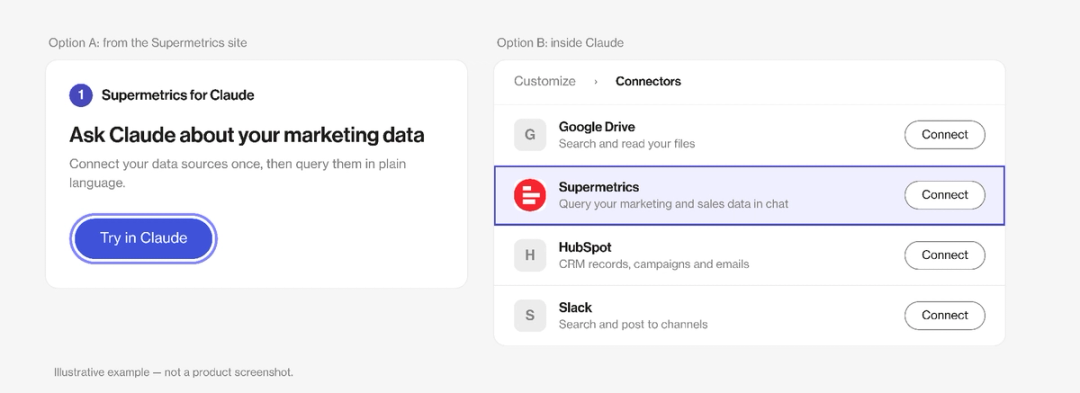
Add Supermetrics in Claude. Open Supermetrics for Claude and click Try in Claude, or go to Customize, then Connectors, and search for Supermetrics.
 2
Choose the team. Sign in to Supermetrics and pick the team to work in. If you have no subscription, a trial begins here.
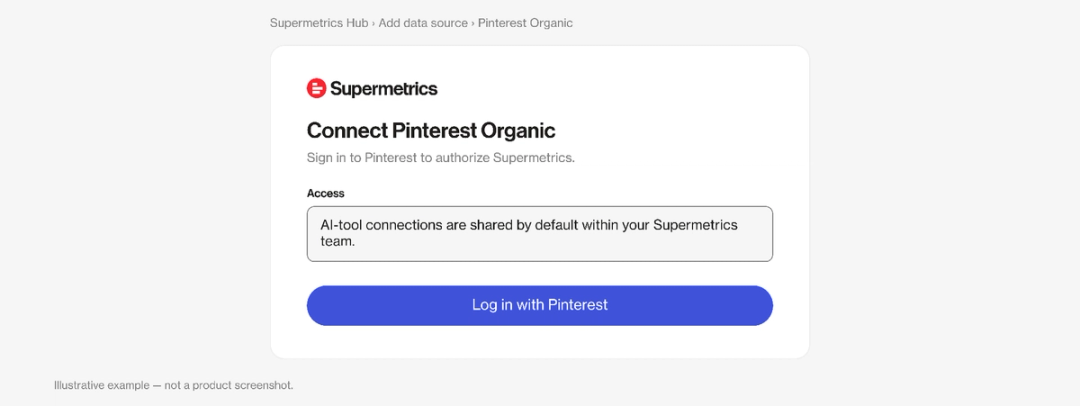
3 Authorize Pinterest. Open Pinterest Organic in the Supermetrics Hub, or use the link Claude gives you. Click Start, log in with your Pinterest business account, click Give access and select the accounts.
 4
Tell Claude to use Supermetrics. If other data tools are connected, write “use Supermetrics” in your prompt so Claude doesn’t pick another one.
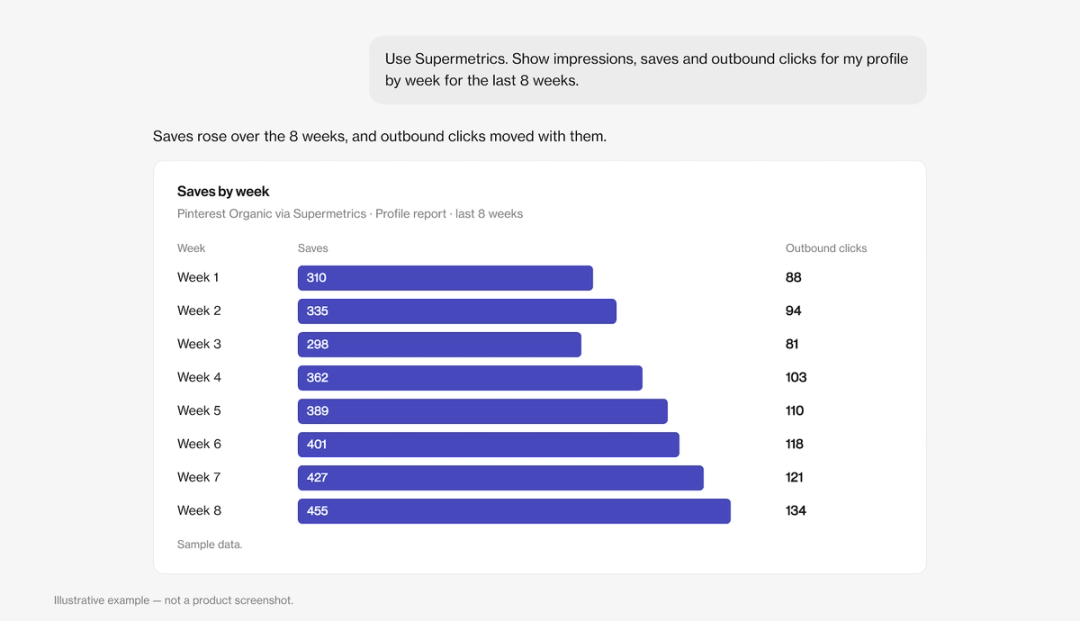
5 Start with a small question. Every report type needs a date range. Try: “Use Supermetrics. Show my Pinterest Organic impressions, saves and outbound clicks by week for the last 8 weeks.”
6 Verify and go deeper. Compare the totals with Pinterest analytics for the same dates. Once they agree, move on to top pins, video plays and metadata, or ask Claude for a dashboard.
Building your own agent or n8n workflow instead? Use the standalone Supermetrics MCP server, which needs a Supermetrics subscription with API access. For more setup help, see the AI tools connection guide.
What can you ask Claude about Pinterest Organic?
Change the dates to suit you.
| Goal | Prompt | What you get |
|---|---|---|
| Reporting | Use Supermetrics. Show impressions, saves and outbound clicks for my profile by week for the last 8 weeks. | A weekly profile table |
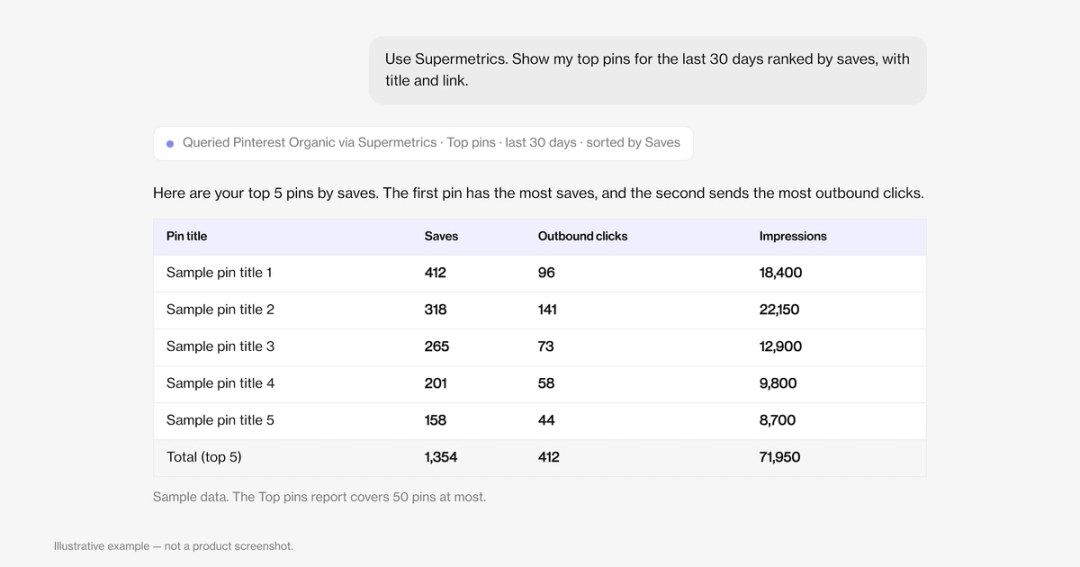
| Reporting | Use Supermetrics. Show my top pins for the last 30 days ranked by saves, with title and link. | Your top pins ranked by saves, with their metrics |
| Reporting | Use Supermetrics. How many followers and boards does my profile have this month, and how many pins do I own? | A short profile summary |
| Diagnosis | Use Supermetrics. Which owned pins got impressions but few outbound clicks in the last 90 days? List their titles and alt text. | A fix list for pins that don’t send traffic |
| Comparison over time | Use Supermetrics. Compare my profile’s saves by month for January–June this year with the same months last year. | A two-year table |
| Cross-source | Use Supermetrics. Compare my daily Pinterest outbound clicks with GA4 sessions from Pinterest for the last 30 days. | Two result sets lined up by date |
More example prompts
| Goal | Prompt | What you get |
|---|---|---|
| Diagnosis | Use Supermetrics. Which of my owned pins from the last 6 months have no description or alt text? | Pins with empty metadata fields |
| Comparison over time | Use Supermetrics. In the last 90 days, did video pins keep viewers longer than image pins? | A comparison by media type |
| Comparison over time | Use Supermetrics. Which dominant colors and media types earned the most saves in the last 90 days? | A ranked table of formats and colors |
| Cross-source | Use Supermetrics. Put organic saves next to paid saves from my Pinterest ad account by week for the last 12 weeks. | An organic and paid view side by side |
More ideas: AI chats use cases.
What can you do with Pinterest Organic data in Claude?
Six tasks fit the connector. Three use pin attributes that only a Pinterest source has.
Rank your best pins
Use the Top pins report and pick the ranking metric: Impressions, Engagements, Outbound clicks, Pin clicks or Saves. Then compare titles, saves and outbound clicks side by side.
Pins missing titles or alt text
Find pins with missing titles or alt text among pins that get impressions but few saves. Owned pins carries each pin’s title, description, alt text and link. Ask Claude for pins with strong impressions but few saves, then list the ones with an empty title or alt text.
Find which formats and colors earn the most saves
Ask Claude to group results by media type and dominant color, then compare saves. Dominant color is a Pinterest-only field.
Review video pins
Owned pins and Top pins both list plays, 10-second plays, 95% completion and average play time. Claude can compare how far people watch.
Track profile growth
The Profile report has followers, pin count and board count next to impressions by date.
Study posting patterns
Each pin carries the date and time it was created. Ask Claude to compare creation weekday and hour with saves.
How do you combine Pinterest Organic with other data in Claude?
Pinterest Organic can join other Supermetrics sources in one chat. Sources line up by a shared field, usually date.
Organic vs promoted pins
Pinterest Ads in Claude lets you compare which pins win organically against the ones you promote.
Pinterest beside other socials
Sprout Social in Claude puts Pinterest engagement beside your other social profiles and posts.
Google profile data
Google My Business in Claude adds Google profile data for businesses with a physical footprint.
Clicks vs sessions
GA4 in Claude lets you compare outbound clicks with sessions to see how many Pinterest visitors reach your site.
Names such as pin titles or campaigns match only when both systems spell them identically. Supermetrics doesn’t create the match for you.
What Pinterest Organic data can Claude query?
Pinterest Organic data comes in three report types, and each query uses one. The types are Profile (user_analytics), Top pins (top_pins) and Owned pins (pin). A date range is required for all three.
| Report type | What it covers | Example field IDs |
|---|---|---|
| Profile | Aggregated organic metrics for all pins plus lifetime profile figures such as followers and boards | user_analytics__user__follower_count, user_analytics__impressions, user_analytics__engagements, user_analytics__saves, user_analytics__user__board_count |
| Top pins | Organic metrics for top pins, ranked by the Sort by setting (see Limits) | top_pins__pin__title, top_pins__impressions, top_pins__closeups, top_pins__saves, top_pins__outbound_clicks |
| Owned pins | Pins you created and saved, with daily breakdowns | pin__title, pin__pin_analytics__impressions, pin__pin_analytics__saves, pin__pin_analytics__outbound_clicks, pin__pin_analytics__date |
| Video fields (Top pins, Owned pins) | Plays, 10-second plays, 95% completion, play time | top_pins__video_mrc_view, pin__pin_analytics__video_10s_view, pin__pin_analytics__video_quartile_95_percent_view |
The listing has 112 fields: 45 metrics and 67 dimensions. The Top pins report has no date dimension. Ad account fields such as user_analytics__ad_account_name appear in all three report types.
Limits, edge cases and data notes
| Situation | What happens | What to do |
|---|---|---|
| Date range | Required for Profile, Top pins and Owned pins | Name the period and ask Claude to show the query |
| Top pins size | The report covers the top 50 pins | Use Owned pins when you need every pin |
| Top pins ranking | The Sort by setting accepts Impressions, Engagements, Outbound clicks, Pin clicks or Saves | Say which ranking you want before the query runs |
| Date breakdown | Top pins has no date dimension | Use Profile or Owned pins for weekly and daily views |
| Mixed fields | Each field belongs to a single report type | Run separate queries and combine the answers in chat |
| Video units | Average play time and total play time differ in unit across Owned pins and Top pins | Ask Claude to convert and label the unit |
| Several accounts | You select accounts at connection. exclude_invalid_accounts hides disabled and inaccessible ones | Name the account in your prompt |
| Pinterest-side activity | Profile includes pins saved by others from claimed accounts | Don’t read profile impressions as only your own pins |
To see how far back your data goes, run a query with a long date range and check what returns.
Field glossary
| Field ID | Plain-English meaning | Type | Watch out |
|---|---|---|---|
| user_analytics__user__follower_count | Followers, listed as Followers | Metric | Profile only |
| user_analytics__user__pin_count | The number of Pins owned | Metric | Profile only. A count of your Pins, not a performance figure |
| user_analytics__impressions | Impressions of your Pins at profile level | Metric | Profile totals, not per pin |
| user_analytics__engagement_rate | The ratio of engagements on a Pin | Metric | Non-aggregatable. Don’t average weekly rows |
| top_pins__saves | The number of times people saved your Pins | Metric | Top pins only, with no date breakdown |
| top_pins__closeups | Close ups: the number of times a Pin was clicked | Metric | Closeups exist in Top pins and not in Owned pins |
| pin__pin_analytics__outbound_clicks | The number of times people performed an outbound click | Metric | Owned pins only |
| pin__pin_analytics__save_rate | Total saves of your Pins as a rate | Metric | Non-aggregatable |
| pin__pin_analytics__video_avg_watch_time | The average time someone spent playing the video | Metric | Owned pins list it without a unit label, Top pins list milliseconds |
| pin__pin_analytics__video_v50_watch_time | Total play time, in minutes in Owned pins | Metric | Non-aggregatable. Top pins report it in milliseconds |
| pin__media_type | The type of media associated with the Pin | Dimension | Use it to split image and video pins |
| pin__created_at_date | The date the Pin was created | Dimension | Not the date the results are for |
What is the Pinterest Organic MCP connector for Claude?
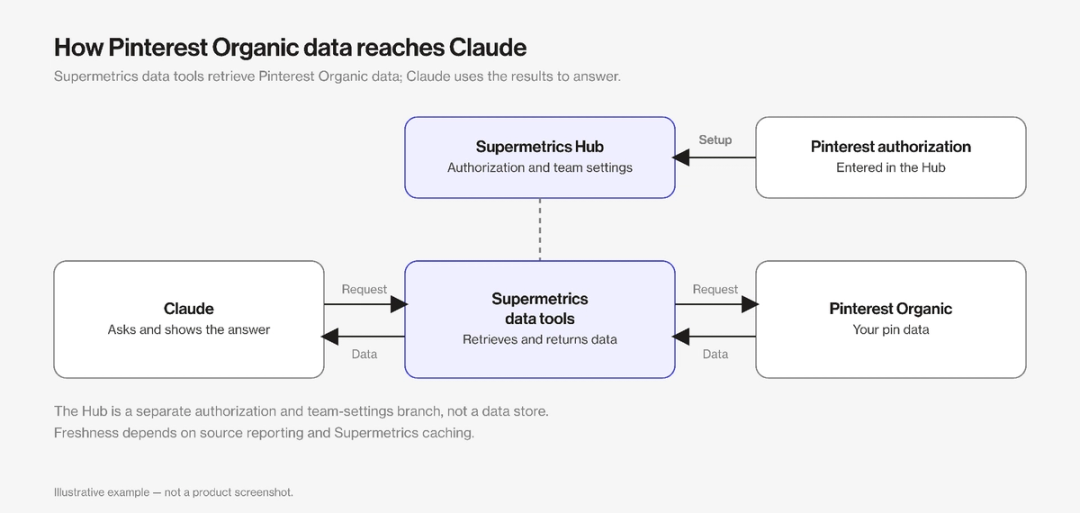
The Pinterest Organic MCP connector for Claude is the Supermetrics connector that lets Claude read your Pinterest Organic data through the Model Context Protocol (MCP).
MCP, short for Model Context Protocol, is an open standard that lets an AI application call tools and fetch data from other systems (modelcontextprotocol.io). The Supermetrics connector for Claude is one such tool. Ask a question about your pins and Claude picks the fields, Supermetrics fetches them from Pinterest, and Claude writes up the result.
What Claude can read is limited to the Pinterest Organic fields Supermetrics lists: profile metrics, pin attributes such as title, description and alt text, and pin performance.
Use AI chats to ask questions in Claude. For custom agents, n8n workflows or other MCP clients, use the standalone Supermetrics MCP server.
Which way should you connect Pinterest Organic to Claude?
Use the Supermetrics connector for Claude when you want pin performance answered in chat, or next to paid Pinterest, analytics or other social data.
| Approach | Setup effort | Data scope | Blending with other sources | Suits |
|---|---|---|---|---|
| Supermetrics connector for Claude | Low: add the connector, log in to Pinterest | Pinterest Organic plus the other sources in your Supermetrics account | Yes, in one chat | Social and content marketers who want answers in chat |
| Supermetrics MCP server (custom client) | Medium: you run your own MCP host | The same sources | Yes, if your agent merges results | Engineers wiring data into agents |
| Pinterest’s own AI or MCP features, if the platform offers them | Depends on the platform | Pinterest only | No, unless you add tools | Questions that stay inside Pinterest. The Pinterest API documentation shows what exists |
| CSV export and upload | Low, but manual each time | One report per file | Only if you merge files yourself | A quick look at one report |
| Direct API and custom code | High: you build, host and maintain a script | Whatever you code | Whatever you code | Teams with a developer who need full control |
When is this not the right tool?
- To schedule or publish pins, use Pinterest’s own tools.
- For a stored history you query with SQL, load it with Pinterest Organic to BigQuery.
- For reports on a schedule, build the view in Pinterest Organic for Looker Studio.
- If you work in spreadsheets, use Pinterest Organic in Google Sheets.
How do you check Claude’s Pinterest Organic numbers?
Check how Claude built the query first, then compare a number with Pinterest. Ask Claude to show the query, the Sort by setting and the field IDs it used.
| Check | What to look for |
|---|---|
| Report type, date range and account | All three match your question |
| One total against Pinterest analytics | A figure such as weekly impressions matches Pinterest analytics for the same dates |
| Field report types | Each field comes from the report type you expect (see the Field glossary) |
| Top pins ranking | The Sort by setting matches the ranking you asked for |
| Profile and pin totals compared | Profile includes saves from claimed accounts, while Owned pins covers pins you created and saved |
| Rates added together | A non-aggregatable rate, such as save rate, wasn’t summed |
| Top pins size and video units | Both have known limits, listed in Limits, edge cases and data notes |
Troubleshooting
| Symptom | Likely cause | Fix |
|---|---|---|
| LICENSE_NOT_FOUND | The connection uses another email or team than the paid subscription | Confirm the email and team of the paid plan, disconnect Supermetrics in Claude Connectors, reconnect and choose that team |
| Claude pulls from the wrong team, or ignores Supermetrics | A different team was picked at first login, or other data tools are connected | Reconnect with the right team in Connectors and add “use Supermetrics” to your prompt |
| “No accounts found” | The login has no Pinterest account Supermetrics can read | Follow the docs article “How to fix No accounts found errors” and reconnect with the right Pinterest login |
| Pinterest Organic isn’t authorized | The Hub connection is missing or needs renewing | Ask Claude for the Pinterest Organic login link, or reconnect in the Hub, then rerun |
| Pinterest says “We did not find any accounts” | You logged in with a personal account, or the business account has no ad account | Log in with the business account and create an ad account for it |
| Another business’s organic data won’t load | You don’t have the client access listed in Before you start | Ask the owner to grant that access |
| A query combining top pin and profile fields fails | The fields belong to different report types | Split it into two queries, one per report type |
| An older connection stopped working | A new connector version released on June 1, 2023 changed authentication, which may affect older connections | Reconnect Pinterest Organic in the Hub and rerun |
| Still stuck | Something else | Contact support through the Supermetrics Hub |
When a working query stops, reconnect Pinterest Organic in the Hub first.
Is it safe? Security and data handling
- For each question, Supermetrics fetches the fields you asked for from Pinterest and returns them to Claude.
- Claude can only read Pinterest Organic data. It can’t publish, edit or delete pins. The one write-like action is a dashboard pushed to Supermetrics Studio.
- Profile figures and performance numbers are business data. Share a chat only with people who should see them.
- You authorize access by logging in to Pinterest in the Hub and clicking Give access. Agencies working for a client need the access listed in Before you start.
- AI chats data-source connections are shared by default. Team members assigned to the subscription can use shared logins, so review team membership and subscription access before connecting client accounts. Anyone who can open the Claude chat can see its returned results.
- How Anthropic stores conversations depends on your Claude plan and organization settings.
- For policies, see the Supermetrics Trust Center.
Related connectors
Send Pinterest Organic data to BigQuery to keep a pin history for SQL
Chart Pinterest Organic in Looker Studio for scheduled social dashboards
Analyze Pinterest Organic in Google Sheets for spreadsheet views of saves and clicks
Ask Claude about Sprout Social to compare Pinterest with other social profiles
Ask Claude about Google My Business to add local profile data
Supermetrics for Claude for every source you can ask Claude about
FAQ
-
It’s a Model Context Protocol endpoint through which an AI client reads Pinterest Organic data. Supermetrics covers this with the connector for Claude and the standalone MCP server, explained in What is the Pinterest Organic MCP connector for Claude? Supermetrics doesn’t document an official Pinterest one, and its connector lets you place pin results beside other sources.
-
Yes. Add Supermetrics through Claude’s Connectors directory. The remote connector works on the web, in Claude Desktop and in Claude Code, subject to your account and organization settings. The standalone Supermetrics MCP server is a separate option for custom integrations and requires a subscription with API access.
-
No. Claude can only read Pinterest Organic data. It can’t publish, edit or delete pins.
-
Supermetrics fetches the fields from Pinterest each time you ask a question. Before you rely on very recent days, check them in Pinterest analytics.
-
Yes. You select the accounts to include when you connect, and the exclude_invalid_accounts setting hides disabled or inaccessible ones. For a client’s account, you need the access listed in Before you start.
-
A trial starts when you log in, so you don’t need a subscription to begin. If you already pay, you need an AI chats destination in the Hub, and you can upgrade or swap an existing destination to get one. See pricing for plans.
-
It depends on your Claude plan. The Supermetrics AI tools guide says Claude Free, Pro, Max and Team accounts use data for training unless you opt out. Enterprise and API accounts don’t. Check Anthropic’s current terms.
-
It can test a pattern, not prove one. Owned pins includes pin__created_at, so Claude can compare saves and outbound clicks by creation weekday and hour. The fields don’t show when your audience is online.
-
Yes. Owned pins and Top pins list video views, 10-second plays, plays to 95%, average play time and video starts. See the Field glossary for units.
-
Yes, in one conversation. Pinterest Ads is its own Supermetrics source, covered on Pinterest Ads in Claude, and the two line up by a shared field such as date.