Supermetrics for Google Gemini
Connect Mailchimp to Google Gemini Enterprise — AI Email Campaign Intelligence


Let Gemini analyze your Mailchimp campaigns with AI-powered pattern recognition. Ask about subject line effectiveness, audience engagement trends, and campaign revenue attribution — get analytical insights and optimization recommendations.
Why Connect Mailchimp to Google Gemini Enterprise?
Analyze your Mailchimp data in Google Gemini Enterprise with natural language — just ask what you want to know.
- Gemini goes beyond listing open rates. It identifies which subject line patterns correlate with higher opens, which send times produce the best click-through rates for your audience, and which list segments are fatiguing. Ask for a campaign strategy recommendation based on historical performance.
- Gemini analyzes your email engagement trends over time to identify list fatigue, segment-level engagement shifts, and deliverability risks. Ask about unsubscribe drivers, spam complaint patterns, and which segments need re-engagement campaigns.
- Supermetrics connects Mailchimp alongside ad platforms. Ask Gemini how email-driven revenue compares to paid acquisition, and whether your email program is more efficient per dollar than paid channels.
How to Connect Mailchimp to Google Gemini Enterprise
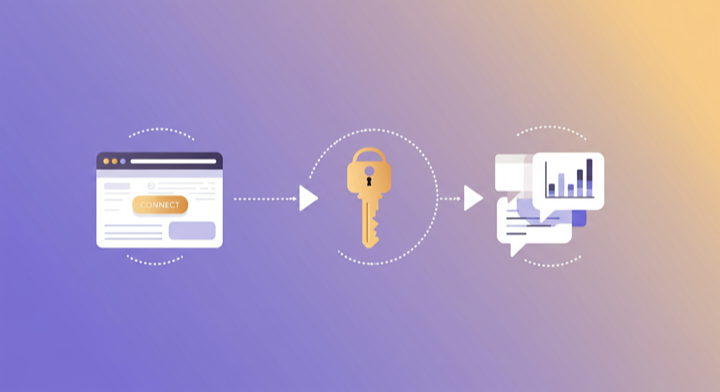
Three steps. Under two minutes. Zero code.
- 1
Add Supermetrics extension in Gemini
Open Google Gemini Enterprise and add the Supermetrics extension from the agent directory.
- 2
Authorize your data source
Authorize your account when prompted — a quick sign-in to connect your data source.
- 3
Start analyzing in Gemini
Ask Gemini anything about your marketing data in plain language. Get insights, comparisons, and recommendations powered by live data.
Example Google Gemini Enterprise Prompts for Mailchimp
Copy these prompts or use them as inspiration. Google Gemini Enterprise understands natural language — just ask what you want to know.
What Mailchimp Data Can You Analyze in Google Gemini Enterprise?
Supermetrics gives Google Gemini Enterprise access to your full Mailchimp reporting data — metrics and dimensions you already know from the Mailchimp interface.
Key Metrics
- Emails sent
- Open rate
- Click rate
- Bounce rate
- Unsubscribe rate
- Unique opens
- Unique clicks
- Total opens
- Revenue
- Orders
- Spam complaints
- Forwards
- Delivery rate
Key Dimensions
- Campaign name
- Campaign type
- Subject line
- Send date
- List name
- Automation name
- Email client
Resources & Guides
How to make marketing data AI-ready
Why Supermetrics for Google Gemini Enterprise?
The only native Google Gemini Enterprise connector with 170+ data sources, campaign management, and enterprise-grade security.

Native Google Gemini Enterprise Connector
One-click setup directly in Google Gemini Enterprise. No plugins to install, no terminal commands, no technical skills required. The first marketing data platform with native AI integrations.

170+ Data Sources
Connect Mailchimp alongside 170+ other platforms through a single integration. Cross-channel analysis in one conversation.

Cross-Channel Analysis
Query Mailchimp alongside every other marketing platform in a single conversation. No data exports, no tab switching.

Enterprise-Grade Security
SOC 2 Type II certified. GDPR and CCPA compliant. OAuth authentication with encrypted credentials. Regional data hosting available.

Real-Time Data
No stale exports. Supermetrics pulls fresh data from Mailchimp every time you ask Google Gemini Enterprise a question. Always current, always accurate.

Complete Data Access
Pull every contact, deal, campaign, and custom property from Mailchimp. No field restrictions, no record limits — your complete dataset, ready for analysis.
Frequently Asked Questions
- Add the Supermetrics extension from the Google Gemini agent directory. Once enabled, authorize Mailchimp as a data source. You can then ask Gemini about your Mailchimp data in natural language — no API calls, no data exports, no SQL required.
- Yes. Supermetrics uses OAuth-based authentication with your Mailchimp credentials encrypted at rest and in transit. Data flows through Google Cloud infrastructure with enterprise-grade security. Supermetrics is SOC 2 Type II certified and GDPR compliant.
- Absolutely. Supermetrics connects 170+ data sources to Gemini through a single extension. You can ask Gemini to compare Mailchimp performance against Google Ads, Analytics, CRM, and e-commerce data in the same conversation — true cross-platform intelligence.
- You can access all standard Mailchimp reporting metrics through Supermetrics, including Emails sent, Open rate, Click rate, Bounce rate, Unsubscribe rate, and more. Both metrics and dimensions are available, so you can slice data by campaign, date, audience, and other dimensions.
- No. The setup takes under two minutes with zero coding. The Supermetrics extension handles all API connections, authentication, and data formatting. Just add the extension, authorize your data source, and start asking questions in plain English.
- Yes. Gemini analyzes your campaign performance data and generates recommendations on subject lines, send timing, audience segmentation, and content strategy. It goes beyond metrics to provide actionable strategy.
- Yes. Both campaign and automation data from Mailchimp are available. Ask Gemini to compare automation performance against manual campaigns.
Also Connect to Google Gemini Enterprise


Ready to Connect Mailchimp to Google Gemini Enterprise?
Join 200,000+ companies that use Supermetrics to connect their marketing data. Set up in under two minutes.