Supermetrics for Google Gemini
Connect HubSpot to Google Gemini Enterprise — AI Pipeline Intelligence


Turn Gemini into your CRM analyst. Query HubSpot pipeline data, marketing performance, and sales metrics with conversational AI — Gemini identifies trends, spots pipeline risks, and writes performance narratives you can share with leadership.
Why Connect HubSpot to Google Gemini Enterprise?
Analyze your HubSpot data in Google Gemini Enterprise with natural language — just ask what you want to know.
- Gemini doesn't just show pipeline numbers. It analyzes deal flow patterns: where deals stall, which stages have the lowest conversion rates, whether pipeline value is growing or shrinking, and what the data suggests about your sales process. Ask follow-up questions to dig deeper.
- Gemini correlates HubSpot lifecycle stage data with marketing touchpoints to identify which campaigns produce MQLs that actually convert to customers. Ask about the true cost per customer by channel, accounting for the full funnel — not just the lead cost.
- Supermetrics connects HubSpot alongside marketing platforms. Ask Gemini to calculate cost per customer by attributing ad spend to downstream CRM outcomes, or compare marketing channel efficiency using pipeline data as the conversion metric.
How to Connect HubSpot to Google Gemini Enterprise
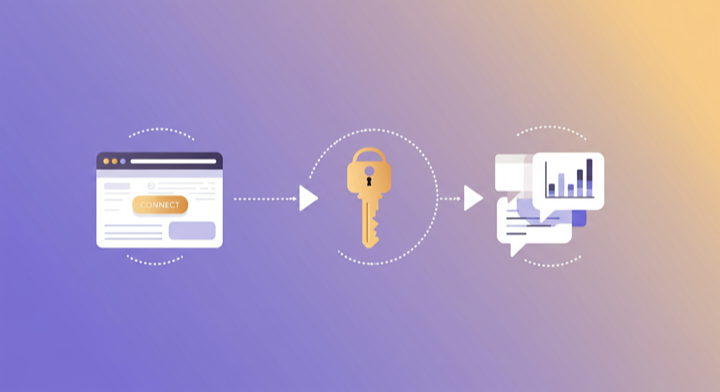
Three steps. Under two minutes. Zero code.
- 1
Add Supermetrics extension in Gemini
Open Google Gemini Enterprise and add the Supermetrics extension from the agent directory.
- 2
Authorize your data source
Authorize your account when prompted — a quick sign-in to connect your data source.
- 3
Start analyzing in Gemini
Ask Gemini anything about your marketing data in plain language. Get insights, comparisons, and recommendations powered by live data.
Example Google Gemini Enterprise Prompts for HubSpot
Copy these prompts or use them as inspiration. Google Gemini Enterprise understands natural language — just ask what you want to know.
What HubSpot Data Can You Analyze in Google Gemini Enterprise?
Supermetrics gives Google Gemini Enterprise access to your full HubSpot reporting data — metrics and dimensions you already know from the HubSpot interface.
Key Metrics
- Contacts created
- Deals created
- Deal amount
- Deal close rate
- Closed won deals
- Amount won
- Email open rate
- Email click rate
- Email bounce rate
- Form submissions
- Page views
- Sessions
- MQLs
- SQLs
- Customer count
Key Dimensions
- Deal stage
- Deal pipeline
- Contact lifecycle stage
- Contact source
- Company name
- Company industry
- Owner
- Campaign
- Email name
- Form name
- Landing page
- Lead status
Resources & Guides
How to make marketing data AI-ready
Supermetrics + HubSpot integration
Why Supermetrics for Google Gemini Enterprise?
The only native Google Gemini Enterprise connector with 170+ data sources, campaign management, and enterprise-grade security.

Native Google Gemini Enterprise Connector
One-click setup directly in Google Gemini Enterprise. No plugins to install, no terminal commands, no technical skills required. The first marketing data platform with native AI integrations.

170+ Data Sources
Connect HubSpot alongside 170+ other platforms through a single integration. Cross-channel analysis in one conversation.

Cross-Channel Analysis
Query HubSpot alongside every other marketing platform in a single conversation. No data exports, no tab switching.

Enterprise-Grade Security
SOC 2 Type II certified. GDPR and CCPA compliant. OAuth authentication with encrypted credentials. Regional data hosting available.

Real-Time Data
No stale exports. Supermetrics pulls fresh data from HubSpot every time you ask Google Gemini Enterprise a question. Always current, always accurate.

Complete Data Access
Pull every contact, deal, campaign, and custom property from HubSpot. No field restrictions, no record limits — your complete dataset, ready for analysis.
Frequently Asked Questions
- Add the Supermetrics extension from the Google Gemini agent directory. Once enabled, authorize HubSpot as a data source. You can then ask Gemini about your HubSpot data in natural language — no API calls, no data exports, no SQL required.
- Yes. Supermetrics uses OAuth-based authentication with your HubSpot credentials encrypted at rest and in transit. Data flows through Google Cloud infrastructure with enterprise-grade security. Supermetrics is SOC 2 Type II certified and GDPR compliant.
- Absolutely. Supermetrics connects 170+ data sources to Gemini through a single extension. You can ask Gemini to compare HubSpot performance against Google Ads, Analytics, CRM, and e-commerce data in the same conversation — true cross-platform intelligence.
- You can access all standard HubSpot reporting metrics through Supermetrics, including Contacts created, Deals created, Deal amount, Deal close rate, Closed won deals, and more. Both metrics and dimensions are available, so you can slice data by campaign, date, audience, and other dimensions.
- No. The setup takes under two minutes with zero coding. The Supermetrics extension handles all API connections, authentication, and data formatting. Just add the extension, authorize your data source, and start asking questions in plain English.
- Yes. Supermetrics pulls data from HubSpot CRM (deals, contacts, companies), Marketing Hub (emails, forms, landing pages), and Sales Hub (activities, meetings). Gemini can analyze across all hubs in a single conversation.
- Yes. Ask Gemini to analyze deal aging, stage conversion trends, and pipeline coverage ratio. It can flag deals that are stalling, stages with worsening conversion rates, and whether your pipeline coverage is sufficient to hit quarterly targets.
Also Connect to Google Gemini Enterprise


Ready to Connect HubSpot to Google Gemini Enterprise?
Join 200,000+ companies that use Supermetrics to connect their marketing data. Set up in under two minutes.