Connect LINE Ads to Claude
Connect LINE Ads to Claude with Supermetrics and turn your LINE Ads data into answers, reports, and next steps without leaving Claude.
Don’t take our word. Try it free today.
At a glance
What it does
The Supermetrics connector lets Claude read LINE Ads reporting over the Model Context Protocol (MCP): spend, impressions, clicks, conversion events, app installs, in-app actions and video views, by campaign, ad group and ad.
What you need
You connect with a Group ID, an API access key and an API secret key. Your LINE account manager has to enable API access for the Group first.
Changes happen in LINE
Claude can report on budgets, bids and statuses. LINE Ads isn’t on Supermetrics’ list of campaign-management platforms, so make changes in LINE Ad Manager.
Before you start
Claude
Connectors have to be available on your Claude account. Supermetrics is listed under Customize, then Connectors. Anthropic’s custom connectors guide explains how remote connectors work.
Supermetrics
You don’t need to buy anything to start. Teams without a subscription get a trial at login. If you already pay for Supermetrics, check the Supermetrics Hub for an AI chats destination. If there isn’t one, add AI chats to your plan, or replace an existing destination with it.
The connection keeps the email and team you use at first login. That matters if you later buy a subscription under a different email (Supermetrics for Claude docs). Current plans are on the pricing page.
LINE Ads
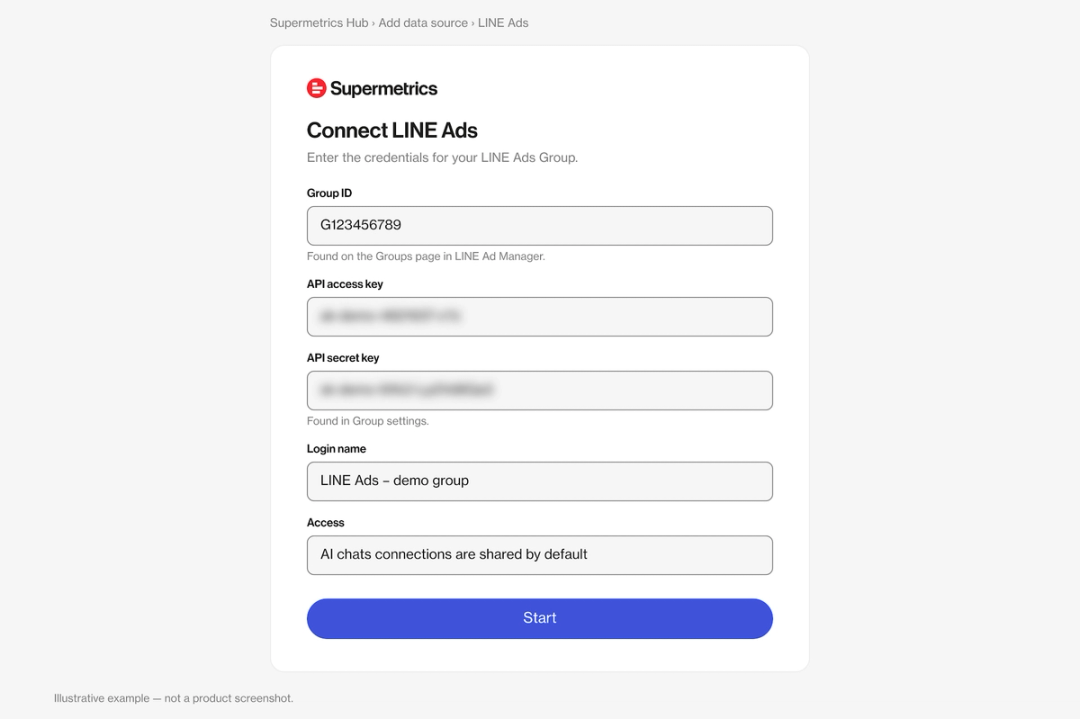
You connect with a Group ID, an API access key and an API secret key. Your LINE account manager has to enable API access for the Group first.
Full LINE Ads access requirements
The LINE Ads connection guide sets two requirements:
- API access has to be enabled on your LINE Ads account for the Group you want to connect. Your LINE account manager enables it.
- You need three credentials: a Group ID, an API access key and an API secret key.
Where to find them in LINE Ad Manager:
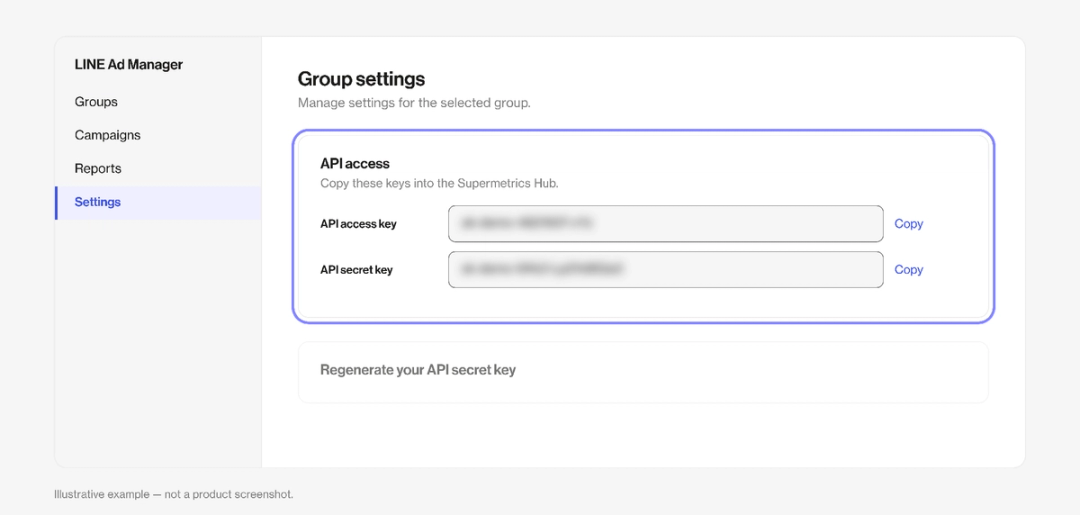
- The Group ID is on the Groups page, in the table next to the group name, in a format like G123456789.
- For the API keys, select the group, open the menu at the top left, choose Settings, then Group settings. Copy the API access key and API secret key. If the secret key isn’t visible, click “Regenerate your API secret key”.
Someone else holds the credentials? Share an authentication link from the Hub so they can connect for you. Platform API background is at developers.line.biz.
Start here
How do you connect LINE Ads to Claude?
 1
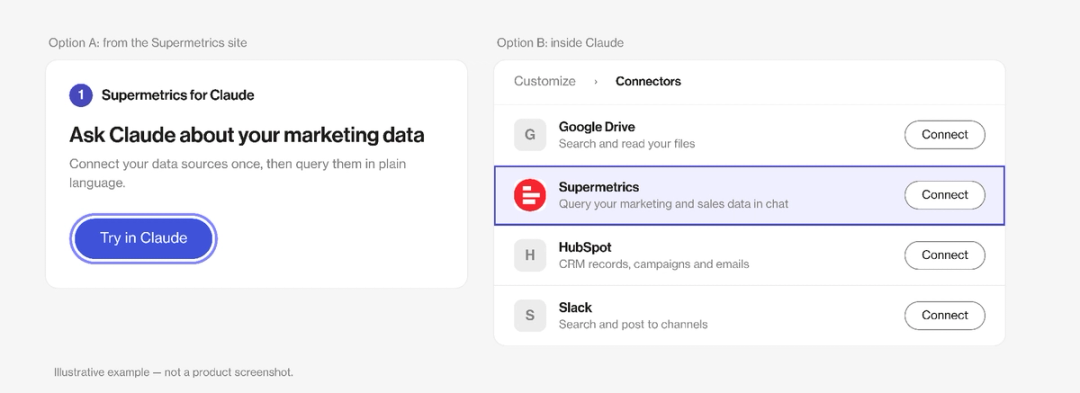
Add Supermetrics to Claude. Use the Try in Claude button on the Supermetrics for Claude page, or find Supermetrics in Claude under Customize, then Connectors.
 2
Choose a team. Sign in to Supermetrics and select the team the connector belongs to.
3 Authorize LINE Ads in the Hub. Go to LINE Ads in the Supermetrics Hub, or follow the login link Claude offers. Enter the Group ID, access key and secret key, name the login, and press Start.
 4
Name Supermetrics in your prompt. If several data tools are connected, say “use Supermetrics” so Claude picks the right connector. If you have more than one LINE Ads account, Claude guides you to select the accounts to use (Supermetrics for Claude docs).
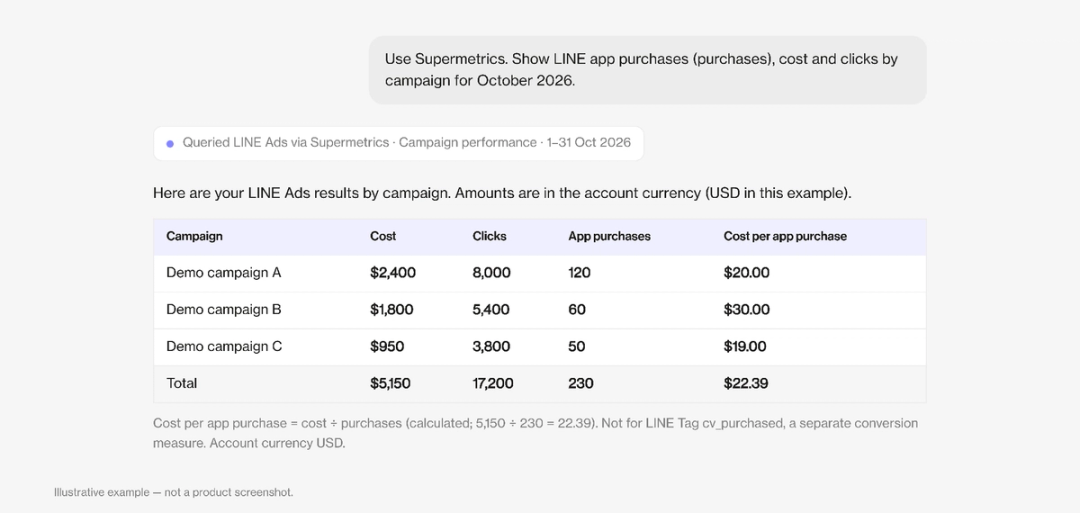
5 Run one small query. Include a date range in your prompt. Try: “Use Supermetrics. Show LINE Ads cost, impressions and clicks by campaign for the last 14 days.”
6 Check it, then go deeper. Compare the totals with LINE Ad Manager for the same dates. If they match, move on to conversion events, app installs, video or budgets, or ask Claude for a dashboard.
Building your own agent or n8n workflow instead? Use the standalone Supermetrics MCP server, which needs a Supermetrics subscription with API access. For more setup help, see the AI tools connection guide.
What can you ask Claude about LINE Ads?
Swap the dates for your own.
| Goal | Prompt | What you get | Fields used |
|---|---|---|---|
| Reporting | Use Supermetrics. Rank my LINE campaigns by cost from October 1 to October 30, with clicks and CPC. | A campaign table sorted by spend, with clicks and cost per click in the account currency | campaign_name, cost, clicks, cpc |
| Reporting | Show purchases, leads and sign-ups as separate columns by campaign for this month to date. | One column per conversion event, one row per campaign | cv_purchased, cv_lead_generated, cv_signup_completed |
| Diagnosis | List each ad group with its delivery status and how much it spent this month. | Ad groups with their status and spend, so you can see which spend without delivering | ad_group_name, ad_group_delivery_status, cost |
| Comparison over time | Compare cost per completed video view this month with last month for each campaign. | A two-period table per campaign | cost_per_video_complete, video_100_watched, year_month |
| Cross-source | For the last 12 weeks, put LINE spend next to my other paid channels by week and tell me which channel gives the lower cost per click. | Each channel’s spend and cost per click lined up by week | cost, year_week_iso, plus the other source’s spend |
| Action | Make a Supermetrics Studio dashboard of cost, purchases and cost per purchase by campaign for last quarter. | A dashboard in Supermetrics Studio | cost, cv_purchased, cost_per_purchase |
More example prompts
| Goal | Prompt | What you get | Fields used |
|---|---|---|---|
| Diagnosis | For last month, where do app users drop between install and purchase on my LINE campaigns? | A step-by-step funnel with the count and cost of each step | total_installs, opens, product_views, add_to_carts, purchases |
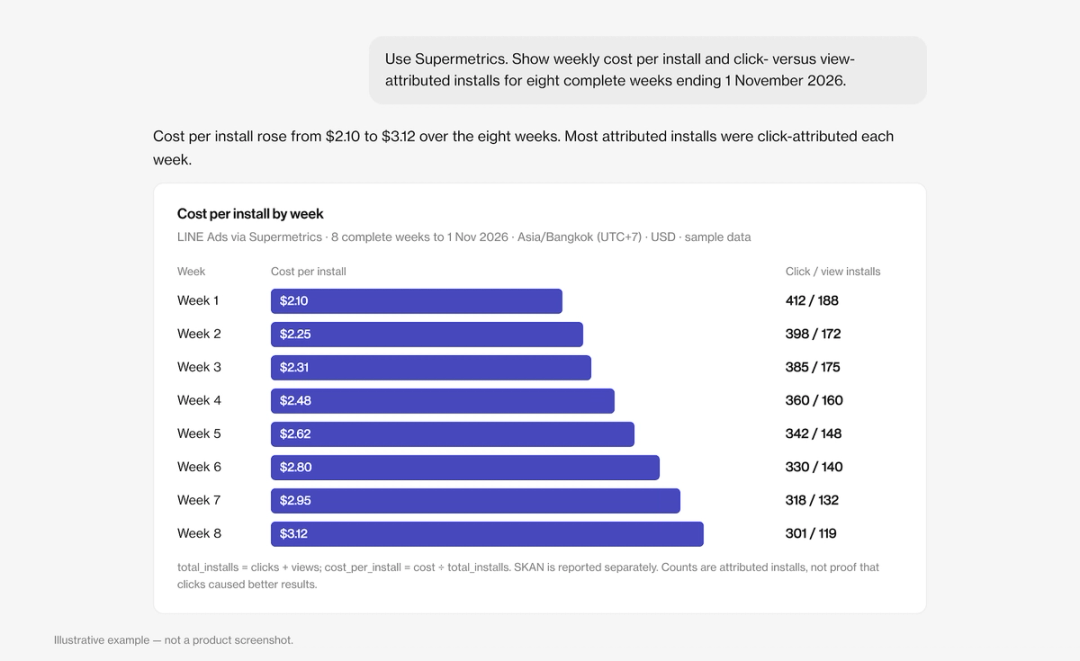
| Comparison over time | For the last 8 weeks, is my cost per install rising week by week, and are clicks or views driving installs? | A weekly trend with installs split into click and view | cost_per_install, installs_clicks, installs_views, year_week_iso |
| Cross-source | Show LINE viewable impressions beside what my verification tool reports for last month, by day. | A day-by-day comparison of the two counts | viewable_impressions, date |
| Reporting | List ad group budgets and bid types for active campaigns, with last month’s spend. | A settings table beside spend, with budgets converted from micros | ad_group_name, daily_budget_micro, bid_type, cost |
About Studio dashboards: AI chats covers viewing and sharing dashboards. Editing them requires a Studio destination subscription.
More patterns are in the AI chats use cases.
What can you do with LINE Ads data in Claude?
Cost efficiency ranking
Rank campaigns by cost efficiency to see which get impressions and clicks cheapest, and which don’t.
Conversions by action
Line up purchases, leads, sign-ups, reservations, checkouts, add-to-carts and product views by campaign, each with its cost per action.
App funnel drop-off
Track app installs from clicks and views through app opens, product views, add-to-carts and purchases. See where people drop off and what each step costs.
Video creative
Judge video creative by comparing video starts, 3-second views and completions, and what each one costs.
Budget and bid settings
List spending limits, daily budgets, bid types and bid amounts by ad group to find odd budget and bid settings.
Delivery problems
Find accounts, campaigns, ad groups or ads with a delivery status problem, next to what they spent.
App install tracking and ad group budgets in micros are specific to LINE.
How do you combine LINE Ads with other data in Claude?
LINE Ads can sit beside your other Supermetrics sources in one chat.
Cheaper reach by channel
With Spotify Ads in Claude, ask which channel produced cheaper reach week by week. Claude queries each source and lines the results up by date. The Spotify Ads connection guide lists AI chats as a destination.
Verification comparison
Supermetrics also has a DoubleVerify in Claude page. Read it before you plan to compare LINE viewable impressions with verification results.
Two sources only join on a shared dimension. Date works because both have it. Campaign names only match if both platforms use identical names, and Supermetrics doesn’t create that match for you. LINE amounts come in the account currency, so convert before adding them to another currency.
What LINE Ads data can Claude query?
LINE Ads has one query type, Campaign performance, which covers the campaign, ad group and ad level. Before you rely on the numbers, see How do you check Claude’s LINE Ads numbers?
| Level or field group | What it covers | Example field IDs |
|---|---|---|
| Performance metrics | Delivery and cost | impressions, viewable_impressions, reach, clicks, cost, ctr, cpc, cpm |
| Conversion events | One count, rate and cost per action for each event type | cv, cv_purchased, cv_lead_generated, cr_purchased, cpa_purchased |
| App events | Installs and in-app actions with their rates and costs | total_installs, installs_skan, opens, product_views, add_to_carts, cost_per_install |
| Video | Starts, view thresholds, completion rates and costs | video_starts, video_views, video_50_watched, video_100_watched, cost_per_video_complete |
| Campaign settings | Status, budget, objective and dates | campaign_name, campaign_objective, campaign_status, campaign_spending_limit, campaign_start_date |
| Ad group settings | Budget, bidding and status | ad_group_name, daily_budget_micro, bid_type, bid_amount_micro, ad_group_status |
| Ads and creative text | Ad identity, status and text | ad_name, ad_status, ad_delivery_status, ad_title, ad_description |
| Account | Name, status, time zone and currency | ad_account_name, ad_account_status, timezone, currency |
The Supermetrics LINE Ads fields page lists 84 metrics and 74 dimensions.
Field glossary
| Field ID | Plain-English meaning | Type | Watch out |
|---|---|---|---|
| cost | Spend in your account currency | Metric | State the currency when you report it |
| reach | The number of unique impressions | Metric | The fields page flags it as non-aggregatable, so don’t sum it across rows |
| ctr | Click-through rate (clicks / impressions) | Metric | It’s a ratio, so recompute it from total clicks and impressions instead of summing rows |
| cv | Conversions across event types | Metric | Named event counters sit beside it, so say which one you mean |
| cv_purchased | The number of purchase conversions | Metric | Its cost and rate fields are cpa_purchased and cr_purchased |
| total_installs | Total app installs | Metric | Related fields split out installs_clicks, installs_views and installs_skan |
| campaign_spending_limit | The maximum budget for the campaign | Dimension | It’s a budget setting, so pair it with cost to see spend against it |
| daily_budget_micro | The daily budget for the ad group, in micros | Dimension | Micros are millionths of a currency unit. Ask Claude to convert and show the result |
| ad_account_delivery_status | The delivery status of the ad account | Dimension | Pair it with cost to spot accounts that spend without delivering |
| timezone | The ad account time zone | Dimension | Report it next to day-level numbers when you reconcile |
What is the LINE Ads MCP connector for Claude?
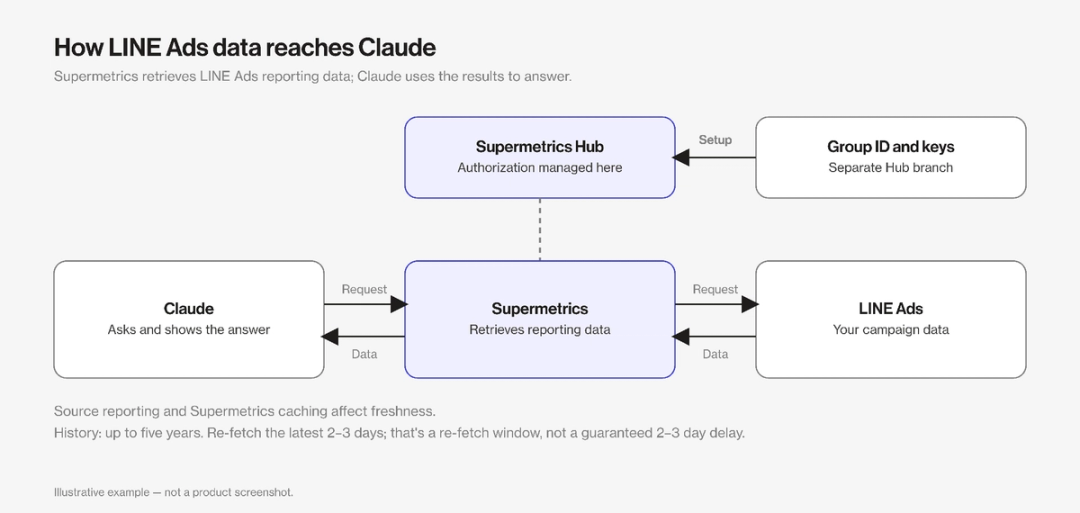
The LINE Ads MCP connector for Claude is the Supermetrics connector that lets Claude read your LINE Ads data through the Model Context Protocol (MCP).
MCP, the Model Context Protocol, is an open standard that lets an AI application call outside tools and read outside data (modelcontextprotocol.io). The Supermetrics connector is one such tool: when you ask about LINE campaigns, Supermetrics queries your LINE Ads Group and the results appear in the chat.
Supermetrics describes LINE as the dominant messaging platform in Japan, Thailand, Taiwan, and Indonesia (Supermetrics connectors). The connector reads its advertising performance: delivery, cost, conversions, app events, video, and the settings of each campaign, ad group and ad.
Use AI chats to ask questions in Claude. For custom agents, n8n workflows or other MCP clients, use the standalone Supermetrics MCP server.
Which way should you connect LINE Ads to Claude?
The Claude connector (AI chats) hides the protocol and needs no MCP setup. The Supermetrics MCP server is a standalone product for technical users: custom workflows, n8n, homemade agents or any MCP-compatible host. If chatting with LINE data in Claude is the whole goal, you don’t need the MCP server.
| Approach | Setup effort | Data scope | Cross-source blending | Maintenance | Best for |
|---|---|---|---|---|---|
| Supermetrics connector for Claude | Low: add the connector, enter the Group keys once | LINE Ads plus other sources in your Supermetrics account | Yes, in one chat | Supermetrics holds the connection. You reconnect if the credentials change | Media buyers and analysts who want answers in chat |
| Supermetrics MCP server (custom client) | Medium: you configure your own MCP host | Same sources as above | Yes, if your agent merges results | You maintain the client | Engineers building agents or automations |
| LINE’s own MCP or AI features, if the platform offers one | Depends on the platform | LINE only | No, unless you add other tools | Depends on the platform | Questions that stay inside LINE |
| CSV export and upload | Low, but repeated each time | One file per upload | Only if you merge files yourself | Manual | A single campaign review |
| Direct API and custom code | High: auth, paging and mapping to build | Whatever you code | Whatever you code | You own it | Teams with an engineer and a fixed need |
Choose the Supermetrics connector for Claude if you want LINE answers without code, or want LINE spend beside another paid channel in the same conversation.
Choose the standalone Supermetrics MCP server for a custom agent, n8n workflow or another MCP host. It requires a subscription with Supermetrics API access. The ready-made remote connector also works in Claude Code.
Choose LINE’s own tooling if your work happens inside LINE, such as creative upload, which the Supermetrics fields don’t cover.
Choose CSV or the API if you need one frozen snapshot (CSV) or a pipeline you control end to end (API).
When is this not the right tool?
- If you need user-level or click-level logs, use LINE’s own reporting or API. The fields are aggregated ad performance.
- If you need a stored history, use LINE Ads to BigQuery and join with sales data there. Chat answers aren’t a store.
- If you need a scheduled dashboard, try LINE Ads in Looker Studio.
- If you work in spreadsheets, use LINE Ads in Google Sheets.
How do you check Claude’s LINE Ads numbers?
Before you rely on an answer, match the date range and LINE account to what you meant to ask, and compare one total, such as cost, with LINE Ad Manager for the same period. Ask Claude to show the query and the fields it used. Compare very recent days with Ad Manager before you rely on them, and test with a long date range if you need older history.
| Situation | What to check or do |
|---|---|
| Date range | State the period in your prompt and ask Claude to show the query |
| Non-aggregatable metrics | The LINE Ads fields page flags reach as non-aggregatable. Ask for the grouping you want in the query. Don’t sum or average the returned rows |
| Currency and time zone | Add the currency and timezone dimensions when you reconcile with Ad Manager |
| Budgets in micros | daily_budget_micro and bid_amount_micro are in micros. Ask Claude to state the converted value and the unit |
| Conversion event | Check whether Claude used cv or a named event such as cv_purchased |
| Click and view installs | Check whether the figure is installs_clicks, installs_views or total_installs |
| Disabled or inaccessible accounts | When the Exclude invalid accounts setting is on, disabled or inaccessible accounts are left out of results |
Troubleshooting
| Symptom | Likely cause | Fix |
|---|---|---|
| LICENSE_NOT_FOUND | The connection sits on an earlier email address or on a team without the subscription | Find the email and team that match the paid plan, then in Claude Connectors disconnect Supermetrics, reconnect and select that team |
| Claude uses the wrong team, or never calls Supermetrics | Another team was selected at first login, or other data tools compete | Reconnect in Claude Connectors with the correct team, and say “use Supermetrics” in the prompt |
| “No accounts found” | The connection doesn’t match a team and subscription that includes it, or the login selected only some accounts | Check the team and subscription, check which accounts were selected, then ask Claude to list accounts. See How to fix “No accounts found” errors |
| Claude says LINE Ads isn’t authorized | No working LINE Ads connection exists in the Hub | Get the LINE Ads login link from Claude, or reconnect in the Hub and run the query again |
| The connection fails at the credentials step | API access may not be enabled for the Group | Ask your LINE account manager to enable it, then retry |
| Keys don’t work or the secret key is missing | The secret key isn’t visible in Group settings | Click Regenerate your API secret key in Group settings, then enter the new one |
| A query that worked stops working | The LINE Ads connection may need renewing | Reconnect LINE Ads in the Hub, then run the query again |
| Still stuck | Something else | Contact Supermetrics support |
Is it safe? Security and data handling
- Claude asks Supermetrics for the fields your question needs and shows the results in the chat. Connect only the Group you need.
- Claude reads LINE Ads data through Supermetrics. The one write-like action is pushing a dashboard to Supermetrics Studio.
- LINE Ads isn’t on Supermetrics’ list of campaign-management platforms, so make changes in LINE Ad Manager. Campaign management is in early access, and the list may change.
- The access key and secret key give API access to the Group, so treat them like passwords. Enter them in the Hub, never in a Claude prompt.
- AI chats data-source connections are shared by default. Team members assigned to the subscription can use shared logins, so review team membership and subscription access before connecting client accounts. Anyone who can open the Claude chat can see its returned results.
- Anthropic’s terms for your Claude plan govern how conversations are stored.
- Policies and certifications are in the Supermetrics Trust Center.
Related connectors
Send LINE Ads data to BigQuery to keep campaign history in a warehouse
Report on LINE Ads in Looker Studio for scheduled campaign dashboards
Analyze LINE Ads in Google Sheets for spreadsheet views of cost and conversions
Connect Spotify Ads to Claude to put audio ad spend in the same chat
Connect DoubleVerify to Claude to see Supermetrics’ DoubleVerify page for Claude
Supermetrics for Claude to see every source you can ask Claude about
FAQ
-
A Model Context Protocol server gives an AI client tools and data, here LINE Ads reporting. Supermetrics offers it as the Claude connector and as the standalone Supermetrics MCP server. See Which way should you connect LINE Ads to Claude?
-
The Supermetrics connector is separate from any LINE tooling: it reads LINE Ads through Supermetrics fields, beside your other sources.
-
Yes. Add Supermetrics through Claude’s Connectors directory. The remote connector works on the web, in Claude Desktop and in Claude Code, subject to your account and organization settings. The standalone Supermetrics MCP server is a separate option for custom integrations and requires a subscription with API access.
-
Claude can report on budgets, bids and statuses. LINE Ads isn’t on Supermetrics’ list of campaign-management platforms, so make changes in LINE Ad Manager. Campaign management is in early access, and the list may change.
-
Compare very recent days with LINE Ad Manager before you rely on them.
-
Yes. You name each login when you connect, so add a second Group as another login. When you have several, Claude guides you to select the accounts to use.
-
Your LINE account manager. See Before you start.
-
In LINE Ad Manager: the Group ID is on the Groups page, and the keys are under Group settings. See Before you start.
-
You can start free: teams without a subscription get a trial at login. After that, access needs an AI chats destination on a Supermetrics plan. Add AI chats to your plan, or replace an existing destination with it. Plans are on the pricing page.