Supermetrics for Google Gemini
Connect Facebook Ads to Google Gemini Enterprise — AI-Powered Campaign Intelligence


Turn Gemini into your Facebook Ads command center. Analyze campaign performance, creative effectiveness, and budget optimization — then take action. Create campaigns, pause underperformers, and adjust budgets directly from Gemini. Instagram Ads included.
Why Connect Facebook Ads to Google Gemini Enterprise?
Ads Manager gives you data. Gemini gives you answers. Connect the two and skip the spreadsheet in between.
- Gemini's reasoning capabilities paired with live Facebook Ads data create something no dashboard can match: a conversation. Ask "Why did my CPA spike last Thursday?" and Gemini pulls the data, identifies the likely causes — frequency increases, audience overlap, budget changes — and explains them. Ask follow-ups to drill deeper. No pre-built report can anticipate every question; a conversation can.
- Gemini analyzes performance across every ad in your account and surfaces patterns human eyes miss. It can compare video completion rates against static image CTR, identify which headline structures correlate with lower CPA, and flag creative combinations that work for one audience but fail for another. Use these insights to brief your design team with data, not gut feelings.
- Instead of manually comparing campaign metrics in a spreadsheet, ask Gemini to rank campaigns by marginal efficiency — where the next dollar spent delivers the best return. It factors in saturation signals like rising frequency and declining CTR to identify campaigns that have peaked versus those with scaling headroom. Ask scenario questions like "If I increase this campaign's budget by 30%, what's the likely impact on CPA?"
- Ad fatigue doesn't happen overnight — it's a slow slide that shows up in the data days before it hits your bottom line. Gemini watches for the telltale pattern: frequency climbing, CTR drifting down, CPM ticking up. It flags at-risk ad sets with specific data points and recommends whether to refresh creative, narrow the audience, or pause and reallocate.
- Supermetrics connects 170+ data sources to Gemini. In a single conversation, compare your Facebook CPA against Google Ads, evaluate whether TikTok or Instagram Reels delivers better video engagement, and check if LinkedIn outperforms Facebook for B2B lead gen. Gemini normalizes the data across platforms so the comparison is meaningful.
- Dashboards show numbers. Gemini tells the story behind them. Ask for a weekly performance summary and Gemini doesn't just list metrics — it explains what changed, why it likely changed, and what to do about it. The output reads like an analyst's brief, not a data dump. Share it in Slack, drop it into a Google Doc, or use it to prepare for your next team meeting.
How to Connect Facebook Ads to Google Gemini Enterprise
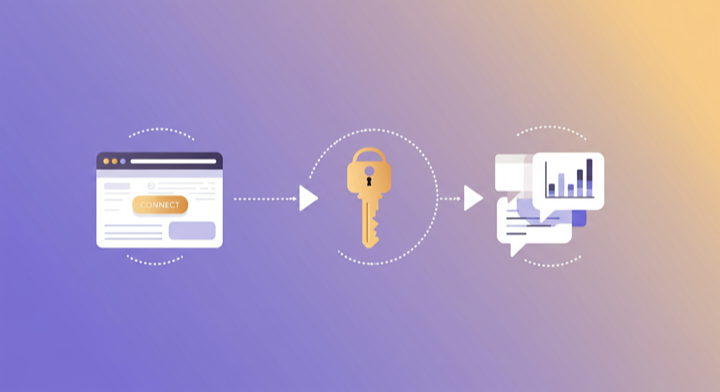
Three steps. Under two minutes. Zero code.
- 1
Add Supermetrics extension in Gemini
Open Google Gemini Enterprise and add the Supermetrics extension from the agent directory.
- 2
Authorize your data source
Authorize your account when prompted — a quick sign-in to connect your data source.
- 3
Start analyzing in Gemini
Ask Gemini anything about your marketing data in plain language. Get insights, comparisons, and recommendations powered by live data.
Example Google Gemini Enterprise Prompts for Facebook Ads
Copy these prompts or use them as inspiration. Google Gemini Enterprise understands natural language — just ask what you want to know.
How Teams Use Facebook Ads in Google Gemini Enterprise
Click a role to see tailored prompts and analysis examples for your workflow.
- “Which campaigns have the best incremental ROAS? Where should I invest the next $1,000 for maximum return?”
Identify scaling opportunities based on marginal efficiency, not just average ROAS.
“Analyze my A/B test results — which creative variants are winning on CPA, and are the results statistically reliable?”Get data-backed creative testing insights with statistical confidence assessment.
“What is my customer acquisition funnel: impressions → clicks → add to cart → purchase? Where is the biggest drop-off?”Identify funnel bottlenecks and prioritize where to focus optimization efforts.
- “Write an executive performance summary for my client covering the last 30 days. Include spend, ROAS, top campaigns, and strategic recommendations.”
Generate analyst-quality client briefs in seconds instead of hours.
“Flag any campaigns where CPA increased more than 25% week-over-week. What is likely causing the increase?”Catch and diagnose performance drops across your client portfolio.
“Compare this client's Facebook Ads efficiency against their Google Ads. Where is each channel strongest?”Provide cross-channel strategic recommendations backed by live data.
“What are the 3 biggest opportunities to improve this account's performance based on the data from the last 90 days?”Let Gemini surface optimization opportunities you might have missed.
- “Which product categories deliver the best ROAS in my catalog campaigns? Are there underperforming products dragging down results?”
Optimize your product catalog for advertising efficiency and identify products to exclude.
“Show me the purchase funnel by device type — are mobile shoppers converting at the same rate as desktop?”Identify device-specific conversion gaps and optimize bidding accordingly.
“What is my average order value from Facebook Ads traffic vs organic? How does ROAS vary by campaign objective?”Understand the revenue quality of paid traffic compared to other acquisition channels.
What Facebook Ads Data Can You Analyze in Google Gemini Enterprise?
Supermetrics gives Google Gemini Enterprise access to your full Facebook Ads reporting data — metrics and dimensions you already know from the Facebook Ads interface.
Key Metrics
- Impressions
- Clicks
- Spend
- ROAS
- CPA
- CTR
- CPM
- Conversions
- Reach
- Frequency
- Video views
- Link clicks
- Cost per action
- Purchase value
- Add to cart
Key Dimensions
- Campaign name
- Ad set name
- Ad name
- Age
- Gender
- Placement
- Device
- Country
- Region
- Platform (Facebook / Instagram / Audience Network)
- Objective
- Delivery status
- Instagram placement (Feed / Stories / Reels / Explore)
Resources & Guides
How to make marketing data AI-ready
How to optimize your Facebook ad campaigns
Facebook Ads report templates
PPC reporting: extract insights from paid campaigns
Why Supermetrics for Google Gemini Enterprise?
The only native Google Gemini Enterprise connector with 170+ data sources, campaign management, and enterprise-grade security.

Native Google Gemini Enterprise Connector
One-click setup directly in Google Gemini Enterprise. No plugins to install, no terminal commands, no technical skills required. The first marketing data platform with native AI integrations.

170+ Data Sources
Connect Facebook Ads alongside 170+ other platforms through a single integration. Cross-channel analysis in one conversation.

Cross-Channel Analysis
Query Facebook Ads alongside every other marketing platform in a single conversation. No data exports, no tab switching.

Enterprise Security
SOC 2 Type II certified. GDPR compliant. OAuth authentication. Your data is encrypted at rest and in transit.

Real-Time Data
No stale exports. Supermetrics pulls fresh data from Facebook Ads every time you ask Google Gemini Enterprise a question. Always current, always accurate.

No Data Limits
Query any date range, any number of campaigns, any level of granularity. No row limits, no sampling, no restrictions on the data you can pull.
Frequently Asked Questions
- Add the Supermetrics extension from the Google Gemini agent directory. Once enabled, authorize Facebook Ads as a data source. You can then ask Gemini about your Facebook Ads data in natural language — no API calls, no data exports, no SQL required.
- Yes. Supermetrics uses OAuth-based authentication with your Facebook Ads credentials encrypted at rest and in transit. Data flows through Google Cloud infrastructure with enterprise-grade security. Supermetrics is SOC 2 Type II certified and GDPR compliant.
- Absolutely. Supermetrics connects 170+ data sources to Gemini through a single extension. You can ask Gemini to compare Facebook Ads performance against Google Ads, Analytics, CRM, and e-commerce data in the same conversation — true cross-platform intelligence.
- You can access all standard Facebook Ads reporting metrics through Supermetrics, including Impressions, Clicks, Spend, ROAS, CPA, and more. Both metrics and dimensions are available, so you can slice data by campaign, date, audience, and other dimensions.
- No. The setup takes under two minutes with zero coding. The Supermetrics extension handles all API connections, authentication, and data formatting. Just add the extension, authorize your data source, and start asking questions in plain English.
- Yes. Facebook Ads (Meta Ads) data includes all Instagram placements. You can filter by placement in Gemini to see Instagram-specific performance, including Stories, Reels, Feed, and Explore.
- Supermetrics can pull Facebook Ads data going back to the lifetime of your ad account, subject to Meta API retention policies. Typically this means 3+ years of historical data is available for analysis in Gemini.
- Yes. Gemini Enterprise provides enterprise-grade security, data governance, and longer context windows. Your Facebook Ads data is not used for model training, and the enterprise tier supports deeper analysis across larger datasets and more complex multi-step reasoning.
- Supermetrics pulls data using your account's configured attribution window in Meta Ads Manager. Whether you use 7-day click, 1-day view, or any other setting, the data Gemini sees matches what you see in Ads Manager.
- Yes. Since Supermetrics supports 170+ data sources through a single extension, you can query Facebook Ads and Google Ads data in the same Gemini conversation. Ask cross-platform questions and Gemini handles the data normalization.
- Gemini can create charts and tables from your data when you ask for visual representations. Request a bar chart of campaign ROAS, a trend line of weekly CPA, or a funnel visualization — Gemini renders them inline in the conversation.
Also Connect to Google Gemini Enterprise


Ready to Connect Facebook Ads to Google Gemini Enterprise?
Join 200,000+ companies that use Supermetrics to connect their marketing data. Set up in under two minutes.