Connect CJ Affiliate to Claude
Connect CJ Affiliate to Claude with Supermetrics and turn your CJ Affiliate data into answers, reports, and next steps without leaving Claude.
Don’t take our word. Try it free today.
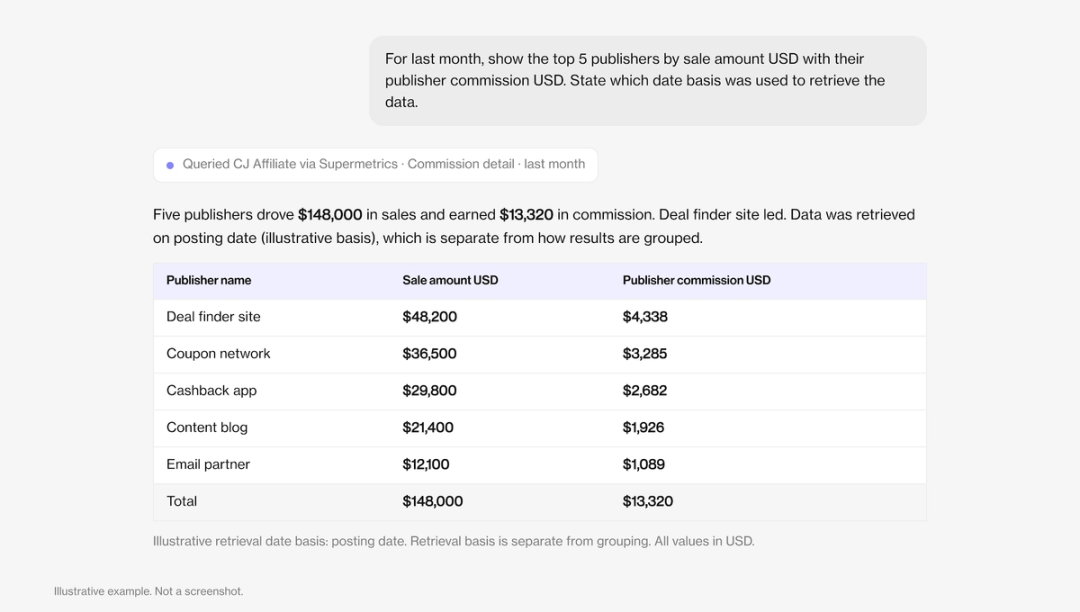
At a glance
What it does
The Supermetrics connector lets Claude read CJ Affiliate commission data over the Model Context Protocol (MCP). That covers sale amounts, publisher and advertiser commissions, CJ fees, commission status, coupons and customer country.
One report
All data comes from one commission detail report, so there’s no report type to pick.
Pick the right date
Commissions carry separate posting, event and locking dates (CJ API parameters). Tell Claude which date to use and ask it to say which one it used.
What you need
You connect with a personal access token and your CID, and only Advertiser accounts are supported.
Before you start
Claude
You need a Claude account that can add connectors (Customize, then Connectors). Anthropic’s guide to custom connectors covers remote connectors in general.
Supermetrics
You can start without a subscription: logging in creates a trial when none exists. Paying teams need an AI chats destination in the Supermetrics Hub. If it’s missing, upgrade or swap a current destination. The connection keeps the email and team from your first login (Supermetrics for Claude docs). See pricing for plans.
CJ Affiliate
The connection guide asks for two things:
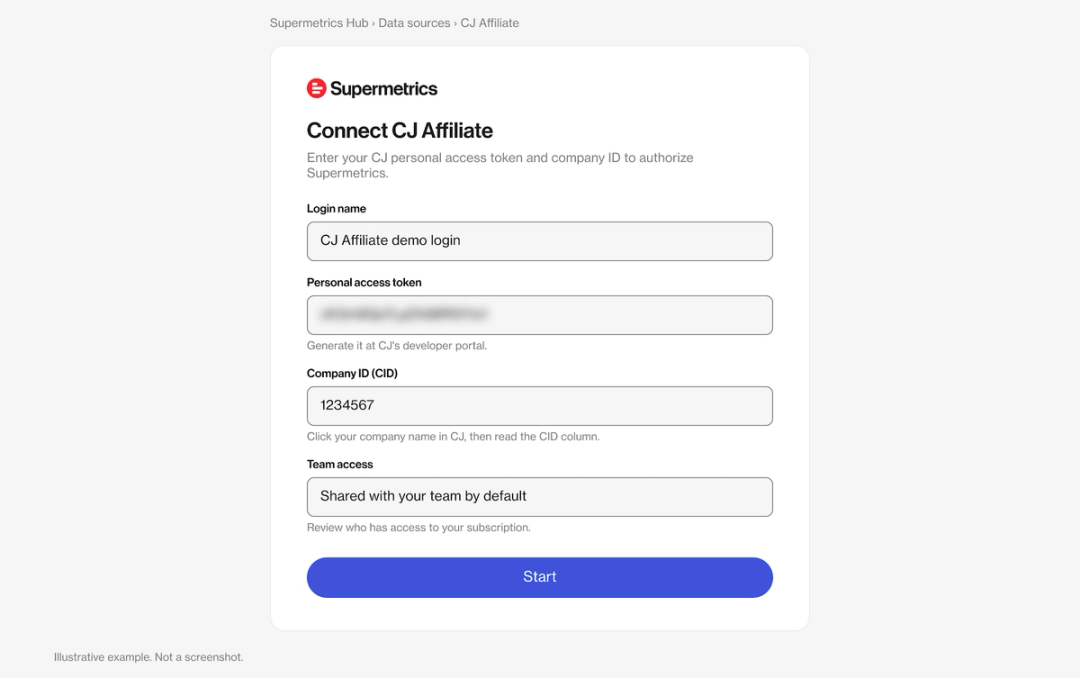
- A personal access token. You or your admin can generate it at CJ’s developer portal.
- Your company ID (CID). Click your company name in the upper right corner of the CJ Affiliate platform, then read the number in the CID column.
Only Advertiser accounts are supported, so a publisher login won’t work. If you can’t create a token yourself, the Hub lets you share an authentication link for a colleague to complete.
Start here
How do you connect CJ Affiliate to Claude?
 1
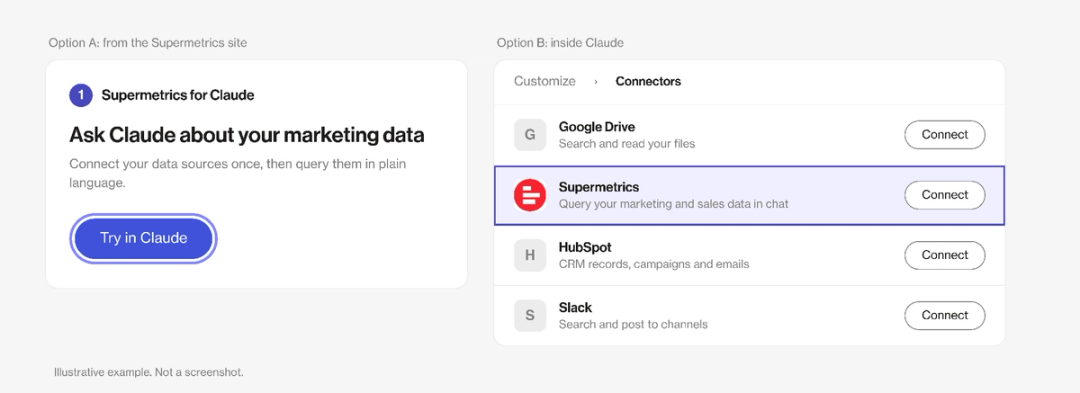
Add the connector. Open the Supermetrics for Claude page and click Try in Claude. To start inside Claude instead, go to Customize, then Connectors, and search for Supermetrics.
 2
Select your team. Sign in to Supermetrics and choose the team whose subscription should power the chat. With no subscription, a trial is created at login.
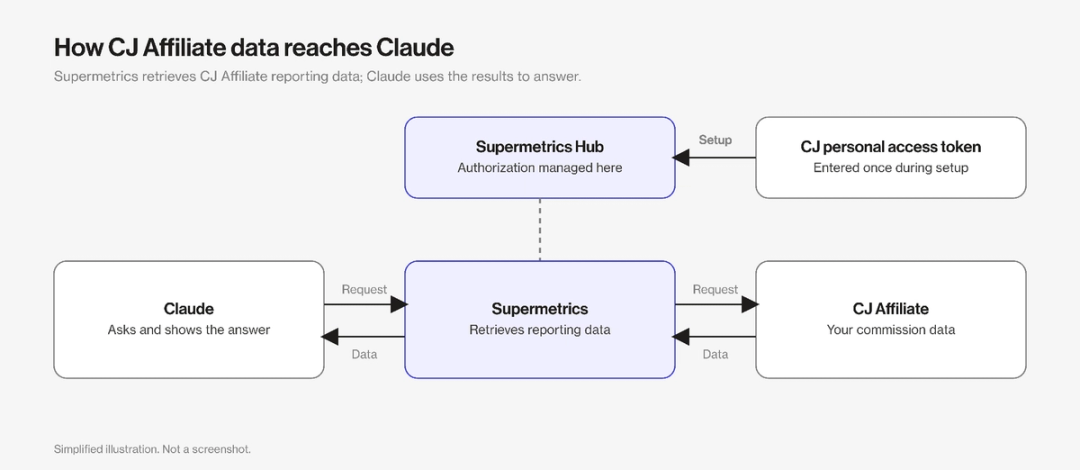
3 Enter your CJ credentials in the Hub. Open CJ Affiliate in the Supermetrics Hub, or use the login link Claude gives you. Paste the personal access token and CID, name the login and click Start.
 4
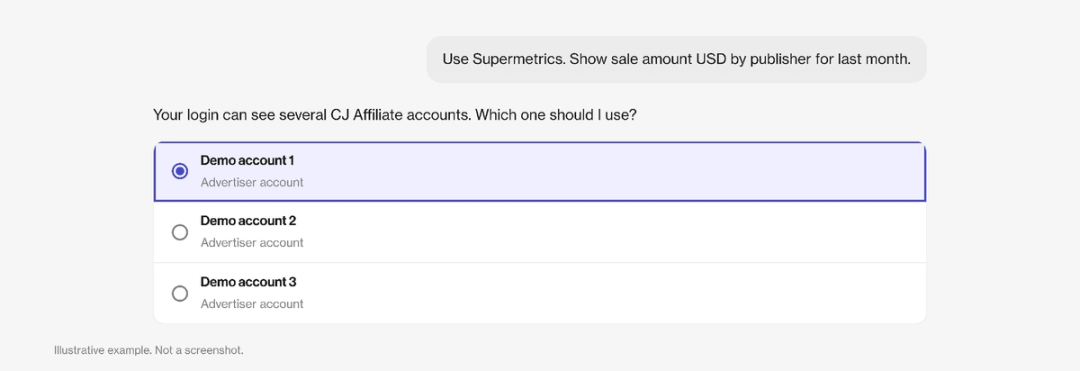
Tell Claude to use Supermetrics. With several data tools connected, begin the prompt with “Use Supermetrics”. If your login can see several CJ accounts, Claude asks which one to use.
5 Pick a date range and run a test query. Give Claude a date range and say which date to use: posting, event or locking. The date you pick changes the totals, so ask Claude to say which one it used (see Limits and data notes). Try: “Use Supermetrics. Fetch commissions by posting date for the last 14 days and show sale amount USD and publisher commission USD by day.”
 6
Check the totals, then ask bigger questions. Compare the result with CJ (see How do you check Claude’s CJ Affiliate numbers?). Then move on to publishers, fees and statuses, or ask Claude for a dashboard.
Building your own agent or n8n workflow instead? Use the standalone Supermetrics MCP server, which needs a Supermetrics subscription with API access. For more setup help, see the AI tools connection guide.
What can you ask Claude about CJ Affiliate?
Start each prompt with “Use Supermetrics.” if you have other data tools connected. Name the date type when totals matter.
| Goal | Prompt | What you get |
|---|---|---|
| Reporting | For last month, fetched by posting date, show the top 15 publishers by sale amount USD with their publisher commission USD. | A ranked partner table |
| Reporting | Break commissions down by customer country and coupon for this quarter, fetched by posting date, and tell me where each code converts. | A country-by-coupon table with a short summary |
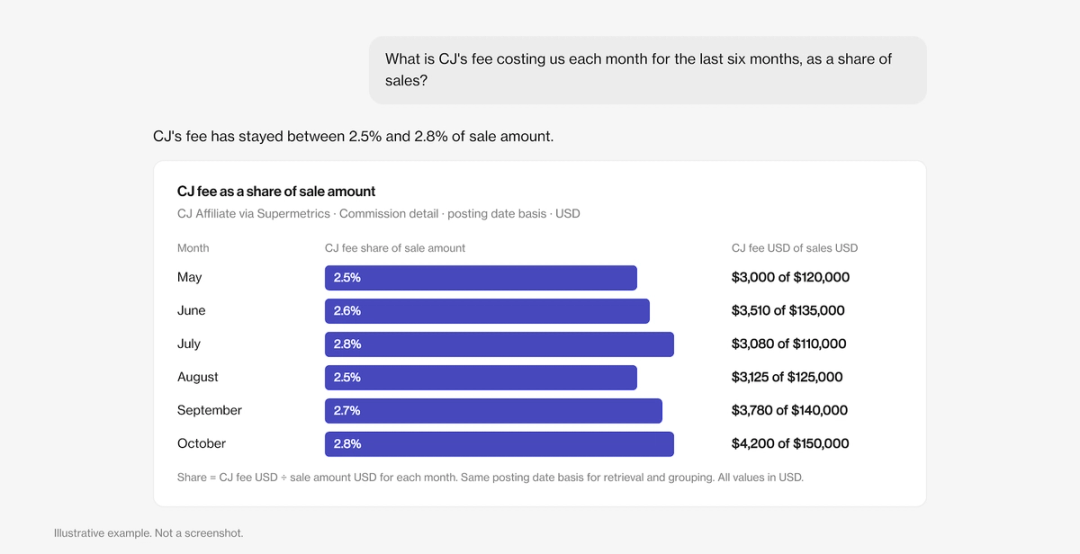
| Diagnosis | What is CJ’s fee costing us each month for the last six months, as a share of sales? | A monthly table with a calculated fee percentage |
| Diagnosis | Show commissions by status with their locking dates, and flag any that haven’t locked. | Status counts and a list of rows to chase |
| Comparison over time | Compare new-to-file sales with repeat sales by month this year. | A two-series monthly table |
| Cross-source | Line up affiliate sale amount USD by day with store orders by day for the same period. | Two result sets that Claude compares by date |
More example prompts
| Goal | Prompt | What you get |
|---|---|---|
| Diagnosis | List order IDs that appear on more than one commission row and show which rows aren’t original. | A short list of possible duplicates and corrections to confirm in CJ |
| Comparison over time | Compare the share of cross-device sales by month over the last two quarters, split by traffic source. | A month-by-source table with a calculated share |
| Reporting | Build a dashboard of sales, fees and commissions by publisher for last month and push it to Supermetrics Studio. | A dashboard you can share from Supermetrics Studio |
More ideas are in the AI chats use cases doc.
What can you do with CJ Affiliate data in Claude?
Top publishers and coupons
Rank publishers, sites and coupons by sales, and see what commission you pay each.
CJ fee as share of sales
Compare CJ’s fee with sales and advertiser commission by month, and have Claude work out the fee as a share of sales.
Commission status
Group commissions by status to catch ones that haven’t locked yet, and compare their posting, event and locking dates. Fetch by locking date to see what locked in a period.
Cross-device sales
Split sales by device change and traffic source to see how much revenue depends on a customer switching devices.
New vs repeat customers
Compare new and repeat customers to see whether a publisher brings new buyers or earns commission on customers you already had.
Duplicate commission rows
Before you pay, list orders with several commission rows and see which ones aren’t the original.
CJ fees and the posting, event and locking dates are specific to CJ’s commission model.
How do you combine CJ Affiliate with other data in Claude?
Affiliate and shop orders
With WooCommerce in Claude, compare daily affiliate sales with the shop’s order count to see whether partner spikes show up in the store.
Newsletters and coupons
With ActiveCampaign in Claude, check whether a newsletter send lines up with a jump in coupon commissions.
Affiliate and paid spend
With Google Ads or Meta Ads (Facebook Ads in Supermetrics), pair CJ sales with paid spend to see whether affiliate sales rise or fall when budgets change.
Two sources only join on a dimension both have. Date works everywhere. Order IDs match only when the store records the same reference CJ keeps as order_id, and coupon codes only when both systems spell them alike. Supermetrics can’t match rows that don’t share a value.
What CJ Affiliate data can Claude query?
CJ Affiliate has no report type setting in Supermetrics. All fields come from the Commission detail report, which the guide describes as nearly real-time commission data from your Advertiser accounts. Supermetrics lists 11 metrics and 56 dimensions for CJ Affiliate (CJ Affiliate fields).
| Field group | What it covers | Example field IDs |
|---|---|---|
| Sales and commission amounts (USD) | Sale value, discounts, what advertisers and publishers earn, and CJ’s fee, all in USD | sale_amount_usd, order_discount_usd, advertiser_commission_usd, publisher_commission_usd, cj_fee_usd |
| Amounts in local currency | The same measures in the advertiser’s or publisher’s currency | sale_amount_adv_currency, advertiser_commission_adv_currency, cj_fee_adv_currency, publisher_commission_pub_currency |
| Commission lifecycle | When a commission was posted, happened and locked, and its status | posting_date, event_date, locking_date, status, reviewed_status |
| Partners | Publishers, their sites and the advertiser behind the commission | publisher_name, publisher_id, website_name, website_id, advertiser_name |
| Order and action detail | The order, the item and the action that earned the commission | order_id, item_id, commission_id, action_name, action_type |
| Customer and traffic signals | New or returning, device change, traffic source, coupon and country | new_to_file, is_cross_device, source, coupon, customer_country |
| Account fields | Which connected account and company a row belongs to | account_id, account_name, company_id |
The other dimensions include date breakdowns by day, week and month, plus datetime versions of the posting, event and locking dates. The rest are IDs, flags and query-metadata fields. commissions is the count metric.
CJ’s Commission Detail API names publisher and advertiser commission pubCommissionAmountUsd and advCommissionAmountUsd (CJ API parameters). The publisher site is website_name (Website name).
Limits and data notes
| Situation | What happens | What to do |
|---|---|---|
| Date range | Totals depend on the period Claude queries | State the period. Ask Claude to repeat the range it used |
| Which date the range uses | Posting, event and locking dates are separate fields (CJ API parameters). A commission with an event date in February and a posting date in March falls in different ranges depending on the date used | Tell Claude which date to use and ask it to say which one it used. Totals differ when you change it |
| Multiple accounts | The account list returns every account your login can see. The “Exclude invalid accounts” setting drops accounts that are no longer valid or available (account exclusion settings) | Name the account. Excluded accounts won’t appear in results |
| Currency | USD, advertiser-currency and publisher-currency fields sit side by side | Pick one currency family per question and have Claude state it. Don’t add totals in different currencies |
| Time zone | event_date is described as UTC | A late sale can land on a different day than in your time zone |
| Freshness | The guide describes the commission detail report as nearly real-time | Compare with CJ for very recent days |
| Large results | Results depend on the range and fields you request | Narrow the range or fields if a result is slow |
| Write actions | Supermetrics documents write actions only for Google Ads, Facebook Ads, Microsoft Advertising and TikTok Ads (what happens in your AI tool, Supermetrics for Claude) | Approve, correct or pay commissions in CJ |
To see how far back history goes or how reversed commissions appear, test with a long range.
Field glossary
Meanings follow the Supermetrics CJ Affiliate fields list.
| Field ID | Plain-English meaning | Type | Watch out |
|---|---|---|---|
| commissions | Number of commission rows | Metric | Counts rows only. Pair it with an amount field |
| sale_amount_usd | Sale amount (USD) | Metric | The USD view. The advertiser-currency twin is sale_amount_adv_currency |
| cj_fee_usd | CJ fee in USD, advertiser accounts only | Metric | A separate field from publisher commission. The advertiser-currency twin is cj_fee_adv_currency |
| publisher_commission_usd | Publisher commission (USD) | Metric | The publisher-currency twin is publisher_commission_pub_currency |
| advertiser_commission_usd | Advertiser commission (USD) | Metric | The advertiser-currency twin is advertiser_commission_adv_currency |
| status | Status of the commission | Dimension | Have Claude list the values it finds before you filter |
| locking_date | Date on which the commission is locked for extending or correcting | Dimension | Ask Claude to use it when you want what locked in a period |
| event_date | Event date for the commission, in UTC | Dimension | See Time zone in the limits table |
| new_to_file | Whether the customer is new or existing, as defined by the advertiser | Dimension | |
| is_cross_device | Whether the transaction was attributed using cross-device tracking | Dimension | |
| original | Displays “1” for an original commission and “0” for a non-original or corrected one | Dimension | Use it to separate originals from corrections |
| customer_country | Country where the transaction occurred, as an ISO 3166-1 alpha-2 code | Dimension | Pair it with coupon to see where a code converts |
What is the CJ Affiliate MCP connector for Claude?
The CJ Affiliate MCP connector for Claude is the Supermetrics connector that lets Claude read your CJ Affiliate data through the Model Context Protocol (MCP).
The Model Context Protocol (MCP) is an open standard that lets an AI app call external tools and read external data (modelcontextprotocol.io). The Supermetrics connector is one of those tools. Claude works out which CJ Affiliate fields your question needs, Supermetrics fetches them through your authorized connection, and Claude turns the rows into an answer. You get commission-level data for the advertiser account you connected: who earned what, on which order, with which coupon, and where the customer was.
Use AI chats to ask questions in Claude. For custom agents, n8n workflows or other MCP clients, use the standalone Supermetrics MCP server.
Which way should you connect CJ Affiliate to Claude?
| Approach | Setup effort | Data scope | Blending with other sources | Maintenance | Best for |
|---|---|---|---|---|---|
| Supermetrics connector for Claude | Low: add the connector, enter a token and CID once | CJ Affiliate plus the other sources in your Supermetrics account | Yes, inside one chat | Supermetrics maintains the connection | Affiliate managers who want answers in a conversation |
| Supermetrics MCP server (custom client) | Medium: you set up your own MCP host | Same sources as the connector | Yes, if your agent joins the results | You maintain the client | Engineers building agents |
| CSV export and upload | Low, but manual each time | One export at a time | Only if you merge files yourself | You repeat it every time | A one-off look at a closed month |
| Direct API and custom code | High: you write and host the script | Whatever you code | Whatever you code | You own token handling and changes | Teams with an engineer |
Choose the Supermetrics connector for Claude if you want commission answers without code, or affiliate sales next to store orders and email activity.
Choose the Supermetrics MCP server if your team runs its own MCP host or an agent that queries CJ Affiliate on a schedule.
Choose CJ Affiliate’s own tools if you need to approve, correct or pay a commission, or you need the publisher view.
Choose a CSV or the API if you need a frozen snapshot (CSV) or a pipeline you fully control (API).
Choose an export if you need a stored copy:
- Send CJ Affiliate data to BigQuery for a permanent commission history in a warehouse
- Build CJ Affiliate dashboards in Looker Studio for standing, scheduled partner reporting
- Pull CJ Affiliate into Google Sheets for commission rows in spreadsheet work
More sources for the same chat: WooCommerce, ActiveCampaign and every other source on Supermetrics for Claude.
How do you check Claude’s CJ Affiliate numbers?
Compare one total with the CJ commission report for the same account, dates and date type. Ask Claude to show the query and the fields it chose. If the numbers differ, work through this table.
| Check | Why numbers differ | What to look at |
|---|---|---|
| Date range and date type | A different date driver | Whether the query used the period you meant, and which date Claude says it used: posting, event or locking |
| Currency | USD against advertiser currency | Whether the field ends in _usd or _adv_currency |
| Status filter | Rows excluded by status | Whether Claude filtered status before summing |
| Originals and corrections | Adjusted rows counted twice | Whether original was used to separate originals from corrections |
| Accounts | A skipped account | Whether “Exclude invalid accounts” dropped an account you expected. Ask Claude which accounts the query excluded |
| Field definitions | A field means something other than you assumed | The glossary, especially status and original |
Troubleshooting
| Symptom | Likely cause | Fix |
|---|---|---|
| LICENSE_NOT_FOUND | The connection is using an older email address or team | Check which email and team own the paid subscription. In Claude Connectors, disconnect Supermetrics, reconnect and pick that team |
| Claude answers from the wrong team, or skips Supermetrics | A different team was chosen at first login, or other data tools are also connected | Disconnect and reconnect Supermetrics in Claude Connectors, select the right team and add “use Supermetrics” to the prompt |
| “No accounts found” | The CJ token and CID don’t reach an Advertiser account, or you connected with a publisher login | Re-enter the token and CID in the Hub and connect with an Advertiser account. Only Advertiser accounts are supported |
| CJ Affiliate isn’t authorized | The CJ login hasn’t been created in the Hub, or it needs refreshing | Ask Claude for the login link, or reconnect CJ Affiliate in the Hub, then rerun the query |
| The Hub rejects the credentials | The personal access token or CID is missing or mistyped | Generate a token at CJ’s developer portal (your admin can do it), and read the CID from the CID column after clicking the company name in CJ |
| Totals move when you rerun with the same dates | Claude used a different date (posting, event or locking) between runs | Name the date in the prompt each time and ask Claude which one it used |
| Still stuck | Something else | Contact Supermetrics support |
If a working query fails, reconnect the login in the Hub first.
Is it safe? Security and data handling
- A query fetches the fields you ask for and returns them to Claude, so anything in the result is visible in that chat. To keep order references out of the chat, skip fields like order_id when you don’t need them.
- Supermetrics documents write actions only for Google Ads, Facebook Ads, Microsoft Advertising and TikTok Ads (what happens in your AI tool, Supermetrics for Claude). Approve, correct or pay commissions in CJ.
- Claude can push dashboards to Supermetrics Studio. Editing them in Studio needs a Supermetrics Studio subscription (Supermetrics for Claude).
- The token and CID go into the Hub once. Treat the token like a password.
- AI chats data-source connections are shared by default. Team members assigned to the subscription can use shared logins, so review team membership and subscription access before connecting client accounts. Anyone who can open the Claude chat can see its returned results.
- Anthropic’s storage and use of chat content depends on your Claude plan and organization settings.
- For Supermetrics policies, see the Supermetrics Trust Center.
Related connectors
Send CJ Affiliate data to BigQuery to keep commission history in a warehouse
Build CJ Affiliate dashboards in Looker Studio for scheduled partner reporting
Pull CJ Affiliate into Google Sheets for spreadsheet analysis of commissions
Add WooCommerce to the same Claude chat to compare store orders with affiliate sales
Add ActiveCampaign to the same Claude chat to compare email activity with coupon commissions
Supermetrics for Claude to browse the supported data sources
FAQ
-
It’s a Model Context Protocol endpoint that lets an AI client read CJ Affiliate data. With Supermetrics, the Claude connector handles that for you. See What is the CJ Affiliate MCP connector for Claude? for when to use the standalone MCP server instead.
-
CJ publishes developer documentation at developers.cj.com. The Supermetrics connector is separate: it reads CJ through Supermetrics fields beside your other sources.
-
Yes. Add Supermetrics through Claude’s Connectors directory. The remote connector works on the web, in Claude Desktop and in Claude Code, subject to your account and organization settings. The standalone Supermetrics MCP server is a separate option for custom integrations and requires a subscription with API access.
-
Supermetrics documents write actions only for Google Ads, Facebook Ads, Microsoft Advertising and TikTok Ads (what happens in your AI tool, Supermetrics for Claude). Approve, correct or pay commissions in CJ.
-
The connection guide describes the commission detail report as nearly real-time data.
-
Claude can flag possible cases for you to review. Ask it to group by order_id and check original, action_type and reviewed_status, then confirm each case in CJ before paying.
-
Yes, when your login can see them. Claude asks which account to use. The “Exclude invalid accounts” setting drops accounts that are no longer valid or available (account exclusion settings).
-
No. Logging in creates a trial when no subscription exists. Paying teams need an AI chats destination in the Hub, and can upgrade or swap a current destination if it’s missing. See pricing for plans.
-
Anthropic’s handling depends on your Claude plan and settings, so check Anthropic’s terms for your plan. For Supermetrics policies, see the Supermetrics Trust Center.
-
An export keeps a copy in a sheet or table that you query later. The connector fetches data when you ask a question in chat. See Which way should you connect CJ Affiliate to Claude? for export options.
-
Commissions carry separate posting, event and locking dates (CJ API parameters). A commission with an event date in February and a posting date in March falls in different ranges depending on the date used. Tell Claude which date to use and ask it to say which one it used.